More Than Just a Breeze: DREO's Smart Tower Fan
If you're tired of choosing between a fan powerful enough to cool a room and one quiet enough to sleep with, the DREO Tower Fan aims to deliver both without compromise.
This isn’t just another oscillating fan; it’s a smart home device packed with features designed for modern living. With its powerful airflow, whisper-quiet motor, and multiple control options including voice and app, it’s built for anyone who values comfort, convenience, and a good night’s sleep in a stuffy bedroom or home office.
- Seriously Quiet At its lowest settings, the 20dB noise level is practically inaudible, making it perfect for light sleepers who need airflow without the disruptive hum of traditional fans.
- Impressive Airflow Don’t let the quiet operation fool you; this fan moves a significant amount of air. The 28 ft/s velocity is noticeable from across a medium-sized room, providing immediate cooling relief.
- Smart Controls are a Game-Changer Beyond the simple remote, the ability to use the DREO app or voice commands via Alexa/Google Assistant adds a layer of convenience that you quickly get used to.
- Intelligent Modes Work Well The Auto mode effectively adjusts fan speed to room temperature, and the Sleep mode’s gradual speed reduction is a thoughtful feature that genuinely helps you drift off.
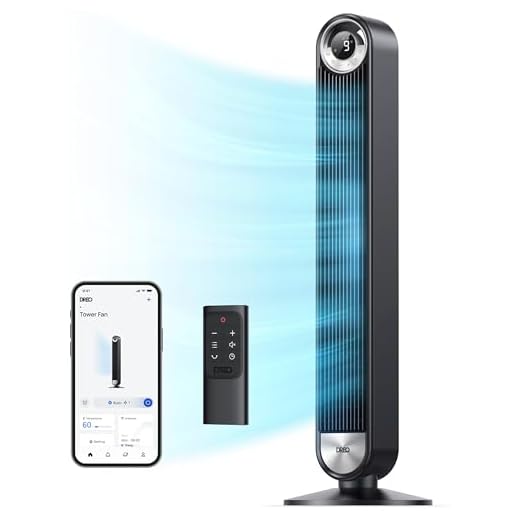
Unlike a personal neck fan, this DREO tower fan cools an entire room with 28 ft/s winds and 90° oscillation. Smart features like app and voice control offer superior convenience for home use.
| Fan Type | Tower Fan |
| Height | 42 inches |
| Max Wind Speed | 28 ft/s |
| Max Air Volume | 1397 CFM |
| Noise Level | 20dB – 48dB |
| Motor Type | DC Brushless |
| Oscillation | 90° |
| Control Methods | Remote, App (iOS/Android), Voice (Alexa/Google), On-board |
| Modes | Normal, Natural, Sleep, Auto |
| Timer | Up to 12 Hours |
- Whisper-quiet operation on lower speeds, as low as 20dB.
- Powerful airflow (28 ft/s) provides effective cooling for large rooms.
- Multiple smart control options including a dedicated app and voice commands.
- Thoughtful ‘Sleep’ and ‘Auto’ modes enhance user comfort automatically.
- Energy-efficient DC motor helps reduce electricity consumption.
- Sleek, modern design fits well with most home decor.
- The beep sound when changing settings can be loud and cannot be disabled.
- Higher speed settings are noticeably louder than the 20dB minimum.
- The plastic base can feel slightly less premium than the main tower unit.
Choosing the right Tower Fans
-
Noise LevelHighA fan's noise output, measured in decibels (dB), is crucial, especially for bedrooms or offices. Lower numbers are better for uninterrupted sleep or work.Look forFans with DC motors and advertised noise levels under 30dB for low settings.AvoidAC motor fans without specified noise levels, as they tend to be much louder.
-
Airflow & PowerHighMeasured in CFM (Cubic Feet per Minute) or ft/s (feet per second), this determines how effectively a fan circulates air and cools a room.Look forHigh CFM/velocity ratings (1000+ CFM for large rooms) and multiple speed settings for flexibility.AvoidFans that don't list airflow specifications, as they are likely underpowered.
-
Control & Smart FeaturesMediumModern fans offer more than just on-board buttons. Remotes, apps, and voice control add significant convenience and accessibility.Look forA clear remote, an intuitive smartphone app, and compatibility with smart home systems like Alexa or Google Assistant.AvoidFans with overly complex controls or unreliable app connectivity.
-
Special ModesMediumFeatures like Sleep, Natural, or Auto modes can greatly enhance the user experience by automating fan behavior for specific situations.Look forSleep modes that gradually reduce speed and dim lights, and Auto modes that adjust based on room temperature.AvoidModes that are just gimmicks, like 'Natural' modes that are erratic and annoying.
Common questions
How quiet is the DREO Tower Fan in a real-world bedroom setting?
On its lowest speeds (1-3), it’s incredibly quiet, living up to the 20-25dB claim. You’ll hear the air moving more than the motor itself, making it ideal for sleeping. On higher speeds, it’s audible but sounds more like a smooth ‘whoosh’ of air rather than a rattling motor.
Is the smart functionality (app and voice control) difficult to set up?
Setup is straightforward. You download the DREO app, create an account, and follow the on-screen instructions to connect the fan to your Wi-Fi. Linking it to Alexa or Google Assistant is also done through their respective apps and takes only a minute or two.
Does the 'Auto Mode' actually work well?
Yes, the Auto Mode is quite effective. It uses a built-in thermostat to measure the ambient room temperature and automatically adjusts the fan speed to maintain a comfortable environment. It’s a great ‘set it and forget it’ feature for days with fluctuating temperatures.
Can you turn off the display and the beeping sounds?
You can turn off the LED display completely by holding the oscillation button, which is a great feature for sleeping. However, the audible beep that sounds when you change a setting via the remote or app cannot be disabled, which can be a minor annoyance.
The DREO Tower Fan masterfully balances powerful room-cooling performance with the quiet operation needed for sleep and work. While the unchangeable confirmation beep is a minor annoyance, the combination of smart features, effective auto modes, and a genuinely efficient DC motor makes it a top-tier choice for home cooling.
- Delivers powerful, room-filling airflow up to 28 ft/s.
- Features an ultra-quiet DC motor, with noise levels as low as 20dB.
- Offers comprehensive control via a remote, smartphone app, and voice assistants.
For anyone seeking a modern, feature-rich tower fan that doesn’t compromise on power or quietness, the DREO 519S is a fantastic investment. It’s particularly well-suited for bedrooms and smart homes where convenience and quiet comfort are paramount. The main reason to buy is its ability to deliver on its core promises: strong airflow and near-silent operation.