Stay Cool Without the Bulk
This is the cooling pad you grab when you need effective, no-frills thermal relief that you can actually fit in your laptop bag.
The Cooler Master NotePal X-Slim focuses on doing one thing well: moving air. It skips the RGB lights and extra hubs in favor of a massive fan, a slim profile, and a price that’s hard to argue with, making it a top contender for gamers and mobile workers alike.
- Large, Effective Fan The single, large 160mm fan spinning at 1500 RPM provides broad cooling coverage across the laptop base, targeting the components that need it most.
- Truly Portable Design Living up to its ‘X-Slim’ name, the cooler is exceptionally lightweight and thin, making it easy to slip into a backpack alongside your laptop without adding significant bulk or weight.
- Don't Lose a Port Its USB pass-through power connector is a standout feature. You can power the cooler and still have a functional USB port available for another peripheral, which is critical on modern ultrabooks.
- Simple but Smart Ergonomics With two different height settings, it doubles as a comfortable ergonomic stand for typing during long work or gaming sessions, reducing neck and wrist strain.
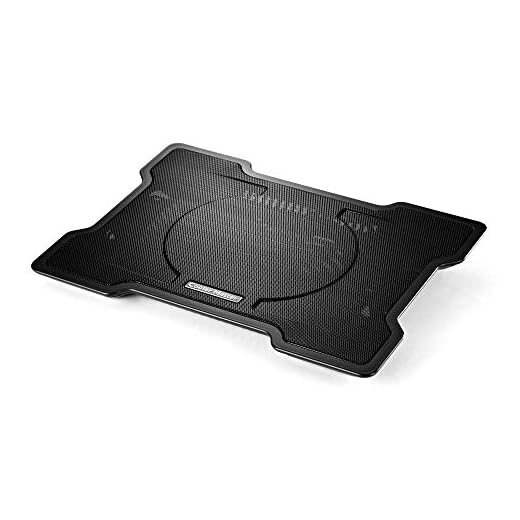
Get powerful cooling from an ultra-slim profile. This pad’s high-performance 160mm fan spins at 1500 RPM to effectively chill even heavy-duty gaming laptops.
| Fan Size | 160 mm |
| Fan Speed | 1500 RPM (+/- 10%) |
| Power Source | USB 2.0/3.0 with Pass-through |
| Laptop Compatibility | Supports up to 17-inch laptops |
| Height Settings | 2 |
| Primary Material | Mesh and Plastic |
| Cable Management | Integrated cable grooves |
- Large 160mm fan provides broad, quiet cooling across the entire laptop chassis.
- USB pass-through port is a game-changer, ensuring you don’t sacrifice connectivity.
- Ultra-slim and lightweight design makes it genuinely portable for travel.
- Two height settings offer a noticeable ergonomic improvement for typing and viewing.
- Sturdy enough to securely support larger gaming laptops up to 17 inches.
- Excellent value for the performance and portability it offers.
- The single 1500 RPM fan speed is not adjustable.
- The plastic construction feels functional but not as premium as all-metal alternatives.
- Fan is audible in a completely silent room, though it’s a low hum rather than a whine.
Choosing the right Laptop Cooling Pad
-
Cooling PerformanceHighThe primary job of a cooling pad is to lower your laptop's temperature. This is determined by the number of fans, their size (mm), their speed (RPM), and the airflow design (CFM).Look forLarge fans that move a lot of air (high CFM) at lower RPMs for quieter operation. A full mesh top allows for better airflow.AvoidPads with small, fast-spinning fans which tend to be noisy and less effective at cooling a large area.
-
Ergonomics and AdjustabilityHighA good cooling pad should also function as a comfortable laptop stand. The right angle can improve posture and reduce neck and wrist strain.Look forMultiple height and angle settings to find the most comfortable position for typing and viewing.AvoidFixed, non-adjustable stands that force you into an uncomfortable posture.
-
Portability and Build QualityMediumIf you plan to travel with your cooling pad, its size, weight, and durability are crucial. A bulky or fragile pad is a liability on the go.Look forSlim profiles, lightweight materials, and features like built-in cable management for easy packing.AvoidHeavy, bulky designs with flimsy plastic parts that are likely to break in a bag.
-
Connectivity and PowerMediumCooling pads are typically USB-powered, meaning they take up a port on your laptop. How they manage this is a key usability factor.Look forA USB pass-through feature that gives you the port back, or pads that include an integrated multi-port USB hub.AvoidPads that occupy one of your few precious USB ports without offering a pass-through or hub.
Common questions
How is the Cooler Master NotePal X-Slim powered?
It’s powered by a single USB-A cable that connects to your laptop. The plug on the cooler itself has a USB port built into it, creating a ‘pass-through’. This means you can plug another device into the cooler, so you don’t lose access to the USB port on your laptop.
Is the 160mm fan noisy?
The fan is relatively quiet for its size. It produces a low-frequency hum that is easily masked by game audio, music, or typical office sounds. In a silent room you will hear it, but it’s a gentle whir, not a high-pitched, annoying whine.
Will my 17-inch gaming laptop be stable on it?
Yes, it’s designed to support laptops up to 17 inches. The mesh surface provides a solid, grippy base. While a larger laptop might overhang the edges of the cooler slightly, it remains stable, and the centrally-located fan is positioned to cool the hottest areas of the chassis.
Can I turn the fan off and just use it as a stand?
Yes. The fan is only active when the USB cable is plugged into your laptop. To use it as a simple ergonomic stand, just don’t plug in the USB cable. The two mechanical height settings work independently of the power.
The Cooler Master NotePal X-Slim delivers excellent cooling performance in a package that’s refreshingly simple and portable. While the lack of fan control and a basic plastic build are minor drawbacks, its effectiveness and smart design, especially the USB pass-through, make it a fantastic value. It’s a top-tier choice for anyone who needs to cool their laptop on the go.
- The single 160mm fan provides powerful and widespread cooling.
- An ultra-slim, lightweight design makes it ideal for travel or moving between work and home.
- The USB pass-through is a critical feature that preserves your laptop's limited port selection.
If you need a reliable, portable, and affordable way to keep your laptop from overheating, the NotePal X-Slim is an easy recommendation. It’s perfect for students, travelers, and gamers who value straightforward performance over superfluous features. The combination of a large, effective fan and a genuinely slim design is a winning formula.