Upgrade Your Workspace: The Best Wireless Keyboard and Mouse Combos
A great keyboard and mouse combo isn't a luxury; it's the foundation of a productive and comfortable workday.
The best combos offer a seamless connection, comfortable ergonomics, and features that actively speed up your workflow. Cheaper sets often suffer from lag, poor build quality, and a typing experience that can actively slow you down and cause discomfort.
- Ergonomics Are Essential For long work sessions, split or wave keyboards with wrist rests can significantly reduce strain on your wrists and arms.
- Multi-Device is a Power User's Must For those juggling a laptop, tablet, and desktop, the ability to switch between devices with one button is a game-changer for efficiency.
- Quiet is a Feature Consider combos with quiet-click mice and low-profile keyboards if you work in a shared space or need to focus without auditory distractions.
- Software Unlocks Potential Customization apps like Logi Options+ allow you to automate repetitive tasks and tailor your peripherals to your specific workflow, saving you time.




Best Overall: Logitech MX Keys S Combo – Performance Wireless Keyboard and Mouse
Boost your workflow with fluid, laptop-like typing and a mouse that scrolls 1,000 lines per second. Automate repetitive tasks with a single keystroke
- Exceptional, tactile, and quiet typing feel
- Mouse tracks precisely on any surface, including glass
- Highly customizable buttons and keys via software
- Premium build quality and USB-C recharging
- Significant price premium over other options
- Included palm rest is not physically attached
- Ergonomic design is right-hand-mouse dominant
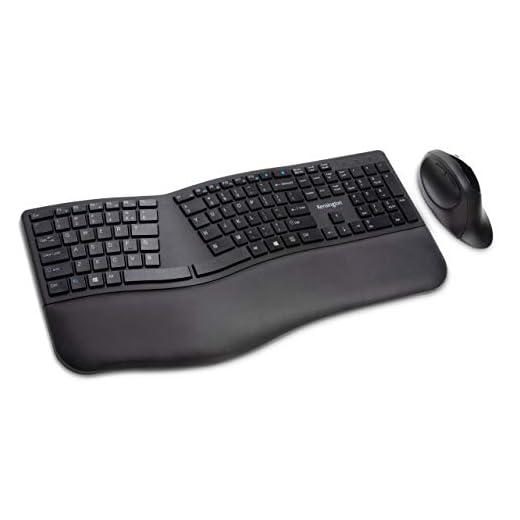
Best Ergonomic: Kensington Pro Fit Ergonomic Wireless Keyboard and Mouse
Protect your wrists with a split, sloped keyboard that promotes neutral alignment. Its dual wireless connection is secured with AES encryption, and qu
- Promotes a healthy, neutral wrist alignment
- Secure, encrypted wireless connection for privacy
- Mouse clicks are nearly silent
- Spill-proof keyboard design adds durability
- Split layout requires a significant adjustment period
- Mouse is functional but very basic
- Keyboard build feels plasticky compared to premium options
Best Value: Dell Premier Multi-Device Wireless Keyboard And Mouse KM7321W
Effortlessly switch between your laptop, desktop, and tablet with seamless multi-device connectivity. This plug-and-play combo offers reliable wireles
- Effortless switching between Bluetooth and USB-paired devices
- Exceptional battery life minimizes maintenance
- Solid, familiar typing experience for immediate productivity
- Incredible price for multi-device functionality
- Lacks any form of backlighting
- Mouse is not ergonomically shaped
- Design is very corporate and utilitarian
Runner Up: SABLUTE MA41 30dB Quiet Ergonomic Wave Keyboard Set
Type for hours in comfort with an ergonomic wave design and a soft leather palm rest. At just 30dB, the ultra-quiet keys are ideal for shared workspac
- Wave design offers comfort without a steep learning curve
- Extremely quiet keys are ideal for shared environments
- Integrated soft palm rest adds to comfort
- Dedicated switch instantly changes layout for Mac/Windows
- Lesser-known brand may lack long-term support
- Mouse feels less premium than the keyboard
- Requires two separate connections for both devices
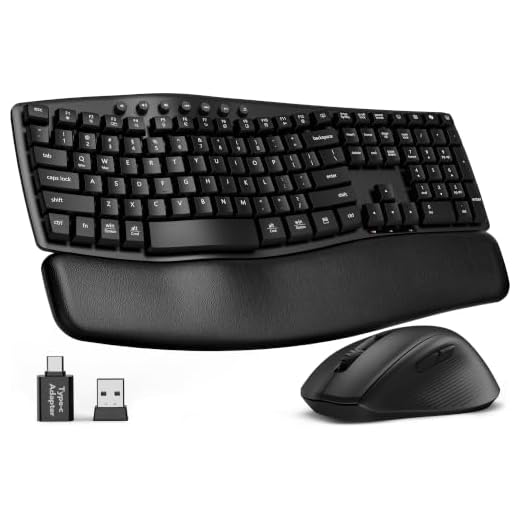
Best Budget: Ergonomic Wireless Keyboard and Mouse Combo
Get the benefits of an ergonomic wave keyboard and wrist rest without breaking the bank. A single USB receiver provides a stable plug-and-play connect
- Incredible value for an ergonomic setup
- Silent mouse is a great feature for quiet offices
- Simple plug-and-play with a single dongle
- Comfortable wave shape for natural typing
- Build quality is noticeably basic
- Lacks advanced features like multi-device or backlighting
- Wrist rest is made of hard plastic
Best for Portability: Logitech Pebble Keys 2 K380s
Stay productive on the go with this slim, lightweight keyboard. Easily switch between three devices with the click of a button and customize shortcuts
- Extremely portable and compact for travel
- Pairs and switches seamlessly between three devices
- Satisfying and quiet scissor-switch keys
- Excellent battery life from two AAA batteries
- This is not a combo; mouse must be purchased separately
- Round keys can take some getting used to
- No backlighting for low-light situations
Side-by-side comparison
|
Best Overall
Logitech MX Keys S Combo – Performance Wireless Ke
|
Best Ergonomic
Kensington Pro Fit Ergonomic Wireless Keyboard and
|
Best Value
Dell Premier Multi-Device Wireless Keyboard And Mo
|
Runner Up
Wireless Keyboard and Mouse Combo, SABLUTE MA41 30
|
Best Budget
Ergonomic Wireless Keyboard and Mouse Combo, Wave
|
Best for Portability
Logitech Pebble Keys 2 K380s, Multi-Device Bluetoo
|
|
|---|---|---|---|---|---|---|
|
|
|
|
|
|
|
|
| Ergonomics | 4/5 | 5/5 | 2/5 | 4/5 | 3/5 | 2/5 |
| Connectivity | Bluetooth, Bolt USB | Bluetooth, USB | Bluetooth, USB | Bluetooth, 2x USB | USB Only | Bluetooth |
| Multi-Device | Yes | Yes | Yes | Yes | No | Yes |
| Quietness | 4/5 | 5/5 | 3/5 | 5/5 | 4/5 | 4/5 |
| Price | $199.99 | $50.71 | $94.50 | $38.99 | $39.99 | $37.99 |
| BUY NOW | BUY NOW | BUY NOW | BUY NOW | BUY NOW | BUY NOW |
What to look for in Wireless Keyboard and Mouse Combos for Productivity
Is a more expensive keyboard and mouse combo really worth it?
For anyone who spends hours at a computer, yes. Premium combos like the Logitech MX Keys S offer superior build quality, a better typing feel, and advanced software features that can genuinely increase your speed and comfort, making the investment pay off in productivity.
What's the difference between a 'wave' and a 'split' ergonomic keyboard?
A wave keyboard has a gentle curve in the key layout but remains a single board, making it easy to adapt to. A split keyboard, like the Kensington Pro Fit, is physically separated into two halves, promoting a more natural, shoulder-width hand position but requires a longer adjustment period.
Do I really need multi-device connectivity?
If you regularly use a desktop, a laptop, and a tablet, it’s a game-changer. Being able to switch your keyboard and mouse between devices with a single button press declutters your desk and streamlines your workflow. If you only use one computer, it’s an unnecessary feature.
How important are quiet keys and clicks?
This is highly dependent on your environment. In a private home office, it’s a matter of preference. However, in an open-plan office or if you work while others are sleeping, a quiet combo is a considerate and essential feature to prevent distractions.
The Bottom Line
- Logitech MX Keys S Combo: The best choice for professionals who want a premium, feature-rich experience.
- Kensington Pro Fit Ergonomic: The top pick for all-day comfort and proactively preventing wrist fatigue.
- Dell Premier Multi-Device: The most cost-effective way to get seamless multi-device switching from a trusted brand.
- SABLUTE MA41: A great quiet and comfortable option that's an easier ergonomic alternative to split keyboards.
- Ergonomic Wireless Keyboard and Mouse Combo: Proof that you can improve your desk posture on a very tight budget.
- Logitech Pebble Keys 2 K380s: The perfect ultra-portable keyboard for working productively from anywhere (just bring your own mouse).
For the ultimate productivity setup, the Logitech MX Keys S Combo is unmatched in quality and features. If your priority is preventing wrist strain, the Kensington Pro Fit Ergonomic offers fantastic comfort and value.