Stop Letting Your Laptop Eat Your Desk
A closed laptop lying flat on your desk is dead space you're paying rent on.
The whole point of a vertical stand is turning a laptop into a silent, out-of-the-way brain box while an external monitor takes over the actual work. The gap between a good one and a bad one comes down to grip: cheap stands either crush your laptop’s hinge or let it slide loose the second you bump the desk, while the good ones adjust to your exact thickness and hold it dead still.
- Grip type matters more than material Auto-adjusting silicone grips (like HumanCentric’s) self-correct for thickness and protect the finish, while screw-clamp aluminum stands need manual calibration but hold heavier laptops more rigidly.
- Check your laptop's closed thickness first Most vertical stands top out around 2.5-2.7 inches; if you’re running a laptop with a thick rubber case or a beefy gaming chassis, measure before you buy.
- Vertical and horizontal solve different problems Vertical stands save desk footprint and work great in clamshell mode with an external display; horizontal riser stands are better if you still look at the built-in screen and need cooling airflow.
- Dual-slot stands are a real category, not a gimmick If you’re juggling a work laptop and a personal one, or running a permanent two-machine setup, a dual vertical holder frees up twice the desk space a single stand does.




Best Overall: HumanCentric Vertical Laptop Stand
Auto-adjusting silicone grips clamp laptops up to 1″ thick with zero tools, freeing desk space for an external monitor while protecting your MacBook f
- Grips self-adjust to your laptop’s exact thickness on the way down
- Matte black finish looks like it belongs on a real desk setup, not a garage shelf
- Frees enough surface area for a full monitor, keyboard, and mouse arm
- Silicone contact points won’t scratch or scuff your laptop’s lid
- 1″ max thickness rules out chunkier gaming laptops
- Small footprint means it can tip if you yank the laptop out one-handed
- Premium price for what’s ultimately a single-slot holder
Runner Up: OMOTON Vertical Laptop Stand Holder
Adjustable jaws fit laptops from 0.55″ to 2.71″ thick, letting this CNC-machined aluminum stand dock nearly any brand vertically without wobble.
- Jaw range covers nearly every laptop on the market, including thicker Windows machines
- CNC-machined aluminum feels sturdy, not flimsy like stamped-metal competitors
- Compact base takes up barely more room than the laptop itself
- Price undercuts the class leader by 40%
- Jaws need manual tightening, so it’s not a drop-in-and-go setup
- No monitor or keyboard shelf built in like some vertical docks
- Rubber padding wears faster than silicone over years of daily swaps
Best for Dual Laptop Setups: OMOTON Dual Vertical Stand
Two silicone-lined slots dock a MacBook and a second laptop side by side, doubling your vertical storage without doubling your desk footprint.
- Docks a work laptop and personal laptop side by side without doubling desk space
- Silicone-lined slots protect both machines from scuffs
- Silver finish matches MacBook and most aluminum ultrabooks
- Same OMOTON build quality as the single-slot version, just wider
- Overkill if you only ever dock one machine
- Wider footprint than single-slot stands, so it needs more desk depth
- Both slots are fixed width, so mismatched laptop thicknesses can leave one side loose
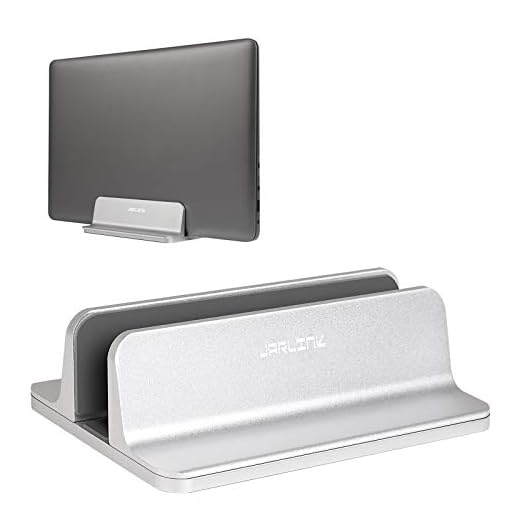
Best Budget: JARLINK Vertical Laptop Stand
An Allen key lets you dial in the exact clamp width for laptops 0.55″-2.55″ thick, delivering scratch-resistant aluminum support at a budget price.
- Aluminum construction feels far sturdier than the price suggests
- Allen key lets you lock in a precise fit instead of relying on spring tension
- Wide adjustment range covers most consumer and business laptops
- Scratch-resistant finish holds up to daily docking and undocking
- Allen key adjustment is a one-time setup hassle if you swap laptops often
- No auto-grip convenience, you’re tightening a hex screw by hand
- Base is narrower than pricier stands, so stability on uneven desks suffers slightly
Best Value: BESIGN LS03 Aluminum Laptop Stand
Folds flat when not docked and elevates your laptop 6″ with open-aluminum venting, keeping it cool while supporting up to 8.8 lbs at a budget-friendly
- Open-aluminum design vents heat instead of trapping it against a closed lid
- Detaches and folds flat for travel or quick desk clearing
- Wide 10-15.6″ compatibility fits nearly any consumer laptop
- 8.8 lb capacity handles heavier 15-inch laptops without flexing
- Not a true vertical dock, it elevates rather than stands the laptop on edge
- Takes up more desk depth than a dedicated vertical slot stand
- Open design means dust and crumbs can collect in the vents
Best Premium: StarTech Adjustable Laptop Stand
Three tilt-adjustable height settings from 7.3″ to 9.3″ and a heavy-duty steel-and-aluminum frame hold up to 22 lbs, backed by a 5-year warranty.
- Steel-and-aluminum frame feels like office furniture, not a desk accessory
- 22 lb capacity means it’ll outlast whatever laptop you own now
- Three tilt-adjustable height settings dial in ergonomic viewing angle
- 5-year warranty signals StarTech expects this thing to survive years of daily use
- Most expensive option in this roundup by a wide margin
- Larger footprint and higher profile than the slim vertical docks
- Tilted riser design, not a true space-saving vertical stand
Side-by-side comparison
|
Best Overall
HumanCentric Vertical Laptop Stand for Desks in Ma
|
Runner Up
OMOTON Vertical Laptop Stand Holder, Adjustable Do
|
Best for Dual Laptop Setups
OMOTON Dual Vertical Desk Laptop Stand Holder, Fit
|
Best Budget
JARLINK Vertical Laptop Stand, Adjustable Aluminum
|
Best Value
BESIGN LS03 Aluminum Laptop Stand, Ergonomic Detac
|
Best Premium
StarTech Adjustable Laptop Stand, Ergonomic Laptop
|
|
|---|---|---|---|---|---|---|
|
|
|
|
|
|
|
|
| Grip/Adjustment | Automatic silicone | Manual jaw | Manual jaw, dual slot | Allen key clamp | Detachable riser | Tilt-adjustable riser |
| Thickness Range | Up to 1" | 0.55"-2.71" | Dual slot, MacBook fit | 0.55"-2.55" | 10-15.6" laptops | 7.3"-9.3" height |
| Material | Silicone/plastic | CNC aluminum | Aluminum/silicone | Aluminum | Aluminum | Steel/aluminum |
| Weight/Capacity | Standard laptops | Standard laptops | 2 laptops | Standard laptops | 8.8 lbs | 22 lbs |
| Price | $39.99 | $25.99 | $27.99 | $22.99 | $15.29 | $68.99 |
| BUY NOW | BUY NOW | BUY NOW | BUY NOW | BUY NOW | BUY NOW |
What to look for in Vertical Laptop Stands
Will a vertical laptop stand damage my laptop's hinge?
No, as long as the laptop is fully closed and latched before you dock it. The stand supports the closed shell, not the hinge itself, so weight isn’t resting on the moving joint. Just make sure the grip width matches your laptop so it isn’t being squeezed tighter than it should.
Can I use a vertical stand with the laptop screen open?
Not with true vertical stands like the HumanCentric or OMOTON models, since they clamp the laptop shut. If you want to keep the built-in screen visible, you need a horizontal riser stand like the BESIGN or StarTech instead, which elevates the laptop flat rather than standing it on edge.
Does my laptop overheat running closed in a vertical stand?
Modern laptops handle clamshell mode fine because their thermal management doesn’t rely on the lid being open, but make sure the stand doesn’t block the side or rear exhaust vents. Running an external monitor also means the internal display isn’t drawing extra power, which offsets some of the heat load.
What's the difference between a vertical stand and a horizontal riser?
A vertical stand docks the laptop on its edge to save desk footprint, meant for clamshell use with an external monitor. A horizontal riser like the BESIGN LS03 elevates the laptop flat so you can still use the built-in screen and keyboard, and it typically offers better passive cooling.
The bottom line
- HumanCentric Vertical Laptop Stand delivers the cleanest automatic-grip docking experience of the group.
- OMOTON Vertical Laptop Stand Holder covers the widest thickness range for the money.
- OMOTON Dual Vertical Stand is the only real answer if you're docking two laptops at once.
- JARLINK Vertical Laptop Stand proves a budget stand can still feel like real aluminum construction.
- BESIGN LS03 Aluminum Laptop Stand trades true verticality for better cooling and fold-flat portability.
- StarTech Adjustable Laptop Stand is the pick for anyone who wants office-grade durability and a 5-year warranty.
The HumanCentric stand wins for anyone who wants a laptop to vanish into dock mode without touching a single screw, while the OMOTON single-slot version is the smarter buy if your laptop runs thicker than an inch. Budget shoppers should grab the JARLINK without hesitation, and anyone running two machines should skip straight to OMOTON’s dual-slot model.