Get Your Tower Off the Floor
A tower sitting flat on the floor is a dust magnet, a foot-traffic hazard, and the fastest way to choke your intake fans.
The gap between a good CPU holder and a bad one comes down to three things: whether it actually fits your case dimensions, whether the mechanism holds its adjustment under real weight instead of creeping down over weeks, and whether it leaves enough clearance for airflow instead of boxing your intake vents against a wall or desk leg. Cheap stands nail one of those and fail the other two.
- Measure your tower before you buy Height ranges vary from 17″ to over 33″ across this lineup, and case width matters just as much — check both before ordering.
- Adjustability beats a fixed shelf Gear-and-lever height adjustment holds position under load better than friction-fit telescoping bars, which tend to sag over time.
- Carpet and hardwood need different bases A fixed-foot stand can dig into carpet and throw the tower off level; locking casters solve that and also make cable access easier.
- Open frames beat closed shelves for cooling Solid-bottom shelves trap heat against the case underside — open-frame designs keep intake fans breathing.


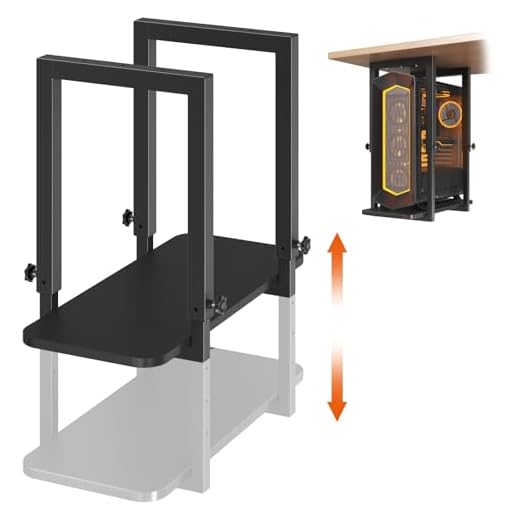

Best Overall: EUREKA ERGONOMIC PC Stand Height Adjustable Black
6-gear height adjustment from 23.25″ to 33.25″ plus a pegboard and mousepad turn this into a full mobile workstation, not just a CPU stand.
- 6-gear adjustment locks in solidly instead of creeping down like friction-fit designs
- 23.25″-33.25″ range covers nearly every mid-tower and full-tower case on the market
- Integrated pegboard adds accessory storage most stands skip entirely
- Feels like a mobile workstation add-on, not just a tower prop
- Priced well above the rest of this lineup
- Larger footprint than a simple shelf, so it needs more under-desk clearance
- Overkill if all you want is basic elevation off the floor
Runner Up: VIVO Black Under Desk PC Mount Shelf, Mount-PCSF1
Two frame widths (8.7″ and 11.5″) let this open-frame shelf fit most towers up to 20.1″ tall while keeping airflow unrestricted for cooling.
- Two frame widths mean a tighter fit instead of a case rattling around loose
- Open-frame construction keeps intake fans unobstructed
- Keeps the tower off the floor, out of dust and debris
- VIVO’s build quality holds up under repeated moves
- 20.1″ height ceiling rules out most full-tower cases
- No height adjustment once mounted
- Requires more precise width measurement than the flexible stands
Best Value: ARES WING Height Adjustable Computer Tower Stand Fits 21.7"-33.5"
88 lb per-shelf capacity and a 21.7″-33.5″ range beat typical 80 lb, 28″ stands, giving taller users more reach without sacrificing strength.
- 88 lb capacity beats the typical 80 lb ceiling on comparable stands
- 21.7″-33.5″ range handles taller full-tower cases most budget stands can’t
- Strong value relative to its height range and weight rating
- Sturdy enough that it doesn’t flex under a loaded tower
- Fewer accessory features than the top pick
- Adjustment mechanism isn’t as refined as the 6-gear EUREKA design
- Base footprint runs a bit wide for tight under-desk spaces
Best for Carpet Floors: fusehome Rolling Adjustable PC Tower Stand for Carpet, Fits Under Desk
Locking 360-degree caster wheels roll smoothly over carpet fibers and then lock tight, solving the wobble and drag issue carpet floors cause other sta
- Casters roll smoothly across carpet fibers where fixed feet catch and tip
- Locking wheels hold the tower steady once positioned
- Makes pulling the tower out for cable work or cleaning painless
- Height adjustment still available despite the mobile base
- Casters add height that can push tighter under-desk setups over clearance
- Wheels aren’t necessary and add cost if your floor is hardwood or tile
- Locking mechanism needs periodic checking to stay carpet-stable
Best Budget: Heavy Duty Under Desk PC Mount, Height Adjustable, Max Load 66 lbs, Black
A steel frame on a wood base holds towers steady at a budget price, with height adjusting 17.3″-25.1″ for compact under-desk clearance.
- Lowest price point in the lineup without skipping height adjustment
- Steel frame on a wood base feels sturdier than the price suggests
- Compact height range suits tight under-desk clearance
- Simple setup with no learning curve
- 25.1″ ceiling excludes most full-tower and many mid-tower cases
- 66 lb capacity is lower than the ARES WING and EUREKA options
- Fewer features overall — this is a bare-bones mount
Best for Tool-Free Install: VIVO Black Clamp-on PC Desk Mount, MOUNT-PC07G
C-clamps mount straight to the desk edge with no drilling, keeping the PC fully visible on display while still supporting up to 66 lbs.
- C-clamps install in minutes with zero drilling or hardware into the desk
- Ideal for renters or anyone who can’t modify the furniture
- Keeps the tower visible and easily accessible at deskside
- 66 lb capacity handles most mid-tower builds comfortably
- Requires a desk edge thick enough for the clamp to grip securely
- Doesn’t offer the height range of the adjustable floor stands
- Tower hangs at desk height rather than tucked underneath out of sight
Side-by-side comparison
|
Best Overall
EUREKA ERGONOMIC PC Stand Height Adjustable Black
|
Runner Up
VIVO Black Under Desk PC Mount Shelf, Mount-PCSF1
|
Best Value
ARES WING Height Adjustable Computer Tower Stand F
|
Best for Carpet Floors
fusehome Rolling Adjustable PC Tower Stand for Car
|
Best Budget
Heavy Duty Under Desk PC Mount, Height Adjustable,
|
Best for Tool-Free Install
VIVO Black Clamp-on PC Desk Mount, MOUNT-PC07G
|
|
|---|---|---|---|---|---|---|
|
|
|
|
|
|
|
|
| Height Range | 23.25"-33.25" | Up to 20.1" | 21.7"-33.5" | Adjustable (carpet-rated) | 17.3"-25.1" | Clamp-mounted, no floor range |
| Weight Capacity | Heavy-duty rated | Heavy-duty rated | 88 lbs | Standard duty | 66 lbs | 66 lbs |
| Mobile / Rolling | No | No | No | Yes | No | No |
| Install Type | Freestanding | Freestanding shelf | Freestanding | Freestanding, rolling | Freestanding | Clamp-on, tool-free |
| Price | $90.00 | $59.99 | $64.99 | – | $49.98 | $44.99 |
| BUY NOW | BUY NOW | BUY NOW | BUY NOW | BUY NOW | BUY NOW |
What to look for in Under-Desk CPU Holders for Tower Computer Storage
How do I know if a CPU stand will fit my tower?
Measure your case’s height and width first, then check the stand’s published range against those numbers with a couple inches of margin. Full-tower cases often exceed 20″ tall, which rules out fixed shelves like the VIVO Mount-PCSF1 but fits adjustable stands like the EUREKA or ARES WING.
Do these stands restrict airflow to my case?
Open-frame designs like the VIVO shelf and the height-adjustable stands leave intake fans clear. The main risk is pushing any stand flush against a wall or desk leg, which can block side or rear vents regardless of the stand itself.
Is a rolling stand worth it if I don't have carpet?
Not really — the locking casters on the fusehome stand solve a carpet-specific wobble problem, and on hardwood or tile you’d get similar stability from a cheaper fixed-foot stand without paying for wheels you won’t use.
Can I mount a full tower to my desk instead of using a floor stand?
Yes, with a clamp-on mount like the VIVO MOUNT-PC07G, provided your desk edge is thick enough for the C-clamp to grip and your tower is under its 66 lb capacity. It keeps the case visible at desk height rather than tucked underneath, which some people prefer for cable management.
The bottom line
- EUREKA ERGONOMIC PC Stand — the most versatile and durable pick for full-tower storage under a desk
- VIVO Under Desk PC Mount Shelf — a dependable open-frame shelf for mid-tower cases up to 20.1"
- ARES WING Computer Tower Stand — the best balance of height range, capacity, and price
- fusehome Rolling PC Tower Stand — the right call specifically for carpeted floors
- Heavy Duty Under Desk PC Mount — the cheapest way to get a compact tower off the floor
- VIVO Clamp-on PC Desk Mount — the fastest, drill-free install for renters and frequent movers
The EUREKA ERGONOMIC stand is the pick if you want a height-adjustable mount that will still hold a full tower steady years from now. If your tower fits under 20.1″ and you want a simpler open-frame shelf, the VIVO Mount-PCSF1 or the budget-focused ARES WING and Heavy Duty mounts cover the mid-range and low-end well.