Taking notes by hand helps you remember information better than typing on a keyboard. Piles of paper notebooks quickly become disorganized and difficult to search through. You might spend hours flipping through old pages just to find one specific meeting detail. Digital tablets offer organization but often lack the satisfying tactile feedback of real paper. Finding a middle ground between analog writing and digital storage solves this common frustration.
Smart notebooks bridge the gap by letting you write naturally while saving your work to the cloud. These devices range from simple reusable pages to advanced electronic tablets with specialized screens. The Rocketbook Fusion Hybrid Reusable Planner provides a budget friendly entry point with erasable pages. For a more premium experience, the reMarkable Starter Bundle offers a dedicated digital screen that mimics real paper. We tested several options to see which ones actually improve daily productivity.
Our testing process focused on writing feel, app reliability, and overall durability. We looked at how easily each notebook transfers handwritten text into digital formats. Battery life and accessory requirements also played a major role in our final rankings. You will find options here for students, busy professionals, and casual journalers. Read on to discover which smart notebook fits your specific daily routine.



Rocketbook Fusion Reusable Smart Notebook
The Rocketbook Fusion Hybrid Reusable Planner combines traditional note taking with digital cloud storage. This notebook targets professionals and students who want a single place to manage their entire schedule. It features a durable spiral binding and a waterproof cover that protects your notes from accidental spills. The flexible design makes it easy to carry in a backpack or briefcase without adding much weight. Anyone tired of buying new paper planners every year will appreciate the reusable format.
You write on the premium reusable paper using the included Pilot Frixion Pen. The notebook includes seven versatile page templates to help you organize different aspects of your life. These templates feature a monthly calendar, a weekly calendar, a to do list, and a goal tracker. Once you fill a page, the companion app allows you to scan and upload your plans directly to cloud services. You then wipe the page clean with a damp cloth to start over again.
This hybrid model stands out from standard notebooks by offering structured planning pages alongside blank note sections. It requires less technical setup than electronic options like the reMarkable tablet. You do have to remember to use the specific erasable pens to avoid ruining the pages. The scanning process takes a few extra seconds compared to automatic syncing pens. However, the low maintenance design makes it a highly practical choice for everyday task management.
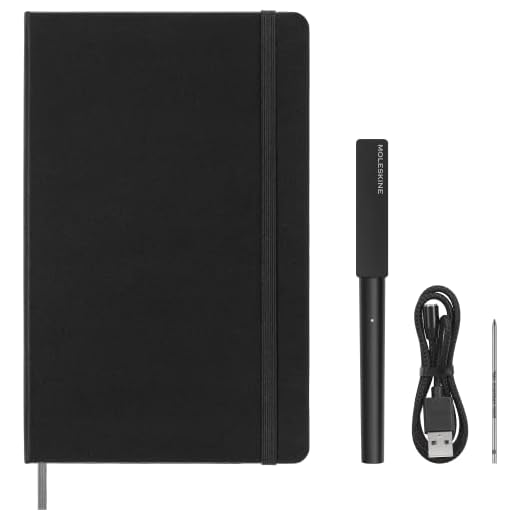
Moleskine Smart Writing Set
The Moleskine Smart Writing Set brings classic notebook aesthetics into the digital age. This kit includes a redesigned digital Smart Pen and a Smart Notebook filled with special N-coded paper. It appeals to writers and artists who love the traditional Moleskine look but need digital backups. The package also comes with a magnetic USB recharging cable and one replacement pen tip. Creative professionals will enjoy the familiar physical format paired with modern technology.
The companion app transfers what is written on the page directly to your device in real time. You can edit, delete, transcribe, and color your notes as you write them. The system allows you to share your drawings and notes as image files or text documents. The digital pen captures every stroke accurately as long as you write on the proprietary paper. This setup digitizes your notes without requiring you to manually scan pages with a phone camera.
Compared to the Rocketbook models, this Moleskine set offers a much more immediate digital transfer. You do not have to pause your workflow to take pictures of your pages. The main drawback is the ongoing cost of buying specific N-coded paper once you fill the initial notebook. It feels much more like a traditional writing experience than writing on a glass tablet screen. This set works best for users who prioritize real time syncing and classic notebook styling.
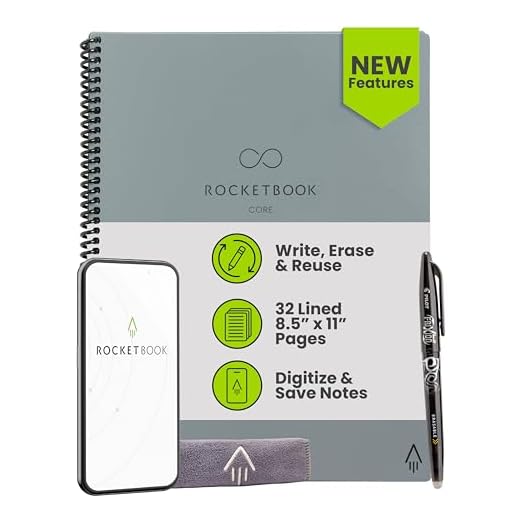
Rocketbook Core Reusable Smart Notebook
The Rocketbook Core Reusable Smart Notebook provides a straightforward approach to digital note taking. This version features lined pages that cater to students taking heavy lecture notes or professionals drafting long documents. It comes in two versatile sizes, including a standard letter size and a smaller executive size. The sleekly redesigned cover gives it a professional appearance suitable for corporate meetings. It serves as an excellent tool for anyone looking to reduce their environmental footprint.
This new and improved core model features premium reusable paper with an improved pen to paper feel. You write your notes using the included Pilot Frixion Pen and then digitize them using the Rocketbook app. The app scans and uploads your written work directly to cloud platforms like Google Drive and Dropbox. After saving your work, you simply erase the pages with water and rewrite on them. The spiral binding allows the notebook to lay completely flat on your desk while you work.
The Core model differs from the Fusion by focusing entirely on lined pages rather than specific planner templates. It offers the same eco friendly reusability but gives you more freedom for unstructured writing. You still need to keep track of the specific erasable pens to maintain the reusable functionality. It costs significantly less than electronic tablets while still providing reliable cloud backups. This makes it an ideal choice for heavy note takers who want a simple and affordable digital solution.
Noteorius Smart Notebook with Pen & Folio
The Smart Notebook with Smart Pen and Folio offers a complete package for digital writing. This bundle includes everything you need to start capturing your handwritten notes electronically. It targets business professionals who want an all in one solution that looks great in a boardroom. The included folio provides a protective and stylish cover for the notebook and pen. Users who travel frequently will appreciate having a dedicated case to keep their writing tools organized.
The smart pen captures your handwriting as you move across the pages of the notebook. The folio keeps the notebook securely in place while providing extra storage for loose papers or business cards. You can easily transport the entire setup in a briefcase or messenger bag. The pen syncs your written data to your connected devices for easy storage and retrieval. The system works reliably to ensure you never lose an important meeting note or creative idea.
This bundle provides a more premium physical presentation than standalone spiral notebooks. The folio adds a layer of professionalism that basic reusable notebooks often lack. It does require you to keep the smart pen charged to maintain the digital syncing features. The initial investment is higher than simple scan and wipe alternatives. However, the integrated design makes it a highly convenient option for users who want a ready to use kit.
RoWrite Smart Writing Pad
The RoWrite Smart Writing Pad takes a unique approach by letting you use standard paper. This device consists of a digital pad and a pressure sensitive pen that uses regular ink. It appeals to artists and writers who refuse to compromise on the feel of real paper. The package includes an elegant and functional folio to protect the hardware during transport. Anyone who dislikes writing on glass screens or special synthetic paper will find this setup refreshing.
The pad uses advanced flexible sensor technology to track exactly where the pen is on the notepad. You can work anywhere offline and then edit or share your captured notes later. When paired with a device, the RoWrite app lets you edit and enhance your digital pages in real time. The app allows you to select different writing instruments, adjust stroke thickness, and add over eighty colors. It even converts your written notes into editable text for easy formatting in word processors.
Unlike the Moleskine system, the RoWrite pad does not force you to buy expensive proprietary notebooks. You can clip any standard paper to the sensor pad and start writing immediately. The device does require you to carry the specific sensor pad, making it slightly bulkier than a standard notebook. You also have to ensure the pad itself stays charged to capture your strokes. This system offers the best balance for users who want digital backups without giving up cheap, standard paper.
reMarkable 2 Paper Tablet Starter Bundle
The reMarkable Starter Bundle provides a dedicated electronic tablet designed exclusively for reading and writing. This device features a 10.3 inch black and white display that mimics the texture of real paper. It targets easily distracted professionals and students who want to disconnect from the internet while working. The system intentionally lacks an app store, pop up ads, notifications, and social media access. This focused design helps you maintain deep concentration during long study sessions or creative drafting.
The tablet delivers a paper feel never before experienced on a digital device. You write using the included Marker Plus, which features a convenient built in eraser on the back end. The software lets you sort your notes and documents using customizable folders and tags. You can write directly on PDF files and convert your handwritten notes into typed text. The device syncs across your smart devices using the reMarkable apps and offers unlimited cloud storage with a Connect subscription.
The reMarkable tablet represents the most advanced and expensive option on this list. It completely replaces physical paper, unlike the Rocketbook or RoWrite systems. You never have to buy replacement notebooks or ink cartridges, though you do need to replace the stylus nibs occasionally. The lack of a backlight means you need a well lit room to use it comfortably. It remains the top choice for users who want a pure, distraction free digital writing environment.
Rocketbook Core Reusable Smart Notebook
The Rocketbook Core Reusable Smart Notebook with dot grid pages offers a flexible canvas for visual thinkers. This version uses a subtle dot pattern instead of standard lines to guide your writing and drawing. It appeals to bullet journalers, engineers, and designers who need to sketch diagrams alongside text. The notebook comes in both letter and executive sizes to fit different carrying preferences. It provides a sustainable alternative to traditional paper by allowing endless reuse of the same pages.
The premium reusable paper features an improved pen to paper feel that makes writing comfortable. You use the included Pilot Frixion Pen to write, draw, and plan your daily tasks. The Rocketbook app scans your pages and uploads them directly to cloud platforms like Google Drive and Dropbox. The dot grid layout helps keep your handwriting straight while remaining invisible enough for clean sketches. Once you finish digitizing your work, you simply wipe the pages clean with a damp cloth.
The dot grid version provides much more creative freedom than the lined Core model or the structured Fusion planner. It shares the same durable spiral binding and sleekly redesigned cover as the rest of the Core lineup. You still face the limitation of needing specific erasable pens to make the system work. The manual scanning process takes a bit more effort than the automatic syncing of the RoWrite pad. However, the dot grid layout makes it the most versatile cheap option for visual note takers.
Buying Guide
Understanding Digital Syncing Methods
Smart notebooks use different technologies to transfer your handwriting to a digital format. Some rely on your smartphone camera to scan physical pages using a dedicated application. These scan and wipe models usually feature special markings on the page corners to help the app align the image. This method requires a few extra seconds of manual work after you finish writing. It remains the most affordable way to digitize your daily notes.
Other systems use specialized pens equipped with hidden cameras or sensors to track your strokes. These pens connect to your phone or tablet via Bluetooth to sync your writing in real time. You can watch your words appear on your digital screen exactly as you write them on the physical paper. This method saves time and ensures you never forget to scan an important page. You do have to remember to keep the pen charged for the system to work.
The most advanced options use pressure sensitive pads or dedicated electronic screens. Sensor pads let you write on normal paper while the clipboard itself records your pen movements. Electronic tablets replace paper entirely with a textured glass or plastic screen. These high end devices often include handwriting recognition software that converts your cursive into typed text. Choosing the right syncing method depends entirely on your budget and your tolerance for manual scanning.
Paper Types and Writing Feel
The physical sensation of writing plays a massive role in how much you will enjoy a smart notebook. Reusable notebooks typically use synthetic paper made from polyester blends rather than wood pulp. This material feels slightly smoother and more slippery than traditional paper. It takes a little time to get used to the way the pen glides across the glossy surface. The ink also takes a few seconds to dry, which can cause smudging for left handed writers.
Systems that use real paper offer the most natural writing experience available. Some require proprietary notebooks printed with microscopic dot patterns that the smart pen reads. These notebooks feel exactly like standard high quality journals but cost significantly more to replace. Other systems use a sensor pad that allows you to use any cheap legal pad or printer paper. This flexibility appeals to users who go through hundreds of pages a month.
Electronic tablets attempt to recreate the friction of real paper using textured screen protectors and specialized stylus nibs. The resulting feel is often described as writing on a dense piece of cardboard. It provides a satisfying scratchy sound that mimics a pencil on paper. You never have to worry about ink smudging or pages tearing with these digital screens. However, the hard surface underneath the texture still feels different from a stack of soft paper.
Battery Life and Maintenance
Different smart notebooks require varying levels of daily maintenance to keep them functional. Scan and wipe notebooks require zero battery power, making them incredibly reliable for travel. You never have to worry about finding an outlet during a long flight or conference. The only maintenance involves wiping the pages clean with a damp cloth and washing the cloth occasionally. You also need to keep track of your specific erasable pens and buy refills when they run dry.
Smart pens and sensor pads introduce battery management into your note taking routine. Most smart pens last for several days of heavy writing before needing a recharge. If the pen dies in the middle of a meeting, you can still write on the paper, but you lose the digital syncing. You have to build a habit of plugging the pen in alongside your phone at night. The companion apps also require occasional updates to maintain compatibility with your devices.
Electronic writing tablets usually offer excellent battery life compared to standard media tablets. Because they use electronic ink displays, they only consume power when the screen refreshes. A single charge can often last for a week or two of regular daily use. You do need to replace the stylus nibs every few months as they wear down from friction. Keeping the device in a protective folio helps prevent screen damage during daily commutes.
Organization and Cloud Storage
The primary benefit of any smart notebook is the ability to organize your notes digitally. Companion apps usually allow you to create custom folders for different projects or classes. You can assign specific tags to pages to make them easily searchable later. Many apps feature optical character recognition that reads your handwriting. This allows you to type a keyword into the search bar and find the exact page where you wrote it.
Cloud integration ensures your notes remain safe even if you lose the physical notebook. Most systems connect directly to popular services like Google Drive, Dropbox, or Evernote. You can set up automatic routing so that notes with a specific symbol go straight to a designated folder. This saves you the trouble of manually sorting files on your computer after uploading them. It creates a highly efficient workflow for managing receipts, meeting minutes, and study guides.
Some premium devices require a monthly subscription to access their full cloud storage capabilities. These subscriptions might offer unlimited storage, extended warranty protection, or advanced text conversion features. Free apps usually provide enough basic functionality for casual users who just want PDF backups. Always check the privacy policy of the companion app if you plan to digitize sensitive corporate information. Secure cloud storage makes a smart notebook an invaluable tool for modern professionals.
Final Verdict
Choosing the right smart notebook comes down to balancing your budget with your preferred writing experience. The Rocketbook Fusion Hybrid offers an excellent entry point for users who want simple, reusable planner pages. If you prefer the feel of a classic journal and want real time syncing, the Moleskine Smart Writing Set delivers beautiful results. The RoWrite Smart Writing Pad provides the best solution for those who insist on using standard paper and regular ink.
For users who want to eliminate physical paper entirely, the reMarkable Starter Bundle provides a premium, distraction free digital canvas. The Rocketbook Core models, available in both lined and dot grid formats, remain highly practical choices for students on a budget. Take time to consider how much manual scanning you are willing to do before making your final decision. Investing in the right system will keep your notes organized and accessible for years to come.