The whiteboard finally got an upgrade
A shared family calendar stuck on the fridge only works if everyone actually walks over and reads it — a command center display puts the same schedule on every phone in the house.
The gap between a good one and a bad one comes down to sync reliability and how many calendars it can merge without choking — some of these handle five family Google/Apple calendars plus chores and meals without a hiccup, others feel like a tablet someone slapped a calendar app onto. Screen size and touch responsiveness matter more than most buyers expect, since a laggy or cramped display gets ignored within a week.
- Bigger screens get used more A 27″ or 32″ display sitting in a kitchen sightline gets glanced at dozens of times a day; a small 10″ panel tends to get walked past unless it’s mounted right at eye level.
- Subscription costs add up fast Some of these devices are one-time purchases, others quietly expect a monthly fee for full calendar sync — check this before buying, since it changes the real price by hundreds of dollars over a few years.
- Chore charts only work if kids can touch them Touchscreen responsiveness matters more here than anywhere else — a chore chart that requires precise taps gets abandoned by a 7-year-old within days.
- Wall mount vs. desk stand changes the use case A wall-mounted unit becomes a household fixture everyone checks on the way out the door; a desk-stand unit works better as a personal planning hub near a home office setup.




Best Overall: Skylight Calendar Max – 27" Digital Calendar & Chore Chart, Classic White
The 27″ HD touchscreen auto-rotates between portrait and landscape, giving the whole family the biggest, clearest shared schedule view of any display
- Screen is large enough to read the full week from across the kitchen
- Auto-rotating layout adapts to wall or counter placement without manual setup
- Chore chart system is genuinely kid-friendly, not an afterthought bolted onto a calendar app
- Established product line with mature software and responsive support
- Most expensive display in this roundup by a wide margin
- 27″ panel needs real wall space — not a fit for small kitchens or apartments
- Some advanced features sit behind a subscription
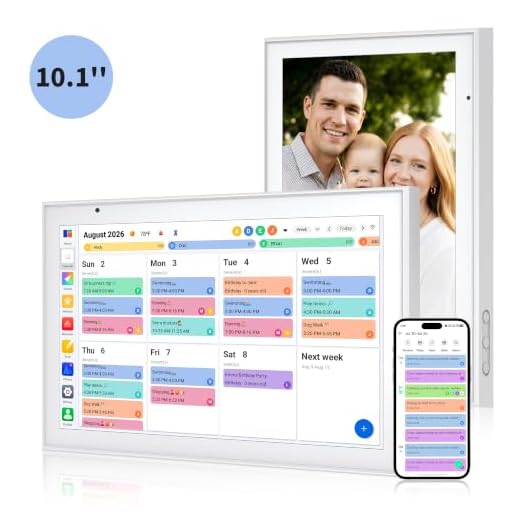
Best Value: Smart Digital Calendar 10.1 Inch, Electronic Family Calendar Planner
Dual-band WiFi syncs 5 calendars instantly and doubles as a photo frame, delivering command-center features at a mid-range price.
- Syncs five separate calendars fast enough that updates feel instant
- Doubles as a photo frame when the calendar view isn’t active
- Meal planner and to-do list cover most of what a bigger display offers
- Price sits well below the premium options without gutting features
- 10.1″ screen is noticeably smaller than the premium picks
- Text can feel cramped with a full week of entries from multiple calendars
- Photo frame mode competes with calendar visibility if not configured carefully
Best Budget: Digital Calendar, 10.1-inch Smart Wall Planner Electronic Calendar & Chore Chart
A full 10.1″ touchscreen command center with 5-calendar sync and timezone-aware reminders at the lowest entry price in this roundup.
- Lowest price of any display that still includes a functional touchscreen
- Desk and wall mount options in the box, no separate purchase needed
- Timezone-aware reminders are useful for families with a parent who travels
- Chore chart function works despite the low price point
- Build quality feels noticeably more plastic than the pricier options
- Software is less polished — expect occasional sync lag
- Screen brightness struggles in direct sunlight near windows
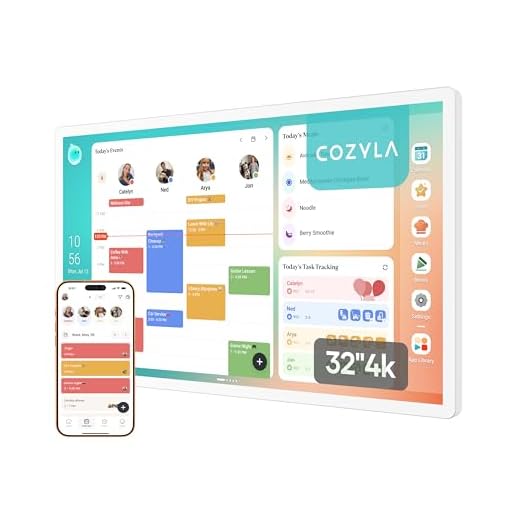
Best Premium: Cozyla Calendar Plus 2: 32"4K Smart Digital Calendar with Google Play Store
A 32″ 4K display with Google Play Store access lets you drag-and-drop widgets and install apps, turning it into a fully customizable command hub.
- 4K resolution at 32″ makes this the sharpest, most readable screen in the roundup
- Google Play Store access means it can run streaming apps, photo apps, and more beyond scheduling
- Subscription-free family syncing avoids ongoing fees other displays charge
- Widget customization lets each family carve out the layout that fits their routine
- Highest price in this roundup — a serious investment for a calendar
- 32″ footprint demands a dedicated wall or large open counter space
- App access adds complexity some families won’t need or want
Runner Up: 【Pro Ver.】Teclast 15.6" Digital Calendar Family Wall Planner Smart Calendar
Every core family-planning tool ships free with zero recurring fees, plus a 180-day AI assistant trial that auto-builds meal plans and shopping lists
- Zero ongoing subscription cost for core planning features, unusual in this category
- AI assistant trial can auto-build meal plans and shopping lists by voice
- 15.6″ screen is a solid middle ground between compact and oversized
- FotoCube Premium software feels complete without needing paid upgrades
- AI assistant features revert or reduce after the 180-day trial ends
- Screen resolution isn’t as sharp as the 4K premium option
- Fewer third-party app integrations than the Play Store-enabled display
Best for Meal Planning: AINFTIME 15.6 Inch Digital Calendar Planner Smart Touch Screen Calendar Sync
Built-in meal planning tools and a Sleep Mode that auto-dims for quiet hours make this the pick for households organizing meals and downtime together.
- Meal planning tools are built-in, not bolted on as an afterthought
- Sleep Mode auto-dims during night hours so it doesn’t glow in a bedroom or open kitchen
- Real-time calendar sync keeps schedules accurate across everyone’s phone
- To-do list integration ties meals and daily tasks into one view
- Mid-pack screen size compared to the largest displays in this roundup
- Meal planning focus means fewer general-purpose widgets than the Android-based option
- Price sits above the budget picks without matching their screen size advantage
Side-by-side comparison
|
Best Overall
Skylight Calendar Max – 27" Digital Calendar & Cho
|
Best Value
Smart Digital Calendar 10.1 Inch, Electronic Famil
|
Best Budget
Digital Calendar, 10.1-inch Smart Wall Planner Ele
|
Best Premium
Cozyla Calendar Plus 2: 32"4K Smart Digital Calend
|
Runner Up
【Pro Ver.】Teclast 15.6" Digital Calendar Family Wa
|
Best for Meal Planning
AINFTIME 15.6 Inch Digital Calendar Planner Smart
|
|
|---|---|---|---|---|---|---|
|
|
|
|
|
|
|
|
| Screen Size | 27" | 10.1" | 10.1" | 32" 4K | 15.6" | 15.6" |
| Chore Chart | Yes | Yes | Yes | No | Yes | No |
| Meal Planning | No | Yes | No | No | Yes | Yes |
| Subscription-Free | No | No | No | Yes | Yes | No |
| Price | $599.99 | $109.99 | $55.96 | $899.99 | $169.99 | $189.99 |
| BUY NOW | BUY NOW | BUY NOW | BUY NOW | BUY NOW | BUY NOW |
What to look for in Smart Family Command Center Displays
Do these displays require a monthly subscription?
It varies by model. The Cozyla Calendar Plus 2 and the Teclast Pro Ver. both offer subscription-free core features, while others like the Skylight Calendar Max gate some advanced tools behind a paid plan. Always check the specific feature list before assuming full functionality is included at purchase price.
How many family calendars can these sync at once?
Most models in this roundup, including the budget and value picks, support syncing up to five separate calendars from services like Google and Apple Calendar. That’s typically enough for a household of four to six people, including shared work or kids’ activity calendars.
Is a bigger screen actually worth the extra cost?
It depends on placement and household size. A 27″ or 32″ display like the Skylight Calendar Max or Cozyla Calendar Plus 2 makes sense for a busy kitchen wall where multiple people read it at once daily, but a 10.1″ or 15.6″ screen works fine for smaller households or desk placement.
Can kids actually use the chore chart features?
Yes, on models with capacitive touchscreens and dedicated chore chart software, like the Skylight Calendar Max and the two budget-tier options. Responsiveness matters most here — a laggy screen makes chore-checking feel like a chore itself, which defeats the purpose.
The bottom line
- Skylight Calendar Max earns Best Overall with the largest, most complete family command center on this list.
- Smart Digital Calendar 10.1 Inch delivers the best mix of features and price for most households.
- Digital Calendar 10.1-inch is the lowest-risk entry point for families new to shared digital scheduling.
- Cozyla Calendar Plus 2 is the premium pick for households wanting a full 4K smart hub, not just a calendar.
- Teclast 15.6" Pro Ver. stands out for its one-time purchase pricing and included AI planning trial.
- AINFTIME 15.6 Inch is the top choice for families whose biggest daily friction point is meal coordination.
The Skylight Calendar Max is the display worth the splurge if the whole family will actually gather around it daily, while the Smart Digital Calendar 10.1 Inch delivers nearly the same core functionality for half the price. Budget-conscious households should start with the 10.1-inch Digital Calendar under $60 before committing to anything larger.