Stop trusting your only copy to one hard drive
Your home office runs on files that exist in exactly one place until you make a second copy of them.
A good backup drive isn’t the fastest one on the shelf, it’s the one you’ll actually plug in every week without thinking about it. Capacity, real-world transfer speed, and whether it survives getting tossed in a bag matter more than marketing numbers, and the right pick changes depending on whether you’re backing up one laptop or an entire team’s worth of client files.
- Capacity beats speed for full backups If you’re mirroring an entire home office’s documents and project files, a single high-capacity drive like a 3TB unit saves you from juggling multiple backups.
- USB 3.0/3.2 is the minimum bar Anything still running USB 2.0 only will bottleneck large backups; look for 3.0 or 3.2 Gen1 for realistic transfer times on gigabytes of files.
- Multi-drive packs solve shared-office backup gaps Teams and multi-computer households are better served by bulk packs of smaller drives than one big shared drive nobody remembers to plug into the right machine.
- DIY enclosures stretch your budget furthest If you already have a spare M.2 SATA SSD sitting in a drawer, an enclosure turns it into a faster backup drive than most pre-built options for under $10.


Best Overall: WD 3TB Elements Portable External Hard Drive
3TB of USB 3.0 capacity backs up an entire home office on one drive, with USB 2.0 fallback for older ports and consoles.
- 3TB is enough headroom to back up years of documents, photos, and project archives without managing multiple drives
- USB 3.0 speeds make full backups and restores practical instead of an overnight chore
- Backward compatible with USB 2.0 ports on older machines
- Works across PC, Mac, and even game consoles if you need one drive for everything
- Spinning hard drive, not a solid-state SSD, so it’s slower and less shock-resistant than flash storage
- Bulkier than flash-based options, less ideal for tossing in a laptop bag daily
- Single point of failure if you rely on it as your only backup
Best for Team Backups: KEXIN 128GB Flash Drive 20 Pack
20 drives at 128GB each let every team member keep a dedicated backup instead of sharing one crowded stick.
- 20 drives means every team member can keep a personal backup without waiting their turn
- 128GB per drive comfortably covers individual document and project folders
- LED indicator makes it obvious when a transfer is actually happening
- Bulk pricing works out cheaper per-drive than buying individually
- USB 2.0 only, so large transfers take noticeably longer than USB 3.0 drives
- 128GB won’t hold a full system backup, just working files
- Easy to misplace one of twenty small sticks if you don’t label them
Best Value: TEAMGROUP C175 128GB USB 3.2 Gen1
128GB of USB 3.2 storage hits 100MB/s transfers at a fraction of the cost of premium backup drives.
- 100MB/s read speeds actually make backups fast, not just technically USB 3.x compliant
- 128GB covers most individual home office backup needs
- Priced low enough to buy a spare without a second thought
- Compact enough to keep on a keychain or in a desk drawer
- 128GB ceiling means it won’t handle full-office or multi-person backups
- No included case, so the connector is exposed when not in use
- Write speeds aren’t listed and typically trail read speeds on budget drives
Best for DIY SSD Backup: MAIWO M.2 SATA SSD Enclosure
Turns a spare M.2 SATA SSD into a 5Gbps portable backup drive instead of buying new storage outright.
- 5Gbps transfer ceiling is genuinely fast if paired with a decent M.2 SATA SSD
- Costs a fraction of what a comparable pre-built portable SSD runs
- Great way to repurpose an SSD pulled from an old laptop upgrade
- High-strength ABS shell holds up better than bare drives tossed in a bag
- Requires you to already own or separately buy a compatible M.2 SATA SSD
- Only works with B+M Key SATA drives, not NVMe, so compatibility needs checking first
- Assembly required, which isn’t for anyone who wants a plug-and-play solution
Best Budget: Centon Electronics DataStick Pro USB 2.0 32GB
32GB of dependable aluminum-built storage covers everyday document backups without a premium price tag.
- Aluminum housing feels sturdier than typical plastic budget drives
- Under $14 makes it an easy add-on purchase for spare backups
- 32GB is plenty for spreadsheets, contracts, and routine document backups
- Simple and reliable with no software or setup required
- USB 2.0 speeds are slow for anything beyond small document batches
- 32GB won’t hold photo libraries or large project files
- No included cap protection details, so the connector can pick up dust in a bag
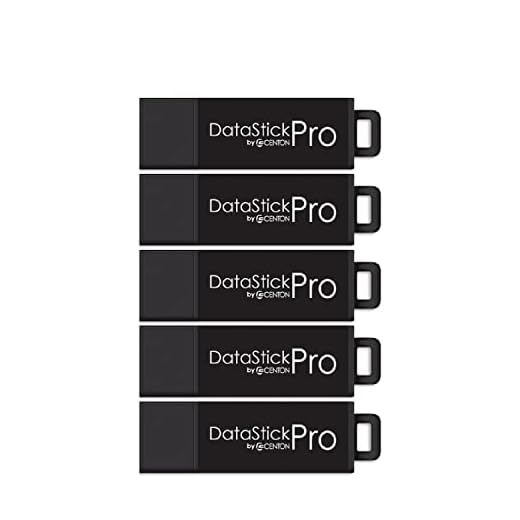
Best for Multiple Devices: Centon DataStick Pro USB 3.2 Gen 1 8GB 5-Pack
Five 8GB drives mean a dedicated backup stick for every device or workstation across the office.
- USB 3.2 Gen 1 speeds despite the compact, low-capacity format
- Five drives cover a small office’s worth of computers without buying separately
- Aluminum build holds up to daily plugging and unplugging
- Small enough to leave permanently plugged into each machine
- 8GB per drive only fits small document sets, not photos or large files
- Not a fit for anyone needing a single large backup drive
- Five separate drives means five things to keep track of
Side-by-side comparison
|
Best Overall
WD 3TB Elements Portable External Hard Drive, USB
|
Best for Team Backups
KEXIN 128GB Flash Drive 20 Pack Flash Drive Bulk U
|
Best Value
TEAMGROUP C175 128GB USB 3.2 Gen1 (USB 3.1/3.0) Re
|
Best for DIY SSD Backup
MAIWO M.2 SATA SSD Enclosure for B+M Key, USB3.0 t
|
Best Budget
Centon Electronics DataStick Pro USB 2.0 Aluminum
|
Best for Multiple Devices
Centon DataStick Pro USB 3.2 Gen 1 Flash Drive Alu
|
|
|---|---|---|---|---|---|---|
|
|
|
|
|
|
|
|
| Capacity | 3TB | 128GB x 20 | 128GB | Varies (BYO SSD) | 32GB | 8GB x 5 |
| Interface | USB 3.0 (2.0 fallback) | USB 2.0 | USB 3.2 Gen1 | USB 3.0 (5Gbps) | USB 2.0 | USB 3.2 Gen1 |
| Best For | Full home office backup | Team/multi-person backup | Single-machine backup | DIY SSD builders | Basic document backup | Multi-device households |
| Portability | 3 /10 | 5 /10 | 5 /10 | 4 /10 | 5 /10 | 5 /10 |
| Price | – | $219.99 | $14.99 | $8.39 | $13.99 | $29.99 |
| BUY NOW | BUY NOW | BUY NOW | BUY NOW | BUY NOW | BUY NOW |
What to look for in Portable SSDs for Backing Up Your Home Office Files
Do I need an actual SSD, or is a hard drive or flash drive good enough for home office backups?
For most home offices, a reliable USB 3.0 hard drive or flash drive is perfectly fine for backups since you’re not running programs off it, just storing copies. SSDs matter more when you need speed for active work, but for backup purposes, capacity and reliability count for more than raw speed.
How much storage do I actually need to back up a home office?
Most single-person home offices fit comfortably in 128GB to 256GB unless you’re storing large photo or video libraries, in which case a multi-terabyte drive like the WD Elements makes more sense. When in doubt, buy more capacity than your current files need since backups only grow over time.
Should I use one big drive or several smaller ones for multiple people?
Several smaller drives, one per person or device, work better in practice than one shared drive because it removes the coordination problem of remembering whose turn it is to plug it in. A 20-pack or 5-pack setup lets everyone maintain their own backup habit independently.
Is building my own SSD with an enclosure actually worth the hassle?
If you already have a spare M.2 SATA SSD sitting unused, yes, an enclosure like the MAIWO gets you real SSD speed for under $10 in added cost. If you’re starting from nothing, buying storage and an enclosure separately usually costs more than just picking up a pre-built external drive.
The bottom line
- WD 3TB Elements Portable External Hard Drive: the default pick for backing up a full home office on one drive
- KEXIN 128GB Flash Drive 20 Pack: solves shared-drive chaos for teams by giving everyone their own
- TEAMGROUP C175 128GB USB 3.2 Gen1: the best speed and capacity for the price on a single-user backup
- MAIWO M.2 SATA SSD Enclosure: the cheapest path to real SSD speed if you've got a spare drive lying around
- Centon DataStick Pro 32GB: a cheap, sturdy option for basic document-only backups
- Centon DataStick Pro 8GB 5-Pack: the right call for multi-computer households that need one drive per machine
For most home offices, the WD 3TB Elements drive is the one to buy first since it covers an entire office’s backup needs on a single drive. If you’re outfitting a team or multiple machines, skip the single big drive and go with a multi-pack so everyone has their own.