Finding the Right Height: The Best Monitor Stands & Risers
Raising your monitor is the fastest way to improve your desk posture and free up valuable workspace.
The best monitor stands offer more than just a simple lift; they provide ergonomic adjustability, smart storage, and even integrated connectivity. Cheap stands can be wobbly or offer limited height, while quality options provide a stable, customizable foundation for a more comfortable and productive setup.
- Choose Your Style: Arms vs. Risers Monitor arms offer full motion for precise positioning, while risers provide a stable shelf and often include storage, defining your desk’s look and function.
- Check VESA Compatibility For any monitor arm, ensure your display has VESA mounting holes (usually 75x75mm or 100x100mm). If not, you’ll need an adapter or must stick to a riser.
- Mind the Weight Limit Always check the stand’s maximum supported weight and screen size. Overloading a stand can lead to sagging, instability, or even damage to your equipment.
- Consider Integrated Features Some modern stands and risers incorporate USB hubs, cable management, and storage drawers, which can significantly declutter your desk and streamline your workflow.



Best Overall: HUANUO FlowLift™ Dual Monitor Stand
This fully adjustable gas spring arm mount offers exceptional flexibility for two screens up to 32 inches. Its dual C-clamp base ensures a wobble-free
- Smooth one-touch height adjustment
- Frees up significant desk space
- Sturdy C-clamp and grommet options
- Excellent range of motion for each arm
- Initial setup can be tricky
- Requires VESA-compatible monitors
- Gas spring tension needs careful tuning
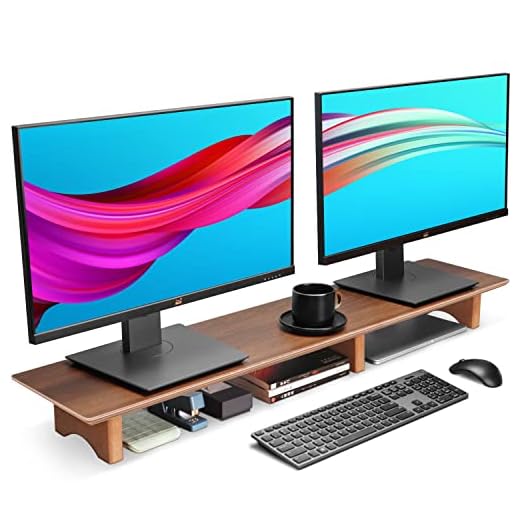
Runner Up: Aothia Solid Wood Dual Monitor Stand Riser
Elevate two monitors with this extra-long, 43-inch solid wood riser. Its black walnut and cork design adds a premium, natural aesthetic to any desk wh
- Premium black walnut finish
- Creates ample storage space underneath
- Extremely simple assembly
- Sturdy and does not wobble
- Fixed height with no adjustability
- Takes up significant desk footprint
- Cork feet can collect dust
Best Premium: Satechi USB C Hub Monitor Stand
This sleek aluminum riser not only elevates your monitor for better ergonomics but also adds a 7-in-1 USB-C hub to your desk, consolidating all your e
- Consolidates cables and peripherals
- Sleek, premium aluminum design
- Adds front-facing port access
- Matches Apple product aesthetics well
- Very expensive for a riser
- Fixed height offers no adjustment
- Requires a USB-C port on host device
Best Value: Mount-It! Dual Monitor Stand
Get full-motion flexibility for two monitors without breaking the bank. This VESA-compatible arm mount offers tilt, swivel, and rotation for screens u
- Incredibly affordable price point
- Offers full tilt, swivel, and rotation
- Includes both C-clamp and grommet mounts
- Sturdy steel construction
- Lacks smooth gas spring movement
- Height adjustment requires tools
- Cable management clips are basic
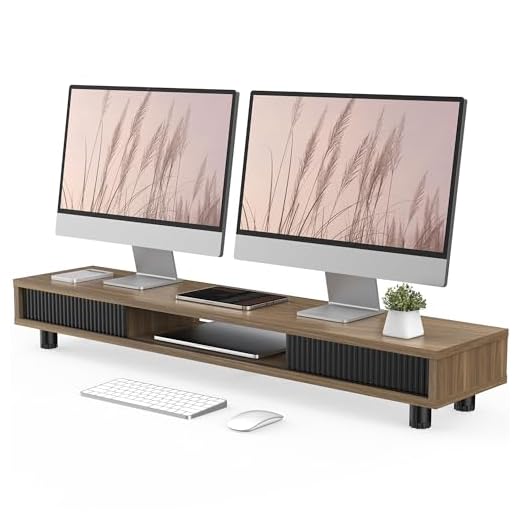
Best for Storage: Fenge Dual Monitor Stand
Organize your entire desk with this 42.5-inch riser featuring three compartments and a sliding door. It’s the perfect solution for elevating two monit
- Massive amount of storage space
- Sliding door neatly hides clutter
- Two tiers for better organization
- Sturdy enough for two large monitors
- Assembly is more involved
- Made of particle board, not solid wood
- Fixed height offers no flexibility
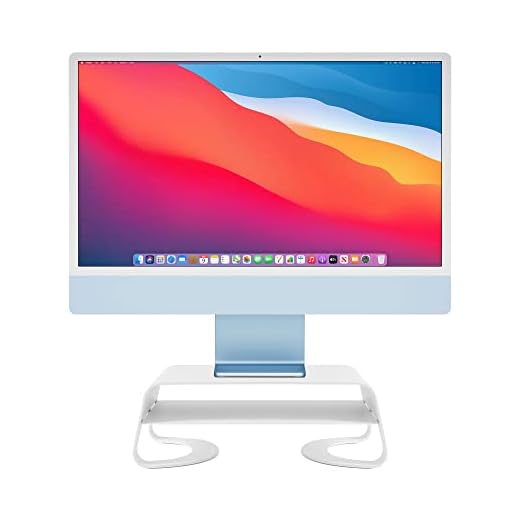
Best Budget: Twelve South Curve Riser Monitor Stand
A simple, elegant, and affordable way to lift your monitor to an ergonomic height. The integrated shelf provides handy storage for hubs and drives, ke
- Clean, minimalist design
- Affordable price
- Integrated shelf is great for small items
- Sturdy metal build feels premium
- Only fits a single monitor
- Height is not adjustable
- Shelf is too small for most laptops
Side-by-side comparison
|
Best Overall
HUANUO FlowLift™ Dual Monitor Stand, Fully Adjusta
|
Runner Up
Aothia Solid Wood Dual Monitor Stand Riser for Des
|
Best Premium
Satechi USB C Hub Monitor Stand for Desk with USB-
|
Best Value
Mount-It! Dual Monitor Stand, Full Motion Desk Mou
|
Best for Storage
Fenge Dual Monitor Stand, 42.5inch Long Monitor St
|
Best Budget
Twelve South Curve Riser Monitor Stand | Ergonomic
|
|
|---|---|---|---|---|---|---|
|
|
|
|
|
|
|
|
| Type | Arm | Riser | Riser | Arm | Riser | Riser |
| Adjustability | 5 /10 | 1 /10 | 1 /10 | 4 /10 | 1 /10 | 1 /10 |
| Max Screen Size | 32″ Dual | 32″+ Dual | Single | 32″ Dual | 32″+ Dual | Single |
| Storage | No | Yes | Yes | No | Yes | Yes |
| Price | $69.99 | $59.99 | $69.99 | $25.94 | $89.99 | – |
| BUY NOW | BUY NOW | BUY NOW | BUY NOW | BUY NOW | BUY NOW |
What to look for in Monitor Stands and Risers
Are monitor arms better than risers?
Neither is ‘better,’ they serve different needs. Arms offer superior ergonomic adjustment for height, depth, and angle, which is ideal for finding the perfect position and freeing up desk space. Risers offer a simple, stable lift and often add valuable storage space and a specific aesthetic to your desk.
How do I know if my monitor is VESA compatible?
Check the back of your monitor for a square pattern of four screw holes. The common sizes are 75x75mm and 100x100mm. You can also check your monitor’s product page or manual for ‘VESA’ specifications. If it’s not compatible, you’ll be limited to risers or need to buy a VESA mount adapter.
What is the correct ergonomic height for a monitor?
When seated upright, the top edge of your monitor screen should be at or slightly below your eye level. This position ensures your eyes look slightly downward toward the center of the screen, which helps reduce strain on your neck and shoulders over long periods.
Can I use a dual monitor stand for just one monitor?
Yes, you can absolutely use a dual monitor arm for a single monitor. You can either remove the second arm or simply leave it unused. This gives you the flexibility to easily add a second monitor in the future without needing to buy new equipment.
The bottom line
- HUANUO FlowLift™ Dual Monitor Stand: This is the best all-around choice for full-motion dual monitor support at a great price.
- Aothia Solid Wood Dual Monitor Stand Riser: Choose this for a stylish, simple elevation with the added benefit of under-monitor storage.
- Satechi USB C Hub Monitor Stand: It's a premium splurge that cleans up cables and adds crucial ports right where you need them.
- Mount-It! Dual Monitor Stand: This is the go-to for anyone who wants the benefits of dual arms on a tight budget.
- Fenge Dual Monitor Stand: If your desk is a mess, this riser's massive storage capacity is the solution.
- Twelve South Curve Riser Monitor Stand: A simple, elegant, and affordable way to lift a single monitor and improve your posture.
For maximum flexibility and ergonomic perfection, the HUANUO FlowLift™ is our top choice, offering smooth gas-spring adjustment for two screens. If you prefer the aesthetics and storage of a shelf, the Aothia Solid Wood Riser provides a beautiful and stable platform for your setup.