Your Zoom calls shouldn't depend on which room you're sitting in
A dead wifi zone in your home office doesn't just slow downloads — it drops the client call mid-sentence.
Most routers ISPs hand out are built to cover a living room, not a house with a converted bedroom or basement office at the far end of the signal. Mesh systems fix this by spreading multiple access points across the home so speed stays consistent no matter which door you close behind you. The gap between a good and bad system here isn’t the marketing — it’s how the nodes actually talk to each other, and whether the coverage numbers hold up through real walls and floors.
- Coverage numbers assume open floor plans The sq ft ratings on the box are measured in ideal conditions — plaster walls, floors, and detached garages cut real-world range noticeably, so size up if your office sits in a converted space.
- WiFi 6 pays for itself in video calls AC1200 systems handle a single video call fine, but add a second person on the network streaming or gaming and you’ll see it in your call quality first.
- Mesh ecosystems don't mix Orbi satellites only pair with Orbi routers, eero nodes only pair with eero — pick your ecosystem once, because expanding later means buying more of the same brand.
- Business-grade gear trades convenience for reliability MikroTik and Ubiquiti access points outperform consumer mesh on raw throughput and uptime, but neither has a parental-controls app or a 10-minute setup — budget the extra install time.


Best Budget: Google Wifi AC1200
The cheapest way into mesh: one point covers 1,500 sq ft, and the Google Home app gets your home office online in minutes with zero networking know-ho
- Setup takes under 15 minutes through the Google Home app, no networking jargon required
- Cheapest true mesh point in this guide
- Automatic firmware updates and basic device prioritization
- Small, unobtrusive design that doesn’t look like network equipment
- AC1200 speeds lag behind WiFi 6 systems, noticeable once multiple devices are on video calls
- A single unit means you’re on your own if signal degrades at the far end of the house
- No dedicated QoS controls for prioritizing work traffic over household streaming
Best Value: Gryphon Guardian Mesh WiFi Router
Adds AC1200 mesh coverage plus a next-gen firewall and granular parental controls, so your home office network stays fast and locked down for one pric
- Next-gen firewall filters malicious traffic before it reaches your work laptop
- Granular parental and content controls with no ongoing subscription fee
- Mesh expansion covers a typical home office plus shared living space
- Security dashboard and network management live in one app
- AC1200 backhaul means large uploads and video calls compete with everyone else’s screen time
- Smaller install base and fewer long-term reviews than Google or eero
- No wired backhaul option for point-to-point speed
Best Premium: NETGEAR Orbi RBS50 Satellite
Tri-band backhaul keeps speeds up to 3 Gbps steady as you add devices, extending your existing Orbi network by 2,500 sq ft without slowdowns.
- Dedicated tri-band backhaul keeps satellite speed high even under heavy load
- Adds serious square footage to an existing Orbi network with no new subscription
- Handles multiple 4K streams plus a video call without visible slowdown
- Sturdy build quality, one of the more polished mesh hardware families available
- Requires an existing Orbi router — this is an add-on, not a standalone system
- The highest price of any single unit in this guide
- Bulky footprint that’s hard to tuck out of sight
Best Overall: Amazon eero 6+ Mesh WiFi System
WiFi 6 and TrueMesh routing deliver gigabit speeds to 75+ devices across 3,000 sq ft, giving a home office the fastest, most dependable coverage here.
- TrueMesh routing actively reroutes around congestion instead of just repeating signal
- WiFi 6 handles video calls, smart home gear, and household streaming at once
- 2-pack blankets a full house, not just a single room
- The eero app is genuinely simple to manage day to day
- Advanced security features sit behind the eero Secure+ subscription
- Listed as like-new/refurbished, so cosmetic condition can vary unit to unit
- No dedicated Ethernet backhaul ports on every node
Runner Up: MikroTik hAP ax2
A quad-core WiFi 6 access point built on RouterOS, giving power users granular network control most consumer mesh systems can’t match.
- RouterOS exposes VLANs, QoS, and firewall rules that consumer mesh systems hide or omit entirely
- Quad-core processor keeps routing overhead off your wifi throughput
- One of the cheapest true WiFi 6 access points on the market
- Built for continuous uptime, the same class of hardware ISPs deploy commercially
- RouterOS has a real learning curve if you’ve never configured anything past factory defaults
- No mesh app or parental controls out of the box
- Single-unit coverage — you’re building a network, not buying a finished one
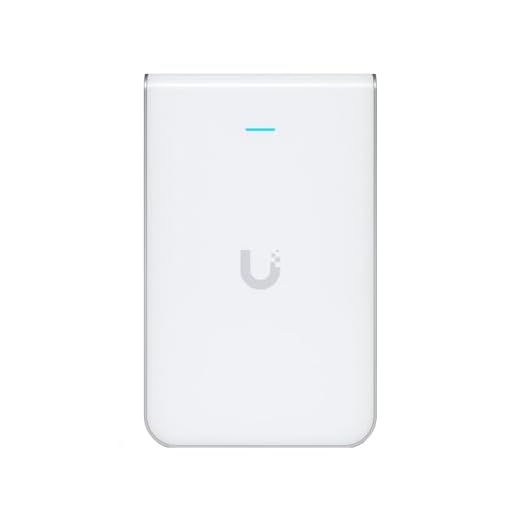
Best for Business-Grade Reliability: Ubiquiti UniFi In-Wall AP
In-wall mounting and 1.99 Gbit/s 802.11ac Wave 2 speeds bring business-grade reliability to a home office that demands enterprise-level uptime.
- In-wall mounting puts the radio inside the room instead of behind furniture
- Wave 2 speeds and MU-MIMO handle several demanding devices per room at once
- Same access point hardware class used in commercial offices, built for always-on reliability
- Integrates with a UniFi controller for site-wide visibility across multiple APs
- Needs a UniFi controller, software or hardware, to unlock its full feature set
- PoE installation is more involved than plugging in a consumer router
- No consumer parental controls or simple mobile app for casual management
Side-by-side comparison
|
Best Budget
Google Wifi – AC1200 – Mesh WiFi System – Wifi Rou
|
Best Value
Gryphon Guardian Mesh WiFi Router and Parental Con
|
Best Premium
NETGEAR Orbi Ultra-Performance Whole Home Mesh WiF
|
Best Overall
Like-New Amazon Amazon eero 6+ mesh wifi system –
|
Runner Up
MikroTik MikroTik hAP ax2 US Version (C52iG-5HaxD2
|
Best for Business-Grade Reliability
Ubiquiti Networks UniFi in-Wall Wi-Fi Access Point
|
|
|---|---|---|---|---|---|---|
|
|
|
|
|
|
|
|
| Coverage Area | 1,500 sq ft (1 pack) | ~1,500 sq ft | +2,500 sq ft (satellite add-on) | 3,000 sq ft (2-pack) | ~1,500 sq ft (1 AP) | ~1,200 sq ft (1 AP, in-wall) |
| WiFi Standard | AC1200 (WiFi 5) | AC1200 (WiFi 5) | AC3000 (WiFi 5, tri-band) | WiFi 6 | WiFi 6 | 802.11ac Wave 2 (WiFi 5) |
| Device Capacity | Moderate (typical household) | Moderate (typical household) | High (tri-band, many devices) | 75+ devices | High (business-grade) | High (business-grade) |
| Security & Parental Controls | Basic (Google Home app) | Advanced (built-in firewall + filters) | Optional (NETGEAR Armor subscription) | Optional (eero Secure subscription) | DIY (RouterOS firewall) | None built-in (managed via controller) |
| Setup Difficulty | Beginner-friendly | Beginner-friendly | Moderate (needs existing Orbi router) | Beginner-friendly | Advanced (RouterOS) | Advanced (PoE + controller) |
| Price | $55.29 | – | $269.99 | $184.97 | $91.82 | $233.63 |
| BUY NOW | BUY NOW | BUY NOW | BUY NOW | BUY NOW | BUY NOW |
What to look for in Mesh Wifi Systems for a Reliable Home Office
Do I need a full mesh system for a home office, or will a single router work?
If your office is more than one room or one floor away from the modem, a single router usually isn’t enough. Mesh systems place a second (or third) access point closer to your desk so the signal doesn’t have to punch through multiple walls, which is exactly where video calls tend to drop.
Is WiFi 6 worth paying more for over AC1200?
Yes, if more than a handful of devices are active during your work hours. WiFi 6 handles simultaneous connections far more gracefully than AC1200, so your call quality doesn’t dip the moment someone else in the house starts streaming. If you’re the only device on the network most of the day, AC1200 is genuinely fine.
Can I mix and match mesh brands, like pairing an Orbi satellite with a different router?
No. Orbi satellites such as the RBS50 only work with other Orbi routers over NETGEAR’s proprietary mesh protocol, and eero, Google Wifi, and Gryphon are similarly closed ecosystems. Pick a brand for your first purchase, because expanding coverage later means buying more of that same brand.
What's the real difference between consumer mesh and business-grade access points like Ubiquiti or MikroTik?
Consumer mesh systems trade some raw performance and configurability for a phone app and a 10-minute setup. Business-grade gear like the MikroTik hAP ax2 or Ubiquiti UniFi in-wall AP delivers better throughput and uptime under sustained load, but expects you to configure firewall rules, VLANs, or a controller yourself — there’s no parental-controls dashboard waiting for you.
The bottom line
- Google Wifi is the lowest-cost way to eliminate a dead zone without learning anything about networking.
- Gryphon Guardian adds real security and parental controls to mesh coverage without a subscription tax.
- NETGEAR Orbi RBS50 is the fix for one stubborn room in an already-established Orbi network, not a first purchase.
- Amazon eero 6+ is the best all-around buy — WiFi 6, full-house coverage, and an app that stays out of your way.
- MikroTik hAP ax2 rewards anyone willing to learn RouterOS with business-grade performance at a hobbyist price.
- Ubiquiti UniFi In-Wall AP is the answer if your home office simply cannot afford a dropped call, ever.
For most home offices, the eero 6+ 2-pack is the one to buy — WiFi 6 speed and full-house coverage without any configuration homework. If budget is the deciding factor, Google Wifi gets you into mesh for under $60, and if you want raw performance without hand-holding, the MikroTik hAP ax2 punches well above its price.