Best Low Blue Light Certified Monitors for Eye Strain
If your eyes feel gritty by 3pm, the monitor is usually the first thing worth fixing, not the last.
Most panels marketed as “eye care” just slap a yellow tint over the display and call it a day. The ones worth buying carry actual third-party certification — TÜV Rheinland Low Blue Light or Flicker-Free — plus a manufacturer’s own dimming and glare-reduction tech working in the background. The six monitors below cover full-size desks, budget builds, small setups, and portable dual-screen rigs, all with verified low blue light credentials rather than a marketing sticker.
- Certification beats a settings menu A TÜV Rheinland or similar third-party stamp means the panel was independently tested for flicker and blue light emission, not just software-filtered on the fly.
- Flicker-free matters as much as blue light PWM flicker at low brightness levels causes as much eye fatigue as blue light does, and it’s invisible unless you know to check for a DC-dimming or flicker-free spec.
- Matte IPS panels do double duty An anti-glare coating on an IPS panel cuts both screen reflections and the squinting that comes with them, which compounds the benefit of any blue light mode.
- Size and certification aren't linked to price The budget pick here (BenQ GW2491) carries the same TÜV certification as monitors twice its price, so cutting cost doesn’t mean cutting eye protection.


Best Overall: BenQ GW2780 27" FHD IPS Monitor
Proprietary Eye-Care tech plus adaptive Brightness Intelligence auto-dims the display to cut fatigue during all-day work sessions.
- Brightness Intelligence auto-adjusts based on ambient light without manual fiddling
- Anti-glare coating handles bright home offices and window glare well
- Full connectivity with DisplayPort, HDMI, and VGA covers older and newer setups alike
- Built-in speakers mean one less cable and one less desk item
- 60Hz refresh rate is fine for office work but limiting if you also game
- Stand offers tilt only, no height or swivel adjustment
- Bezels are slim but not the ultra-thin style some competitors now offer
Best Budget: BenQ GW2491 23.8" FHD Eye-Care Monitor
TÜV-certified Low Blue Light Plus and Flicker-Free tech, plus ePaper mode for effortless long reading sessions.
- Genuine TÜV certification, not just a manufacturer claim, at under $90
- 100Hz refresh rate is a nice bump over the standard 60Hz at this price
- ePaper mode turns the screen nearly monochrome for long-form reading
- Ultra-slim bezel design looks more premium than the price suggests
- 23.8″ screen feels tight if you’re used to 27″ displays
- No height-adjustable stand out of the box
- Speakers are absent, so you’ll need external audio
Best Value: XIAOMI A27Qi 27" QHD Monitor
TÜV Rheinland-certified Low Blue Light and DC Dimming minimize flicker, backed by QHD clarity and ΔE<2 color accuracy.
- QHD resolution gives noticeably crisper text than the FHD monitors in this list
- ΔE<2 color accuracy and 95% DCI-P3 make it usable for light photo or video work
- TÜV Rheinland-certified Low Blue Light Mode plus DC dimming actually reduces flicker
- 100Hz refresh rate makes scrolling and window dragging feel smoother
- Xiaomi’s after-sales support in the US is less established than BenQ or ASUS
- Stand adjustability is more limited than the price might suggest
- No USB-C, so laptop users need a separate cable
Best for Small Desks: ASUS VA24EHE 24" Monitor
ASUS Eye Care combines flicker-free and blue light filter tech in a compact 24″ frameless design ideal for tight desks.
- Frameless design keeps the footprint minimal, good for standing desks or small apartments
- ASUS Eye Care combines flicker-free tech with a blue light filter that doesn’t wash out color much
- 75Hz refresh and Adaptive-Sync make it more capable than a typical office monitor
- HDMI and D-Sub/DVI-D cover both modern and older machines
- 24″ is on the small side for spreadsheet-heavy or multi-window work
- Stand is fixed-tilt only, no height adjustment
- Speakers aren’t included
Best for Home Office: ASUS VA27EHE 27" Monitor
TÜV Rheinland-certified flicker-free and low blue light tech in a 27″ frameless display built for daily home office use.
- 27″ of screen real estate makes side-by-side windows and video calls much easier
- TÜV Rheinland-certified flicker-free and low blue light protection, verified rather than assumed
- Frameless bezels look clean in multi-monitor home office setups
- Adaptive-Sync smooths out scrolling in browsers and documents
- Only 1920×1080 at 27″, so text looks softer than the QHD Xiaomi option at the same size
- No USB-C or built-in USB hub
- Stand lacks height or pivot adjustment
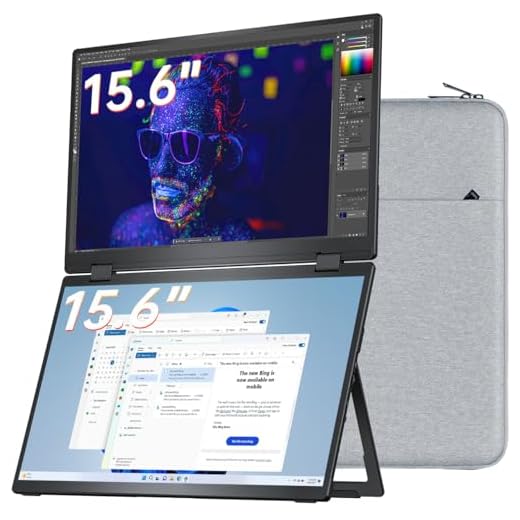
Best for Multi-Screen Setups: VisionOwl Dual 15.6" Portable Monitor
Dual matte IPS screens cut glare for extended multitasking, folding into a portable low-strain second-screen setup.
- Two matte IPS panels cut glare on both screens, useful for travel or bright rooms
- Folds flat with a built-in kickstand, genuinely portable for laptop-based work
- VESA mountable if you want to convert it into a permanent desk setup later
- USB-C and HDMI inputs work with laptops, MacBooks, and consoles alike
- Priciest option in the lineup by a wide margin
- 15.6″ panels are small for detailed spreadsheet or design work
- No dedicated low blue light certification, relying instead on matte coating and HDR
Side-by-side comparison
|
Best Overall
BenQ GW2780 Computer Monitor 27" FHD 1920x1080p |
|
Best Budget
BenQ GW2491 23.8” 1080p FHD 100Hz IPS Eye-Care Mon
|
Best Value
XIAOMI 2K Monitor A27Qi – 27-inch QHD IPS Computer
|
Best for Small Desks
ASUS 24 Inch Desktop Monitor – 75Hz, Full HD (1920
|
Best for Home Office
ASUS 27 Inch Desktop Monitor – Full HD (1920 x 108
|
Best for Multi-Screen Setups
VisionOwl Portable Monitor Dual 15.6 Inch 1080P FH
|
|
|---|---|---|---|---|---|---|
|
|
|
|
|
|
|
|
| Screen Size | 27" | 23.8" | 27" | 24" | 27" | Dual 15.6" |
| Resolution | 1920×1080 | 1920×1080 | 2560×1440 | 1920×1080 | 1920×1080 | 1920×1080 |
| Low Blue Light Certification | BenQ Eye-Care | TÜV-Certified | TÜV Rheinland | ASUS Eye Care | TÜV Rheinland | Matte IPS (uncertified) |
| Refresh Rate | 60Hz | 100Hz | 100Hz | 75Hz | 75Hz | 60Hz |
| Price | $199.99 | $89.99 | $184.99 | $144.00 | $138.50 | $419.99 |
| BUY NOW | BUY NOW | BUY NOW | BUY NOW | BUY NOW | BUY NOW |
What to look for in Low Blue Light Certified Monitors
Does a low blue light certification actually reduce eye strain, or is it marketing?
A genuine third-party certification like TÜV Rheinland means the panel passed independent testing for blue light emission and flicker, which is a real physical measurement, not just a software tint. It won’t eliminate eye strain caused by poor posture or bad lighting, but it removes one measurable contributor.
Is a hardware low blue light mode better than just using f.lux or Night Shift?
Software filters like Night Shift adjust color temperature but don’t touch the underlying flicker or brightness modulation, which is often the bigger fatigue driver. A certified hardware mode addresses both, so pairing certified hardware with a software filter for evening hours gives the best result.
Do I need a high refresh rate monitor for eye strain, or is that just for gaming?
Refresh rate matters less than certification and flicker-free tech for straight office work, but 75-100Hz does make scrolling and cursor movement feel smoother, which reduces the eye effort of tracking motion. It’s a nice-to-have, not a requirement, for a low-strain setup.
Is a bigger screen or a dual-screen setup better for reducing eye strain?
It depends on your workflow — a single larger panel like the 27″ ASUS or Xiaomi reduces the need to constantly refocus between windows crammed onto one small screen. A dual-screen setup like the VisionOwl helps more if you’re juggling reference material and active work side by side, especially while traveling.
The bottom line
- BenQ GW2780 — the most complete eye-care package for anyone who wants one monitor to just handle it
- BenQ GW2491 — proof that real TÜV certification doesn't require a premium price tag
- XIAOMI A27Qi — the best combination of QHD sharpness, color accuracy, and certified low blue light mode
- ASUS VA24EHE — the right size and eye-care tech for a small desk or standing setup
- ASUS VA27EHE — a larger frameless upgrade for home offices juggling spreadsheets and video calls
- VisionOwl Dual Portable Monitor — the pick for travelers or multitaskers who need two glare-reducing screens instead of one
The BenQ GW2780 is the safest all-around buy, pairing full Eye-Care tech with a 27″ IPS panel and every port you’d need. If budget is tight, the BenQ GW2491 delivers the same TÜV certification for under $90, and the Xiaomi A27Qi is the strongest value pick if you want QHD sharpness alongside certified low blue light protection.