Working from the couch destroys your posture unless you use a dedicated laptop stand to raise your screen to eye level. Balancing a hot computer on a throw pillow quickly leads to back pain and reduced productivity. A stable, adjustable stand is the only way to turn your living room into a functional workspace without ruining your spine.
We tested several options to find the best laptop stands for a couch that actually support good posture. The SAIJI Laptop Bed Tray Table offers a highly adjustable surface that works well for sitting cross-legged or stretching out. If you prefer something that rests directly on your lap, the LAPGEAR Home Office Pro Lap Desk provides a cushioned base with a built-in wrist rest. Both of these designs tackle the common problem of screen glare and awkward typing angles. Your ideal style relies entirely on how you sit while working.
You need to consider the weight of the stand and how easily it stores away when the workday ends. Some models feature folding legs that tuck under the sofa, while others are simple cushioned boards you can slide onto a shelf. Adjustability plays a huge role in preventing neck strain during long typing sessions. A fixed-angle desk might work for casual browsing, but full-time remote work requires multiple height settings. We evaluated these stands based on stability, comfort, and how well they keep your wrists in a neutral position.
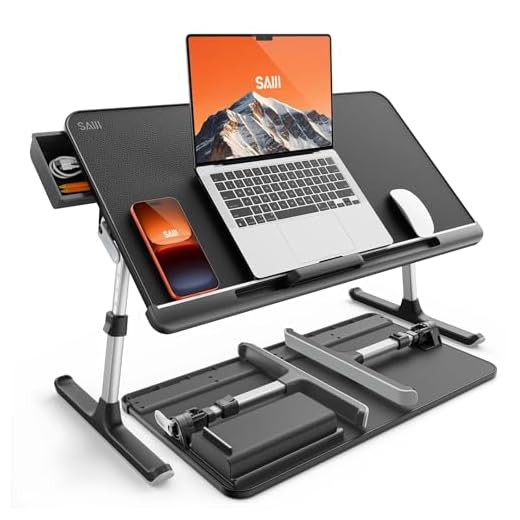


SAIJI Laptop Bed Tray Table
SAIJI Adjustable Laptop Bed Tray
The SAIJI Laptop Bed Tray Table is a freestanding desk that sits over your legs while you work on the sofa. It suits remote workers who want a solid surface that does not rest directly on their thighs. The wide stance gives you plenty of room to shift your legs around during long meetings. People who struggle with heavy lap desks will appreciate the independent support structure. It arrives fully assembled so you can start working immediately.
Adjusting the desk is incredibly simple thanks to the two auto-lock buttons on each side. You can quickly change the height to match your seating position. Two clamps allow you to adjust the surface angle across four different settings to reduce neck strain. The desktop features a non-slip PVC leather surface that keeps your computer from sliding when tilted. It also includes a small storage drawer on the left side for pens or charging cables.
Compared to traditional cushion-based lap desks, this model offers far more height adjustability. It stands out from the LAPGEAR model because it completely removes the weight of the laptop from your body. The light but sturdy frame folds flat for easy storage when you finish working. This makes it a great choice for small apartments where you cannot leave a desk set up permanently. If you need maximum angle control for typing, this tray table delivers excellent results.
LAPGEAR Home Office Pro Lap Desk
LAPGEAR Home Office Pro Lap Desk
The LAPGEAR Home Office Pro Lap Desk is a cushioned board that rests directly on your legs. It targets users who prefer a traditional lap desk feel but need extra space for accessories. The wide profile easily accommodates larger laptops up to 15.6 inches while leaving room to spare. Anyone who uses an external mouse will find this design highly practical for couch work. It provides a stable base without requiring you to lock your legs into a specific position.
This desk measures 21.1 inches wide and 14.1 inches deep to give you a spacious work area. It features a built-in 5 by 9 inch precision tracking mouse pad on the right side. A dedicated phone slot sits at the top to keep your mobile device visible while you type. The bottom features a dual support cushion that promotes airflow and keeps your legs cool. The solid surface comes in a sleek black carbon color that resists scratches and provides a firm typing base.
This model takes a completely different approach than the freestanding SAIJI tray table. It relies on your lap for height rather than adjustable legs, which limits how high you can raise the screen. However, the integrated handle and lightweight 2.8 pound design make it much easier to carry from room to room. It is an excellent option for casual browsing or shorter work sessions where you want to lean back into the sofa cushions. The built-in wrist rest also provides excellent typing support that many folding stands lack.
SAIJI Height and Angle Adjustable Laptop Stand
SAIJI Height & Angle Adjustable Laptop Stand
This SAIJI Height and Angle Adjustable Laptop Stand is a versatile tray that creates an ergonomic workspace on soft surfaces. It appeals to users who need a highly customizable setup for their living room or bedroom. The wide leg base spans across your lap to provide a stable platform that will not wobble when you type. People who suffer from neck pain will benefit from the ability to raise the screen closer to eye level. It works exceptionally well for those who frequently shift between sitting up and leaning back.
Because this stand features independent legs, it completely removes the heat of the laptop from your body. The adjustable joints allow you to lock the surface at various angles to suit your current posture. You can easily raise or lower the height to accommodate different couch cushion depths. The desktop surface provides enough friction to keep your device secure even at steep inclines. A built-in stopper prevents your computer from sliding into your lap during intense typing sessions.
This stand shares many similarities with the first SAIJI model but focuses heavily on extreme angle adjustments. It offers more flexibility than the LAPGEAR desk since you can change the height independently of your legs. The folding mechanism allows you to collapse the legs completely flat for storage under a sofa. While it takes up more physical space than a simple lap board, the ergonomic benefits are significant. It is an ideal choice for full-time remote workers who spend eight hours a day away from a traditional desk.
VIVO 20 inch Over Couch Swivel Table
VIVO Over Couch Swivel Table
The VIVO 20 inch Over Couch Swivel Table is a floor-standing desk that slides under your sofa. It serves people who want a permanent or semi-permanent workstation in their living room. The heavy base provides a sturdy foundation that prevents the table from tipping over while you work. Users who dislike having any weight resting on their legs will find this design incredibly comfortable. It acts as a floating desk that you can pull toward you or push away as needed.
The table features a swiveling top that rotates smoothly to help you get in and out of your seat. You can adjust the height of the main column to match the exact level of your couch cushions. The 20 inch surface provides ample room for a standard laptop and a cup of coffee. Its low-profile base slides easily under most standard sofas and recliners. The solid construction ensures that the desk remains stable even when you are typing aggressively.
Unlike the SAIJI and LAPGEAR models, this desk does not sit on the couch with you. It is a piece of standalone furniture that requires floor space and clearance under your sofa. This makes it less portable than a folding tray but far more stable for heavy laptops. You never have to worry about balancing the desk when you need to stand up quickly. It is the best option for users who want a dedicated living room workspace without buying a full-sized desk.
MOFT Folding Laptop Stand
The MOFT Folding Laptop Stand is an ultra-thin desk that transforms into a sturdy platform. It is great for minimalists who hate bulky furniture and want something they can hide away instantly. Frequent travelers and digital nomads will appreciate how easily it slips into a standard backpack. Despite its thin profile, it provides a surprisingly rigid surface for typing on soft couches. Anyone who values clean aesthetics and clever engineering will enjoy using this stand daily.
This stand measures just half an inch thick and folds down to the size of a standard magazine. It uses a unique Z structure and tri-angle bottom support to hold up to 22 pounds of weight securely. You can set it up as a standing workstation that raises your laptop by 10 inches. For sitting on the couch, it offers four different angle modes including 25, 35, 45, and 60 degrees. The construction relies on customized PU and stiff fiberglass to ensure it survives daily folding and unfolding.
The MOFT stand is drastically different from the heavy VIVO swivel table or the wide LAPGEAR cushion desk. It prioritizes extreme portability and a tiny footprint over having extra space for a mouse or phone. While it lacks the wide leg base of the SAIJI trays, its fiberglass core keeps it remarkably stable on uneven cushions. You do sacrifice some lap comfort since the thin edges rest directly on your legs. However, for users who want a stand that practically disappears when not in use, this is an unbeatable design.
Understanding Ergonomics on the Couch
Working from a sofa naturally encourages poor posture because soft cushions cause your hips to sink. This sinking motion rounds your lower back and forces your neck to crane forward to see the screen. Over time, this awkward positioning creates severe tension in your shoulders and upper spine. A proper stand helps correct this by raising the screen closer to your natural eye level. Keeping your head in a neutral position is the first step to pain-free remote work.
Wrist alignment is another critical factor when setting up a living room workspace. Typing on a flat surface that sits too high or too low forces your wrists to bend at unnatural angles. This constant strain can lead to repetitive stress injuries or general fatigue by the end of the day. A good setup allows your arms to rest comfortably at your sides with your elbows bent near a ninety-degree angle. Adjustable tilt features help you find the exact angle needed to keep your wrists straight.
Heat management also plays a surprising role in your overall physical comfort. Laptops generate a significant amount of heat that transfers directly to your legs if you rest the device on your lap. This heat buildup causes discomfort and makes you shift into worse postures to find relief. Raising the computer on a solid surface prevents this heat transfer entirely. It also protects your device by allowing proper airflow to reach the cooling vents on the bottom of the chassis.
Choosing the Right Base Style
The foundation of your stand determines how it interacts with your body and your furniture. Cushion-based models rest directly on your thighs and conform to the shape of your legs. These are highly comfortable for short sessions and keep you warm during colder months. However, they trap heat and limit how high you can raise the screen. They also require you to keep your legs relatively still to maintain a stable typing surface.
Freestanding tray models feature independent legs that bridge over your lap entirely. This design removes all weight from your body and allows you to cross your legs or stretch out freely. The wide stance provides excellent stability even if you shift your weight on the sofa cushions. The main drawback is that they take up more physical space and can feel bulky in tight seating areas. You also need to ensure the legs are wide enough to accommodate your body comfortably.
Floor-standing models offer a completely different approach by removing the desk from the couch entirely. These units feature a heavy base that slides under the sofa and a cantilevered arm that holds the tray. They provide the most stable typing experience and feel the most like a traditional office desk. You never have to move the desk off your lap when you need to stand up to grab a coffee. They do require adequate floor clearance and are much harder to store out of sight.
The Importance of Adjustability
A fixed flat surface rarely provides the correct ergonomics for couch-based work. Your seating position changes constantly throughout the day as you naturally shift to relieve pressure points. Having a stand that can adapt to these micro-movements is essential for long-term comfort. Height adjustment allows you to compensate for deep, sinking cushions versus firm, supportive seating. You can raise the desk when sitting upright and lower it when leaning back to watch a presentation.
Angle adjustment is equally important for reducing glare and improving your typing posture. Tilting the keyboard toward you reduces the need to hover your hands over the keys. This slight incline supports a more natural wrist position and reduces fatigue in your forearms. Most high-quality stands offer multiple locking angles so you can find the perfect pitch for your specific body type. A secure locking mechanism ensures the surface will not collapse under the weight of your hands.
When evaluating adjustable features, pay close attention to the locking mechanisms used. Push-button locks are generally the easiest to operate and provide a secure hold once engaged. Friction-based clamps offer infinite adjustments but can slip over time if not tightened properly. You want a system that allows you to make quick changes without needing to remove your computer from the tray. The easier it is to adjust the stand, the more likely you are to actually use those ergonomic features.
Portability and Storage Considerations
Living rooms are primarily spaces for relaxation, so your workspace should not dominate the room permanently. The ability to pack away your desk at the end of the day helps create a healthy boundary between work and home life. Folding designs are incredibly popular because they collapse down to a fraction of their working size. You can easily slide a folded tray under the sofa or tuck it behind a decorative basket. This quick cleanup process keeps your living area looking tidy and inviting.
Weight is a major factor if you plan to move your setup frequently. Heavy wooden trays look beautiful but become tedious to haul out of a closet every morning. Lightweight materials like aluminum or rigid fiberglass offer excellent strength without the added bulk. If you prefer a cushion-based model, look for one with an integrated carrying handle. A handle makes it simple to grab the desk with one hand while carrying your laptop in the other.
Consider how your stand will travel if you occasionally work from coffee shops or take road trips. Ultra-thin folding models can slip right into a laptop bag alongside your computer. Larger tray tables are strictly meant for home use and will not fit in standard luggage. Think about your daily routine and where you actually plan to use the desk most often. Buying a highly portable model makes sense only if you actually intend to take it out of the house.
Final Verdict
Upgrading your couch workspace is a vital investment in your spinal health. Choose the SAIJI Tray Table for maximum adjustability, or the LAPGEAR Lap Desk for a cushioned feel. Measure your sofa cushions today and order your ideal stand.