Stop Looking Like You're Calling From a Cave
Your webcam isn't the problem — the ceiling light above your desk is.
Overhead lighting casts shadows under your eyes and turns your face into a flat gray smudge on every call. A dedicated key light fixes this in seconds: it sits at eye level, throws even light across your face, and makes a $50 webcam look like a $500 one. The difference between a good panel and a bad one comes down to CRI (color accuracy), diffusion (soft vs. harsh), and whether you can adjust brightness without getting up from your desk.
- CRI 95+ is the real spec that matters Lumens get the marketing attention, but Color Rendering Index above 95 is what keeps your skin tone looking natural instead of sickly or washed out on camera.
- App or remote control beats physical knobs mid-call Fumbling with a dial while you’re live on a call looks worse than the lighting problem you’re trying to fix — app-controlled or remote-controlled panels let you adjust without anyone noticing.
- Diffusion matters more than raw brightness A smaller panel with good diffusion (soft, wraparound light) beats a bigger, harsher one that creates hard shadows and blown-out highlights.
- One light fixes 90% of problems, two lights fix the rest A single key light eliminates the worst shadows for almost everyone, but a two-panel key-and-fill setup is the only way to get truly even, shadow-free lighting on both sides of your face.




Best Overall: Elgato Key Light
App-controlled brightness and 2900-7000K color temperature from 160 OSRAM LEDs give you studio-grade, flicker-free video call lighting with minimal he
- App control means you adjust brightness and temperature from your phone without leaving your seat
- 160 LEDs spread the light evenly, avoiding the hot-spot look cheaper panels produce
- Runs cool enough for hour-long calls without radiating heat at your face
- Desk clamp mounts cleanly without eating desk space
- Costs 3x more than budget alternatives
- App requires a stable Wi-Fi connection to control reliably
- No battery option, so it needs to stay plugged into an outlet
Best Value: NEEWER 25W Streaming Key Light GL25B
176 edge-lit LEDs deliver CRI 98+ diffused light across a 12.9″ panel, with wireless remote and app control for shadow-free calls at half the price.
- CRI 98+ actually edges out the pricier competition on color accuracy
- Physical remote works even if your Wi-Fi is down, unlike app-only competitors
- Larger 12.9″ panel produces softer, more even light than smaller units
- Desk stand is sturdy enough that it won’t wobble every time you bump the desk
- App is less polished than Elgato’s
- Stand takes up more desk real estate than clamp-mounted options
- Build quality is solid but noticeably more plastic than premium panels
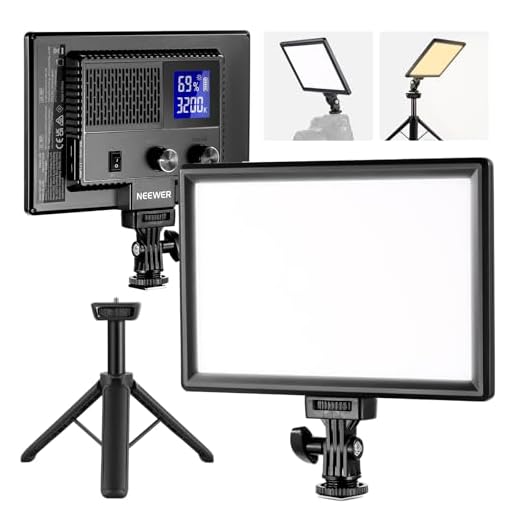
Best Budget: NEEWER NL-116AI 9" Panel
A 4000mAh battery and precise 1% dimming knobs pack CRI 95+ portrait lighting into a 9″ panel that costs a fraction of studio alternatives.
- Built-in battery means it works even at a desk without a nearby outlet
- 1% dimming knobs give finer control than most budget panels offer
- Desk tripod is included, so there’s nothing extra to buy
- Small footprint fits on cramped desks without crowding your monitor
- 9″ panel is noticeably smaller, so light falloff is more visible at a distance
- Battery life shortens over repeated full-day charge cycles
- No app or remote, everything is manual knob adjustment
Best for Eye Comfort: RALENO 13" LED Soft Light Panel
650LUX soft diffusion and CRI>95 keep skin tones natural and glare low during long calls, in a 1-inch panel slim enough to hide behind your monitor.
- Heavy diffusion produces genuinely soft light instead of a harsh point source
- Thin 1-inch profile hides easily behind or beside a monitor
- Sturdy desk stand holds position through a full day of adjustments
- Large 13″ surface area means less flicker sensitivity for sensitive eyes
- No app control, just physical dials
- 650LUX output is lower than the Elgato or NEEWER GL25B in bright rooms
- Color temperature range is narrower than pricier alternatives
Best for Small Desks: Ulanzi VL120 RGB Pocket Light
Credit-card-sized with 120 RGB and bi-color LEDs, this pocket light clips anywhere a desk has no room for a stand, still hitting CRI 95+.
- Small enough to clip directly onto a monitor bezel with no stand needed
- Battery-powered, so it doesn’t add another cord to your desk
- Wide 2500-9000K range covers everything from warm to daylight-neutral
- RGB option is a nice bonus for anyone who also streams or records video
- Lower total output than full-size panels, better suited to close-range desk setups
- Small size means less diffusion, so light can look slightly more direct
- Battery needs regular recharging with daily use
Best for Dual-Light Setup: NEEWER NL-192AI 2-Pack
Two 192-LED panels with CRI 97+ and aluminum stands let you light both sides of your face evenly, eliminating the single-source shadow of one-panel ri
- Two panels let you light both sides of your face, eliminating single-source shadowing
- CRI 97+ on both panels keeps color consistent across the whole setup
- Aluminum stands are noticeably sturdier than the plastic stands bundled with single-panel kits
- Bi-color adjustment on each panel lets you fine-tune left and right independently
- Two stands take up considerably more desk space than a single-panel setup
- Costs as much as the Elgato for two panels of lower per-unit refinement
- Setting up and aiming two lights takes more trial and error than a single key light
Side-by-side comparison
|
Best Overall
Elgato Key Light – Professional 2800 lumens Studio
|
Best Value
NEEWER 25W 12.9" Streaming Key Light with Desk Sta
|
Best Budget
NEEWER NL-116AI 9" LED Video Light Panel, Camera L
|
Best for Eye Comfort
RALENO 13" LED Video Soft Light Panel with Desk St
|
Best for Small Desks
Ulanzi VL120 RGB Video Light On-Camera, 3100mAh, 2
|
Best for Dual-Light Setup
NEEWER 13" LED Video Light Panel Kit with Tripod S
|
|
|---|---|---|---|---|---|---|
|
|
|
|
|
|
|
|
| CRI Rating | Not specified | 98+ | 95+ | >95 | 95+ | 97+ |
| Control Method | App (Mac/PC/iOS/Android) | App + 2.4G remote | Manual dial | Manual dial | Manual button | Manual dial (per panel) |
| Power Source | Wired only | Wired only | Battery (4000mAh) | Wired only | Battery (3100mAh) | Wired only |
| Panel Size | Full-size | 12.9" | 9" | 13" (slim) | Pocket-size | 13" x2 |
| Price | $179.99 | $89.99 | $49.99 | $74.99 | $35.95 | $149.99 |
| BUY NOW | BUY NOW | BUY NOW | BUY NOW | BUY NOW | BUY NOW |
What to look for in Key Light Panels for Video Calls
Do I really need a key light if my webcam already has decent low-light performance?
Yes — even the best webcam sensors can’t fix bad lighting, they can only compensate for it by boosting ISO, which introduces grain and washes out detail. A key light fixes the actual problem at the source instead of asking software to patch around it.
Where should I position a key light for video calls?
Place it slightly above eye level and just off to one side of your camera, angled down at roughly 45 degrees toward your face. This mimics natural window light and avoids the flat, shadowless look of a light placed directly behind the camera.
Is one key light enough, or do I need two?
One key light solves the majority of lighting problems for most people and is the right starting point. A second fill light only becomes worth it if you’re doing frequent recorded video, streaming, or want to eliminate the last bit of shadow on the far side of your face.
Does a higher lumen count always mean better lighting?
No — lumens measure raw brightness, not quality. A panel with lower lumens but better CRI and diffusion will look more natural on camera than a brighter panel that’s harsh and undiffused, since you can always dim a light down but can’t fix bad color rendering.
The bottom line
- Elgato Key Light: the dependable, app-controlled standard that just works
- NEEWER GL25B: the best balance of price and performance for most buyers
- NEEWER NL-116AI: proof that decent lighting doesn't require a big budget
- RALENO 13" Panel: built for people whose eyes get tired during long call days
- Ulanzi VL120: the answer when your desk simply has no room for a stand
- NEEWER NL-192AI 2-Pack: the upgrade path once one light isn't eliminating every shadow
The Elgato Key Light remains the safest pick if you want app control and proven reliability without thinking about it again, while the NEEWER GL25B gets you 90% of that experience for nearly half the price. If budget is tight or your desk has no room to spare, the NL-116AI and Ulanzi VL120 both solve the core problem without the premium price tag.