Typing with freezing fingers severely impacts productivity, and standard mouse pads only pull heat away from your skin. Heated mouse pads solve this problem by providing a direct, continuous heat source right where your hands rest. In our testing, we found that the most effective models either cover the entire desk area under your keyboard or create a small heated pocket specifically for your mouse hand.
We evaluated several options to identify the best ways to warm up your workspace. The Heated Desk Pad Mouse Pad offers a large surface area with three distinct heat settings, while the iLeadon Heated Mouse Pad provides four temperature options for more granular control. We also tested enclosed warmers and five-level heating mats to cover different environmental needs.
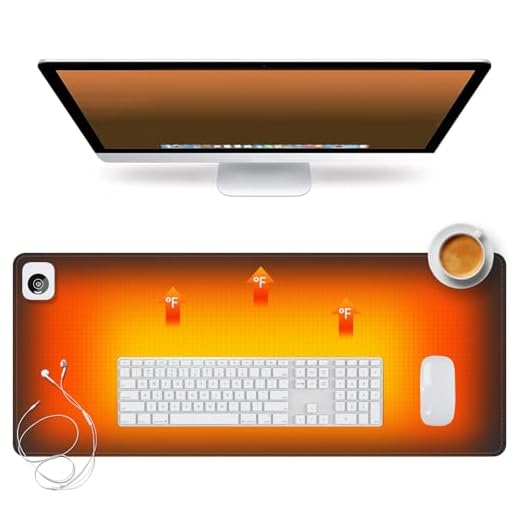
#1 Heated Desk Pad Mouse Pad – 3 Levels Heating
PU Leather Heated Desk Pad (31.5" x 13")
This large desk mat replaces your standard mouse pad with a heated PU leather surface, covering a wide area to warm both hands. The smooth material works well for standard office mice and daily typing tasks, doubling as a protective desk layer during summer months. A fast heating element warms up quickly, controlled by a corner-mounted box that stays out of your way. It features three temperature levels, an automatic shut-off function, and UL certification, running on a standard 110V US plug. The open format provides total freedom of movement for typing long documents, offering a professional aesthetic suitable for corporate environments.
#2 iLeadon Heated Mouse Pad, Heated Desk Mat
The iLeadon Heated Mouse Pad features a comfortable Lycra surface that feels gentle against the skin, offering a breathable alternative to faux leather. It covers a massive section of your workspace to accommodate a full-size keyboard and mouse. Four distinct temperature settings allow precise comfort control, while internal heating elements provide uniform warmth without cold spots. A non-slip base keeps the pad firmly anchored during heavy typing sessions. The fabric surface provides a smooth glide for your mouse, making it a strong contender for users who want a soft, breathable mat that warms both hands evenly.
#3 Heated Desk Pad, Heated Mouse Pad 5 Heating Levels
This heated desk pad provides a large heated zone directly underneath your primary input devices, offering constant radiant heat for your wrists and forearms. The flat profile ensures your keyboard sits level while your mouse glides freely. Its standout feature is the inclusion of five distinct heating levels, providing incredibly precise temperature control compared to standard models. The heating elements distribute warmth evenly across the active area, powering up quickly to relieve stiff joints. While it requires significant desk space, the extra temperature steps make it highly valuable for users who demand maximum adjustability.
#4 USB Heated Mouse Pad Hand Warmer
The WOLVIO USB Heated Mouse Pad is a plush pouch that encloses your mouse and hand, trapping warm air directly around your fingers. It specifically targets the mouse hand, blocking out cold ambient air completely. Running on USB power, it offers three temperature settings (110, 130, and 145 degrees Fahrenheit) and three automatic shut-off timers. The heating pad sits inside the roof of the pouch, radiating heat down onto the back of your hand for a significantly warmer feel than open mats. While the pouch structure slightly restricts mouse movements, the intense trapped heat makes it an excellent choice for extremely cold environments.
Understanding Heat Distribution Styles
Heated mouse pads generally fall into two main categories based on their shape. Flat desk mats cover a large surface area and warm everything resting on top of them. Enclosed pouches create a small pocket of hot air specifically for your mouse hand. Your choice dictates how much heat you feel and how freely you can move.
Flat mats provide a subtle, radiant heat that warms your wrists and forearms. Because they are open to the air, they lose some heat to the surrounding room. They are excellent for people who need to warm both hands while typing on a keyboard. The open format means you have zero restrictions on your mouse movements.
Enclosed pouches trap the heat inside a small fabric cave. This creates a much more intense warming effect because the hot air cannot escape. The heating element usually rests directly above the back of your hand. The major downside is that your movements are confined to the inside of the pouch.
Temperature Controls and Safety Features
Having adjustable temperature settings is crucial for a comfortable experience. Office temperatures fluctuate throughout the day, and your heating needs will change accordingly. Look for models that offer at least three distinct temperature levels. This allows you to start on high to break the chill, then drop to low for maintenance.
Safety features are incredibly important when dealing with heating elements on your desk. Automatic shut-off timers prevent the pad from running all night if you forget to unplug it. Some models allow you to set specific time limits, while others default to a standard four-hour window. A reliable auto-off feature provides safety when you leave the office.
The type of power source also affects how hot the pad can get. Wall-plugged models draw more power and generally heat up faster than USB alternatives. USB-powered pads offer convenience because you can plug them right into your computer tower. However, USB ports deliver limited wattage, which caps the maximum temperature.
Surface Materials and Mouse Tracking
The surface material of a flat heated mat determines how well your mouse will perform. Faux leather is a very common material because it is durable and easy to wipe clean. It provides a smooth glide that works well for standard office tasks and web browsing. However, faux leather can sometimes feel sticky against bare skin when the heat is turned up.
Fabric surfaces offer a softer, more traditional mouse pad feel. Materials like Lycra or woven cloth breathe better than plastic or faux leather. This prevents your wrists from sweating when resting on the warm surface for hours. Cloth surfaces generally provide better tracking accuracy for high DPI mice.
The bottom of the mat is just as important as the top surface. A good heated pad needs a textured rubber or silicone base to prevent sliding. A non-slip base ensures the heating element stays exactly where you want it.
Sizing and Desk Space Considerations
Measuring your available desk space is a mandatory step before buying a flat heated mat. These accessories are often much larger than standard mouse pads. They sit under your keyboard, mouse, and sometimes your monitor stand. You need a clear, flat area for the heating element to work safely.
Oversized mats ensure that your hand stays warm no matter where you move your cursor. Just make sure the mat does not hang over the edge of your desk.
Storage during the summer months requires consideration. Flat mats can usually stay on your desk year-round with the power turned off. They simply act as a protective desk blotter when you do not need the heat. Enclosed pouches take up drawer space when not in use.
Final Verdict
A heated mouse pad immediately relieves cold hands and stiff joints during long workdays. Review your desk space and temperature needs, then select one of our tested models above to instantly upgrade your daily typing comfort.