Stop cramming your hands into a keyboard built for someone else's fingers
Most keyboards are designed around an average hand size, and if your fingers or palms run bigger than that average, every keystroke means extra reaching, curling, and wrist compensation.
The difference between a keyboard that works for large hands and one that doesn’t comes down to three things: how far the keys spread apart, whether the layout tents up instead of forcing flat wrists, and whether there’s enough surface for your palm to actually rest. Cheap split keyboards fake the ergonomics with a gap down the middle and nothing else; the ones on this list either separate wide enough to match your shoulder width or contour deep enough to give thick fingers real travel room.
- Split distance matters more than split existence A keyboard with a 1-inch gap down the middle isn’t meaningfully different from a flat board. Look for models that separate at least 6-9 inches, like the Kinesis Freestyle2, or fully detach so you set the distance yourself.
- Tenting reduces forearm rotation strain Large hands paired with flat keyboards force your forearms to pronate further than smaller hands need to. Adjustable tenting (the Goldtouch Elite goes to 60 degrees) lets you rotate the keyboard halves upright so your wrists stay neutral.
- Deep contours beat flat keywells for big fingers Flat or lightly-sculpted keyboards make large fingers reach further off-axis to hit adjacent keys. The Kinesis Advantage360’s bowl-shaped keywells put every key within a short, straight reach regardless of finger length.
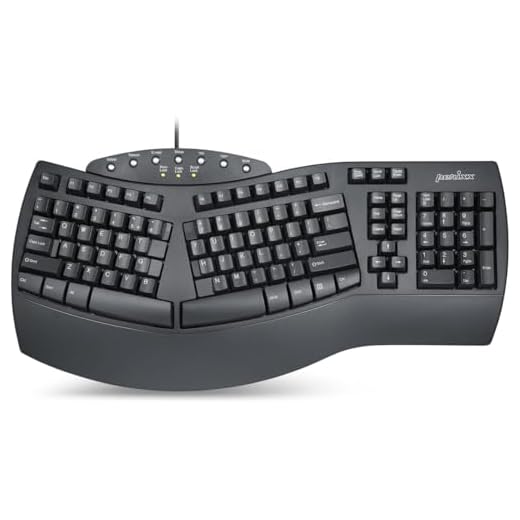
- You don't need to spend $400 to fix wrist strain The Perixx PERIBOARD-512B proves a basic split layout with a real wrist rest solves most of the problem for under $50. Save the premium spend for programmability or wireless if you actually need it.


Best Overall: Kinesis Advantage360 Professional Split Ergonomic Keyboard
Concave keywells and column-stagger keys give large hands room to spread out, while shoulder-width splay keeps wrists straight instead of cramped.
- Concave keywells put every key within short reach even for long fingers
- Independently tented halves let each hand find its own neutral angle
- Fully programmable firmware remaps any key or layer without software running in the background
- Column-stagger layout eliminates the diagonal finger reaches that trip up wide hands on standard boards
- 479 dollars is a real commitment before you know if the layout suits you
- Steep learning curve for the first one to two weeks of typing
- Bulkier footprint than a standard board, not ideal for small desks
Best for Custom Fit: Goldtouch Elite Adjustable Ergonomic Keyboard
Dial in up to 30° of splay and 60° of tenting so larger hands and long fingers find their own natural, strain-free angle instead of a fixed layout.
- Widest tenting range in this lineup at a fraction of the flagship price
- Splay and tent adjust independently so you can fine-tune without compromise
- Sturdy metal hinge holds its position instead of drifting during a typing session
- Standard key layout means near-zero relearning curve
- Membrane switches feel mushier than mechanical alternatives
- No backlighting, a problem if you type in low light
- Wired only, no Bluetooth option
Runner Up: Logitech Ergo K860 Wireless Ergonomic Keyboard
The curved split frame and scooped keycaps give large hands a wider, natural stance while the memory-foam wrist rest cuts wrist bending by 25%.
- Scooped keycaps give large hands a wider natural resting position than flat keys
- Memory-foam palm rest is dense enough to hold shape after months of use
- Switches between three paired devices without re-pairing
- Reliable Logitech build quality and driver support
- Fixed curve and tent angle, no adjustability once you own it
- Split distance is modest compared to fully separated boards
- Requires Logi Options+ software to access full customization
Best for Wide Split & Tenting: KINESIS Freestyle2 USB-A Ergonomic Keyboard
Separates up to 9 inches with 15° of tenting, giving large hands and broad shoulders the widest natural spread of any keyboard here.
- 9-inch max separation matches shoulder width better than any fixed-split board here
- Included VIP3 lifters add tenting without buying a separate accessory
- Low-profile keys reduce finger travel for large hands typing at speed
- Halves are light enough to reposition mid-session as you get tired
- No wrist rest included, you’ll want to add one separately
- Connecting cable between halves is short out of the box
- Wired only, and USB-A means an adapter for newer laptops
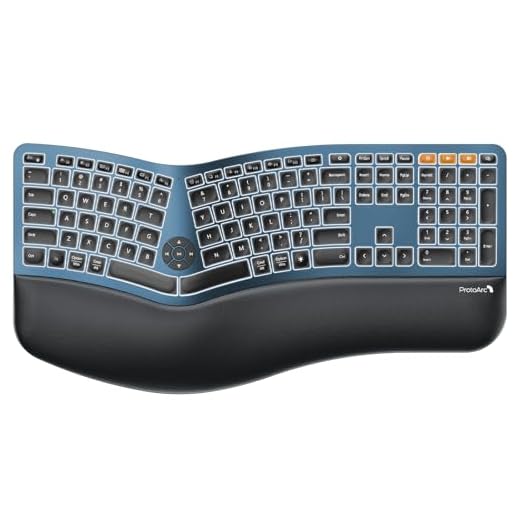
Best Value: ProtoArc EK01 Plus Full Size Wireless Split Keyboard
Full-size split layout gives large hands room to spread without losing the numpad, backed by a cushioned wrist rest for long sessions.
- Keeps the numpad, rare among split ergonomic boards at this price
- Cushioned wrist rest included instead of sold separately
- Dual Bluetooth pairing switches between two devices instantly
- Backlit keys help in dim home office lighting
- Split angle is fixed, no tenting adjustment
- Full-size width means it still takes up significant desk space
- Battery life is shorter than wired alternatives during heavy backlight use
Best Budget: Perixx PERIBOARD-512B Wired Ergonomic Keyboard
Split key zones and curved keycaps fit larger fingertips for under $30, with 4.2mm key travel that mimics mechanical feedback.
- Curved keycaps accommodate larger fingertips better than flat budget boards
- Deep 4.2mm key travel gives tactile feedback closer to mechanical than most membrane boards
- Attached wrist rest means one less accessory to buy or lose
- Under 50 dollars removes the risk of trying ergonomic typing for the first time
- Fixed split angle with no tenting whatsoever
- Membrane switches wear out faster under heavy daily use
- Plasticky build feels less durable than pricier options
Side-by-side comparison
|
Best Overall
Kinesis Advantage360 Professional Split Ergonomic
|
Best for Custom Fit
Goldtouch Elite Adjustable Ergonomic Keyboard
|
Runner Up
Logitech Ergo K860 Wireless Ergonomic Keyboard – S
|
Best for Wide Split & Tenting
KINESIS Freestyle2 USB-A Ergonomic Keyboard w/ VIP
|
Best Value
ProtoArc Backlit Bluetooth Ergonomic Keyboard, EK0
|
Best Budget
Perixx PERIBOARD-512B Wired Ergonomic Keyboard – S
|
|
|---|---|---|---|---|---|---|
|
|
|
|
|
|
|
|
| Split Style | Fully split, adjustable | Adjustable splay & tent | Fixed curved split | Fully split, up to 9" | Fixed split, full-size | Fixed split, compact |
| Tenting | Independent adjustable | 0-60° | Fixed curve | 15° (with lifters) | None | None |
| Connection | Bluetooth + USB | Wired USB | Bluetooth + USB | Wired USB-A | Dual Bluetooth + USB | Wired USB |
| Wrist Rest Included | No | No | Yes | No | Yes | Yes |
| Price | $479.00 | $96.00 | $119.99 | $144.00 | $79.98 | $49.99 |
| BUY NOW | BUY NOW | BUY NOW | BUY NOW | BUY NOW | BUY NOW |
What to look for in Ergonomic Keyboards for Large Hands
How do I know if I actually need a split keyboard for large hands?
If your elbows flare out or your wrists bend inward to reach the keys on a standard board, that’s a sign your hand width is pushing past what a compact layout was designed for. Wrist or forearm soreness after normal typing sessions is another common indicator worth addressing before it becomes chronic.
Is a fully split keyboard like the Kinesis Freestyle2 harder to learn than a fixed-split model?
There’s a short adjustment period, usually a few days, as you get used to independently positioning each half. Most people find it easier than adapting to a heavily contoured board like the Advantage360, since the key layout itself stays standard.
Do I need tenting if I already have a wide split keyboard?
Split distance and tenting solve different problems. Split width relieves shoulder strain from reaching too far inward; tenting relieves forearm rotation strain from typing on a flat surface. Large hands often benefit from both, which is why the Goldtouch Elite and Kinesis Freestyle2 pair splay with tenting.
Can a budget keyboard like the Perixx actually help, or is it just a gimmick?
The fixed split and curved keycaps genuinely reduce wrist bending compared to a flat keyboard, even without tenting or full separation. It won’t match what an adjustable board delivers, but it’s a real improvement over a standard layout and a reasonable way to test whether split ergonomics help before spending more.
The bottom line
- Kinesis Advantage360 Professional: deepest contours and full adjustability for hands that need a serious layout change
- Goldtouch Elite Adjustable: the most tenting and splay range per dollar in this guide
- Logitech Ergo K860: the reliable, low-learning-curve choice with genuine wrist support
- Kinesis Freestyle2: the widest physical split for matching true shoulder width
- ProtoArc EK01 Plus: full-size comfort with a numpad at a fair price
- Perixx PERIBOARD-512B: the cheapest way to find out if split ergonomics work for you
The Kinesis Advantage360 Professional is the pick if you want the deepest, most adjustable fit and don’t mind the price or learning curve. If you’d rather dial in your own angle without spending 479 dollars, the Goldtouch Elite delivers nearly as much adjustability for a fifth of the cost.