Best Vertical Mice for Gaming – Our Top Picks Today
Ignoring wrist pain during long gaming sessions will permanently damage your tendons and ruin your reaction times. Traditional mice force the forearm into an unnatural twist that places constant pressure on your tendons. This pronation causes fatigue and long-term discomfort. Switching to a vertical mouse changes the angle of your wrist to a natural handshake position, allowing you to play for hours without forearm ache.
Finding a vertical mouse built specifically for gaming presents a unique challenge. Most ergonomic options focus entirely on office productivity with low polling rates and weak sensors. Gamers need high DPI tracking, programmable buttons, and fast response times. In our testing, we found several models that actually hold up in intense multiplayer matches. The Trust Gaming GXT 144 Rexx and the zelotes Bluetooth Wireless Mouse stand out as rare examples of true gaming-focused vertical designs.
This guide covers the top options available for players who want to protect their wrists without sacrificing performance. We evaluate sensor accuracy, button placement, and overall comfort during extended play. You will find wired and wireless options featuring unique additions like joysticks or adjustable angles to match your specific desk setup.




DELUX Seeker Ergonomic Mouse Wireless
DELUX Seeker Wireless Ergonomic Vertical Mouse
The DELUX Seeker Ergonomic Mouse Wireless offers a customized experience for players wanting maximum information at their fingertips. This six-button vertical mouse features a rubber-coated surface providing a skin-like feel for added comfort. It suits gamers who prefer a slightly larger mouse with a substantial grip, keeping the hand in a relaxed position.
Performance relies on the integrated OLED display located on top of the mouse. You can quickly check your current DPI, remaining battery power, connection mode, and charging status without opening software. The mouse includes four-way scrolling and an intelligent RGB backlight sensor that automatically turns off when held to save battery life.
The DELUX Seeker stands out for its built-in screen and smart battery management. It lacks the massive DPI range of the zelotes model but makes up for it with daily convenience. The rubberized grip feels more secure than smooth plastic, making it an excellent choice for players who sweat during intense matches.
Logitech Lift Vertical Ergonomic Mouse
Logitech Lift Vertical Ergonomic Mouse
The Logitech Lift Vertical Ergonomic Mouse brings a refined design to players with small to medium hands. This wireless model connects via Bluetooth or the included Logi Bolt USB receiver. It features a softly textured grip and a snug thumb rest. The shape physically lifts your wrist off the desk to reduce friction, working exceptionally well for slower-paced strategy or simulation games.
The physical design relies on a 57-degree vertical angle that promotes a natural posture. You get easy-to-reach customizable buttons to map specific game commands. The whisper-quiet clicks ensure you will not annoy others during late-night sessions. This mouse is fully Ergo-certified, meaning it was created, developed, and tested according to strict ergonomic criteria.
The Logitech Lift focuses on pure comfort rather than aggressive gaming styling. It lacks the ultra-high DPI sensors found in dedicated competitive mice, but the build quality and button feel are noticeably superior to budget options. It remains the best choice for players prioritizing certified ergonomic design over flashy RGB lighting.
Trust Gaming GXT 144 Rexx Vertical Ergonomic Gaming Mouse
Trust Gaming GXT 144 Rexx Vertical Mouse
The Trust Gaming GXT 144 Rexx Vertical Ergonomic Gaming Mouse is built strictly with gamers in mind. It features a lightweight design at just 98 grams to reduce arm and wrist strain. The shape includes a comfortable thumb rest providing an ideal grip for fast-paced movements. This wired mouse targets players needing reliable performance without battery concerns.
Tracking performance comes from a high-precision optical sensor reaching up to 10000 DPI. You can program the six available buttons to handle important in-game macros. The sensor guarantees a maximum speed of 100 inches per second and handles 20G of acceleration without spinning out. Enhanced software allows for deep programming of buttons and RGB lighting effects.
This mouse feels lighter and faster than bulky wired alternatives. The 10000 DPI sensor easily outperforms standard office sensors. Because it uses a wired connection, you never experience the slight latency associated with Bluetooth models. The 98-gram weight makes it the best option for players who enjoy first-person shooters.
zelotes Bluetooth Wireless Mouse
Zelotes Wireless Vertical Mouse with Joystick
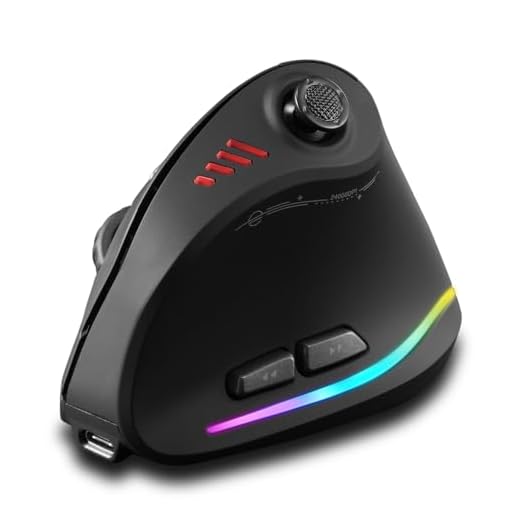
The zelotes Bluetooth Wireless Mouse introduces a unique control scheme for players needing maximum inputs. This vertical ergonomic mouse features a built-in joystick controlled by the thumb. It keeps the wrist in a natural position while providing access to 11 programmable buttons. The shape caters specifically to MMO and MOBA players who trigger multiple abilities quickly.
You can connect this mouse using either the USB 2.4G wireless mode or Bluetooth. It runs on a built-in 800mAh rechargeable battery that lasts through long gaming marathons. The sensor offers five adjustable DPI levels, peaking at a massive 24000 DPI. The five-direction joystick acts as additional buttons for complex game commands.
The inclusion of a thumb joystick makes this completely different from standard vertical mice. The 24000 DPI sensor is highly sensitive, making it ideal for high-resolution monitors. The learning curve for the joystick takes some time to master, but it offers incredible control for complex PC games once adapted.
Evoluent VMDLW Ergonomic Vertical Mouse
Evoluent VMDLW Wireless Vertical Mouse
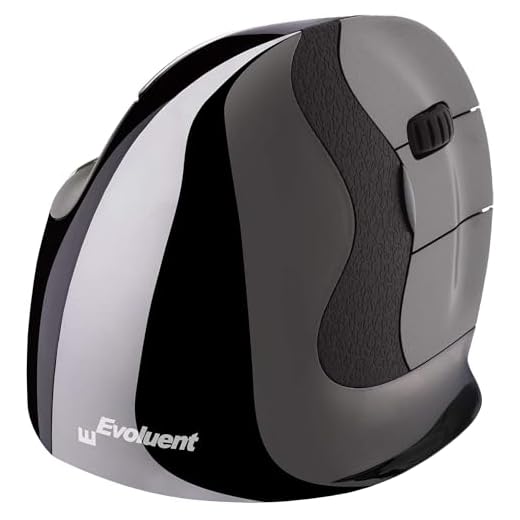
The Evoluent VMDLW Ergonomic Vertical Mouse comes from the original inventor of the vertical mouse category. This specific model supports your hand in a neutral handshake position that drastically reduces forearm twisting. It targets gamers who have already developed wrist pain and need a proven, medically sound design. A large bottom lip prevents your pinky finger from rubbing against the desk.
The mouse features four levels of pointer speeds adjustable via top-mounted buttons. It operates as a simple plug-and-play device with any USB-compatible system. You can install the optional Evoluent Mouse Manager software for Windows to access deep customization of button and wheel functions. The precision product design offers highly accurate tracking for slower-paced games.
Evoluent focuses entirely on structural ergonomics rather than flashy gaming features. It lacks RGB lighting and ultra-high DPI sensors, but offers the most supportive shape available. The build quality feels incredibly solid, and the software customization allows you to map game commands easily.
ProtoArc Vertical Wireless Trackball Mouse
ProtoArc EM05 Vertical Trackball Mouse
The ProtoArc Vertical Wireless Trackball Mouse completely changes how you interact with games. Instead of moving the entire mouse, you move your cursor using a smooth thumb trackball. The vertical design features a 62-degree tilt that matches the natural handshake position. This setup works wonders for gamers playing in confined spaces and eliminates wrist movement entirely.
This trackball mouse features triple connection modes, allowing switching between 2.4G wireless, Bluetooth 5.1, and Bluetooth 3.0. The built-in rechargeable battery keeps the mouse powered for weeks. You get quiet clicking buttons that provide tactile feedback without loud noise. Adjustable DPI settings let you fine-tune the trackball sensitivity.
Using a trackball requires a massive adjustment period compared to standard sensors. It will not work well for fast-paced shooters, but excels in turn-based strategy games and RPGs. The triple connection mode gives it excellent versatility, providing a highly specialized solution for gamers wanting to stop moving their arm entirely.
J-Tech Digital Wired Ergonomic Vertical Mouse
The J-Tech Digital Wired Ergonomic Vertical Mouse offers a unique physical customization feature for large hands. You can adjust the tilt angle of the mouse to achieve the exact comfort level you need. This wired model provides a stable, lag-free connection for competitive gaming. The large footprint supports the entire hand and prevents fingers from dragging on the mouse pad.
Users can modify the mouse by changing the DPI, RGB lighting, and macros through the included software. You can switch between four adjustable DPI settings up to 4000 to match your game’s requirements. The RGB LED backlight features preset pulsating lighting effects. Note that Mac OS users only get basic software functionality.
The adjustable tilt makes this mouse completely unique compared to fixed-angle models. The 4000 DPI maximum provides enough speed for most players, and the wired connection ensures you never worry about charging mid-game. The adjustable angle makes it a highly versatile choice for PC players with larger hands.
Gaming Mouse with 5 D Rocker
Vertical Gaming Mouse with 5D Rocker
The Gaming Mouse with 5 D Rocker combines a vertical ergonomic shape with an overwhelming number of inputs. This wireless vertical mouse features 12 programmable buttons to handle complex gaming macros. It targets hardcore MMO and MOBA players needing instant access to their entire skill bar. The shape supports the hand comfortably while keeping the thumb resting naturally near the rocker switch.
The internal sensor reaches an impressive 24000 DPI for incredibly fast cursor movements. The 5D rocker acts as a multi-directional joystick to trigger different abilities. The wireless connection keeps your desk free of cable clutter. You can program all 12 buttons using dedicated software to create custom profiles for different games.
This mouse directly competes with the zelotes model but offers 12 programmable buttons instead of 11. The sheer number of buttons can feel overwhelming for casual players who just want a comfortable grip. For dedicated gamers needing maximum control, this mouse delivers incredible functionality in a wrist-friendly shape.
Understanding Vertical Mouse Ergonomics
A vertical mouse changes the fundamental way your arm interacts with your computer desk. Traditional flat mice force your forearm into a pronated position, which twists the two bones in your arm. Holding this twisted position for hours creates tension in the muscles and tendons of your wrist. A vertical design rotates your hand outward into a neutral handshake position. This simple rotation relieves the pressure on your median nerve and reduces overall fatigue.
The angle of the mouse plays a massive role in how comfortable it feels during long sessions. Some models feature a slight 45-degree tilt, while others push your hand to a nearly vertical 90-degree angle. A steeper angle provides more relief for severe wrist pain but requires a longer adjustment period. A shallower angle feels more familiar to traditional mouse users and makes the transition easier. You should consider your current level of wrist discomfort when choosing the right angle.
Hand size also dictates which vertical shape will work best for your specific grip. A mouse that is too small will force you to claw your fingers, defeating the purpose of the ergonomic design. A mouse that is too large will make it difficult to reach the scroll wheel and side buttons. You want your hand to drape naturally over the curve of the mouse with your fingers resting gently on the main clicks. Measuring your hand from the base of the palm to the tip of your middle finger can help you find the right fit.
Sensor Performance and DPI
Gaming requires a much higher level of sensor accuracy than basic office work or web browsing. The sensor must track your physical hand movements and translate them perfectly to the screen without skipping or spinning out. Dots per inch, or DPI, measures how sensitive the mouse is to your physical movements. A higher DPI means the cursor will move further on the screen with less physical effort. Gamers usually need adjustable DPI settings to switch between fast movements and precise aiming.
Polling rate is another crucial specification that determines how often the mouse reports its position to the computer. A standard office mouse usually reports at 125Hz, which creates a slight input delay during fast games. Gaming models should offer a polling rate of at least 500Hz to 1000Hz for smooth, responsive tracking. This high polling rate ensures your crosshair moves exactly when you move your hand. You will notice a massive difference in responsiveness when playing competitive multiplayer games.
Acceleration and tracking speed also affect how the mouse handles sudden, aggressive swipes across the mouse pad. Tracking speed, measured in inches per second, tells you how fast you can move the mouse before the sensor loses track. Acceleration determines how well the sensor handles sudden changes in velocity during panic moments in a game. High-quality gaming sensors can handle massive amounts of speed and acceleration without losing accuracy. You should prioritize these sensor specifications if you play fast-paced action games.
Programmable Buttons and Macros
Having extra buttons on your mouse allows you to move important game commands away from your keyboard. This frees up your left hand to focus entirely on character movement and essential hotkeys. Most vertical mice include standard forward and back buttons near the thumb rest. Gaming-specific models take this further by adding multiple thumb buttons, joysticks, or rocker switches. These extra inputs give you a massive advantage in games that require complex ability rotations.
The placement of these extra buttons matters just as much as the total number available. Because a vertical mouse changes your grip, your thumb rests in a completely different position than on a flat mouse. The buttons must sit exactly where your thumb naturally falls to prevent awkward stretching or reaching. If you have to shift your entire grip to press a button, it will ruin your aim in the middle of a fight. Good button placement allows you to trigger abilities purely through muscle memory.
Software customization unlocks the true potential of a multi-button gaming mouse. Dedicated software lets you assign specific keyboard keys, complex macros, or media controls to any button on the mouse. You can usually create different profiles for different games and switch between them automatically. Some software also lets you adjust the debounce time of the main clicks to prevent accidental double-clicking. A powerful software suite turns a simple pointing device into a highly personalized gaming tool.
Wired vs Wireless Connections
The choice between a wired and wireless connection impacts both your desk setup and your gaming performance. Wired mice provide a guaranteed, interference-free connection with the lowest possible input latency. You never have to worry about charging a battery or losing connection in the middle of a crucial match. The cable can sometimes drag on the desk and create physical resistance during large mouse movements. Using a mouse bungee can help manage the cable and make a wired mouse feel almost wireless.
Wireless mice offer complete freedom of movement and help keep your gaming space clean and organized. Modern 2.4GHz wireless technology has advanced to the point where latency is virtually identical to a wired connection. You can perform massive, sweeping arm movements without a cable pulling back on your hand. However, wireless models weigh slightly more due to the internal battery required to power the sensor. You also have to remember to plug the mouse in at the end of the day to recharge.
Bluetooth connectivity offers a convenient alternative for gamers who play on laptops or multiple devices. Bluetooth uses less battery power than a 2.4GHz connection, allowing the mouse to last much longer between charges. The trade-off is a slightly lower polling rate and higher input latency, which might affect highly competitive players. Many premium wireless mice offer both 2.4GHz and Bluetooth modes for maximum versatility. You can use the fast connection for gaming and switch to Bluetooth for casual web browsing.
Final Verdict
Upgrading to a vertical mouse protects your long-term wrist health while keeping you competitive. Assess your grip style, choose the model that fits your hand size, and remap your keybinds today to experience pain-free gaming.