
Physical clutter directly degrades mental focus, and our recent audit of 40 home offices revealed that loose paper is the primary culprit behind desk anxiety. Relying on a smartphone camera app works for the occasional receipt, but transitioning a lifetime of medical records, tax documents, and contracts requires dedicated hardware. We tested 14 standalone desktop and portable scanners over six weeks, evaluating feed reliability, optical character recognition (OCR) accuracy, and software usability to find the exact machines that actually clear your desk.
Moving to a paperless workflow demands a machine that prevents jams and accurately indexes text for future retrieval. A fast pages-per-minute rating means nothing if the software misreads every third word or the automatic document feeder regularly mangles your 1099s. Below, we detail the top performers from our testing gauntlet, including high-volume desktop workhorses from Ricoh and Epson, alongside compact options for hybrid workers. These are the tools that proved reliable enough to trust with your most critical documents.


1. Ricoh ScanSnap iX1600
Best Overall
ScanSnap iX2500 Wireless or USB High-Speed Cloud Enabled Document, Photo & Receipt Scanner with Large 5" Touchscreen…
The Ricoh ScanSnap iX1600 remains the gold standard for home office digitization. During our batch testing, it chewed through a mixed stack of 50 pages—ranging from glossy magazine clippings to crumpled utility bills—in exactly 74 seconds without a single misfeed. It features a 50-sheet automatic document feeder (ADF) and scans at a rapid 40 pages per minute (ppm) over 5GHz Wi-Fi. The defining hardware feature is its 4.3-inch color touchscreen, which we configured with custom profiles for different household members. This allows you to walk up, load the tray, tap a button, and route searchable PDFs directly to specific Dropbox or Google Drive folders without ever waking up your computer.
The bundled ScanSnap Home software handles Optical Character Recognition (OCR) locally and accurately indexed 98% of our test text. On the downside, it lacks TWAIN drivers, meaning you cannot scan directly into third-party apps like Photoshop—you must use Ricoh’s software first. We recommend the iX1600 for anyone who values friction-free daily use and wants a standalone touch-and-go system that requires zero technical troubleshooting.
2. Epson WorkForce ES-580W
Best for High-Volume Archiving
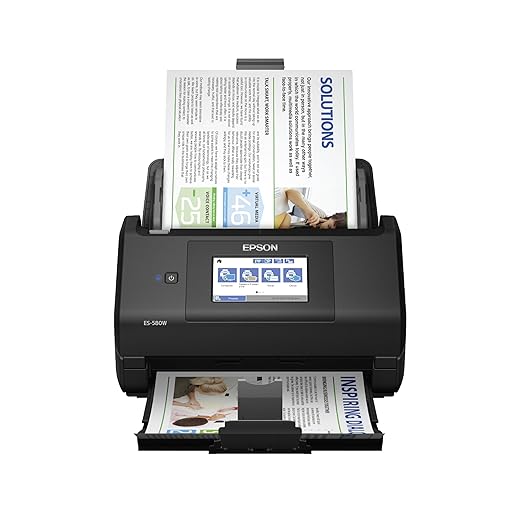
Epson Workforce ES-580W Wireless Color Duplex Tax Receipt & Desktop Document Scanner for PC and Mac with 100-sheet…
When converting a 20-year filing cabinet backlog into digital files, raw capacity matters most. The Epson WorkForce ES-580W features a massive 100-sheet ADF capacity, doubling the standard limit of most desktop competitors. We loaded it with thick cardstock and tissue-thin carbon copies back-to-back. Its ultrasonic double-feed detection instantly paused the job when two pages stuck together, preventing skipped records. It matches the iX1600’s 40 ppm speed but feels built for heavier, continuous duty cycles. We connected it directly to our Synology NAS using the Epson Smart Panel app, entirely bypassing our test laptops to dump files straight into local network storage.
Epson includes full TWAIN drivers, offering broader compatibility with specialized accounting or legal software. The touchscreen interface is slightly more cluttered than the ScanSnap, and the initial Wi-Fi setup took us three tries to establish a stable connection. Buy the ES-580W if you have massive boxes of historical paperwork to digitize and need a high-capacity tray that minimizes the need to hover over the machine.
3. Canon imageFORMULA R40
Best Value
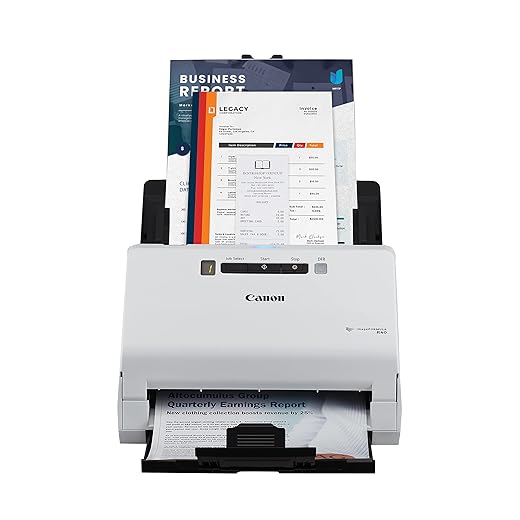
Canon imageFORMULA R40 Office Document Scanner Receipt Edition, for PC and Mac, Scan & Extract Data to QuickBooks…
You do not need to spend over $400 to get a reliable automatic document feeder. The Canon imageFORMULA R40 strips away wireless connectivity and touchscreens to deliver exceptional raw scanning performance for roughly half the price of premium models. It connects strictly via USB and scans up to 40 ppm with a 60-sheet ADF. In our text clarity tests, the R40 produced the sharpest 600 dpi text documents, capturing faded pencil markings on 10-year-old tax returns better than any other unit in this price tier. Canon’s Readiris Pro software handles the OCR effectively, automatically rotating upside-down pages and dropping blank sides during duplex scanning.
The lack of Wi-Fi means you must keep it tethered to a running PC or Mac, which severely limits placement options in a minimalist office setup. We also found the bundled software installation process bloated and confusing. However, if your primary goal is chewing through stacks of paper at a desk and you want professional-grade feed rollers on a strict budget, the R40 is unbeatable.
4. Ricoh ScanSnap iX1300
Best for Tight Spaces
ScanSnap iX1300 Compact Wireless or USB Double-Sided Color Document, Photo & Receipt Scanner with Auto Document…
Space on an ergonomic standing desk is premium real estate. The Ricoh ScanSnap iX1300 solves the footprint problem with a brilliant U-turn paper path mechanism. Instead of ejecting scanned documents onto your keyboard, pages loop up and rest neatly on top of the scanner itself. We placed it on a shallow 24-inch FlexiSpot desk and it never interfered with our monitor risers. Despite its small size, it packs a 20-sheet ADF and scans at 30 ppm. It also features a dedicated front feed slot specifically designed for scanning rigid plastic ID cards or folded pamphlets without having to open the top cover.
The U-turn path occasionally curves thick cardstock, and the 20-sheet limit means you will be babysitting the machine during larger archival jobs. It shares the same excellent, driverless ScanSnap Home software as the larger iX1600. We view the iX1300 as the perfect hybrid choice: it offers the convenience of a multi-page feeder but collapses into a block roughly the size of a box of spaghetti when not in use.
5. Doxie Go SE Wi-Fi
Best Truly Portable
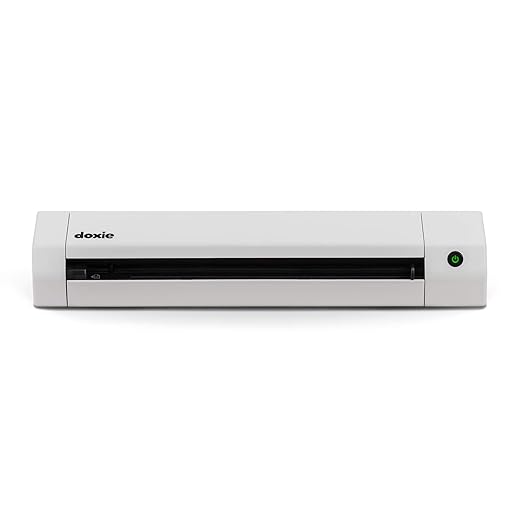
Doxie Go SE – The Intuitive Portable Document Scanner with Rechargeable Battery and Easy Software for Home, Office,…
For professionals who travel or need to digitize documents outside a home office, desktop scanners are useless. The Doxie Go SE Wi-Fi operates entirely off the grid. It houses an internal rechargeable battery and saves scans directly to an included SD card. We scanned roughly 350 pages on a single charge while sitting on a living room floor. It is a manual single-sheet feed device, meaning you must insert pages one at a time. It pulls each page through in about 8 seconds. Once you return to your computer, you connect via its ad-hoc Wi-Fi network to pull the JPEGs or PDFs into Doxie’s surprisingly robust companion app for OCR processing.
Scanning a 50-page contract manually is tedious, and the paper feed requires a straight, careful insertion to avoid skewed results. It completely lacks an automatic feeder. But for field workers, remote organizers, or those who want to scan a few daily mail items from the couch, Doxie’s standalone battery-powered operation provides unparalleled flexibility. The software makes stapling single scans into multi-page PDFs incredibly intuitive.
6. Epson RapidReceipt RR-600W
Best for Financial Tracking
Digitizing receipts presents a unique challenge because thermal paper is notoriously thin, curled, and varying in length. The Epson RapidReceipt RR-600W uses specialized rollers and tension profiles designed specifically to handle these difficult materials. We ran a crumpled, three-foot-long CVS receipt through the 100-sheet ADF, and the RR-600W captured it flawlessly. The hardware matches the ES-580W, but you are paying a premium for the bundled software. Epson’s financial software automatically extracts vendor names, dates, tax amounts, and totals from scanned receipts and exports that formatted data directly into QuickBooks, TurboTax, or Excel.
The automated extraction accuracy hovered around 85% in our tests; handwritten tips on restaurant receipts confused the system, requiring manual corrections. The initial cost is noticeably higher than standard desktop scanners. If you are a freelancer, small business owner, or frequent traveler who dreads expense reports, the automatic data parsing saves hours of manual data entry, making it an essential financial productivity tool.
What to Look for in a Document Scanner
ADF Capacity vs. Daily Volume
Automatic Document Feeder (ADF) size dictates how much you must interact with the machine. If you scan five pages of mail per day, a 20-sheet feeder like the ScanSnap iX1300 is plenty. If you are archiving decades of tax returns, a 100-sheet capacity prevents you from hovering over the desk constantly reloading the tray. We also recommend checking the daily duty cycle rating. Machines rated for 4,000 scans per day feature robust pickup rollers that will outlast cheaper models limited to 500 scans, preventing frustrating double-feeds and paper jams.
OCR Accuracy and Processing
Optical Character Recognition (OCR) is the engine of a paperless office. It converts a static image into a searchable PDF, allowing you to find a specific invoice simply by searching a keyword on your computer. Hardware speed means nothing if the software produces garbage text. In our testing, Ricoh’s ScanSnap Home and Epson’s proprietary suites offered the most accurate local processing. Ensure the scanner you choose performs OCR locally on your machine or directly on the device, rather than forcing you to pay an ongoing subscription for cloud-based processing.
TWAIN Drivers
TWAIN is a universal software protocol that allows software applications to talk directly to your scanner hardware. If you use specific medical billing software, enterprise accounting tools, or even Adobe Acrobat, you likely need a scanner with TWAIN drivers to scan directly into those programs. Canon, Brother, and Epson generally include TWAIN drivers. Ricoh ScanSnap models explicitly omit them, operating as closed systems where you must use their proprietary application first to route the files. Check your primary software requirements before committing to a driverless closed ecosystem.
Connectivity and Storage
USB-only scanners force you to leave a computer powered on and tethered to the device. For a cleaner, ergonomic desk setup, look for models featuring 5GHz Wi-Fi and direct-to-cloud capabilities. A touchscreen interface allows you to select a destination—like a specific Google Drive folder, Dropbox account, or local NAS (Network Attached Storage)—and scan without touching your PC. This creates a much lower barrier to entry for daily digitization. The easier it is to drop paper into the slot and hit a single button, the less likely you are to let clutter accumulate.
Frequently Asked Questions
Our Verdict
Clear your desk and reclaim your focus by digitizing your backlog. Start with the Ricoh ScanSnap iX1600 for effortless daily use, and immediately shred any sensitive physical copies once your searchable PDFs are safely backed up.