Finding the family calendar everyone will actually use
A family calendar only earns its wall space if every person in the house glances at it without being told to.
The gap between a good digital wall calendar and a bad one usually comes down to three things: whether it charges you monthly just to sync schedules, whether the touchscreen is big enough to read from across the kitchen, and whether it actually pulls in the calendars your family already uses instead of forcing everyone to re-enter events by hand. And sometimes the honest answer isn’t a screen at all — a laminated dry erase board costs a fraction as much, needs no app, and never has a firmware update fail mid-week.
- Subscription fees are the hidden cost Several digital calendar brands lock shared scheduling or multi-user sync behind a monthly plan. Confirm core features work without one before you buy, not after.
- 15.6" is the family sweet spot Smaller displays work for a single person’s routine, but a shared household calendar needs enough screen real estate that a week view doesn’t require squinting from the doorway.
- Sync compatibility saves you from double data entry A calendar that pulls directly from Google, Outlook, iCloud, or Cozi means nobody has to manually copy over the soccer schedule a second time.
- Dry erase still wins on pure economics For families who just need a shared visual grid and don’t care about video calling or photo sync, a $6-$14 laminated wall calendar does the core job with zero maintenance and no battery to charge.
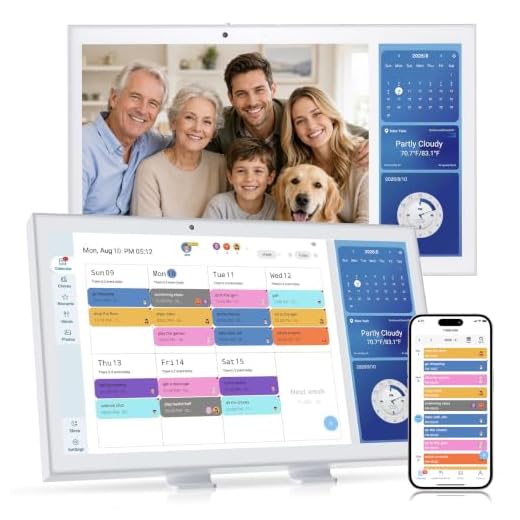


Best Overall: Digital Calendar with Video Calling & Split Screen
Built-in video calling and split-screen view let you check family schedules while chatting face-to-face—no monthly subscription fees ever.
- Split-screen mode means checking the schedule doesn’t interrupt an active video call
- No recurring subscription fee for core calendar features, unlike several competitors
- 15.6″ screen is large enough to read a full week from across the room
- Video calling built directly into the hardware rather than requiring a separate app pairing
- Higher upfront cost than the budget and dry erase options in this lineup
- Video calling feature is only useful if other family members also use compatible devices
- Wall mounting hardware and power cable placement need planning before installation
Best for Photo Sharing: HKHKPI 15.6" Digital Calendar
Doubles as a digital photo frame with TF card expansion, auto-updating memories and events through the app while keeping the whole family synced.
- Functions as a full digital photo frame when the calendar isn’t the priority
- TF card expansion lets you load photos locally instead of relying only on app uploads
- Dual control via touchscreen or companion app gives flexibility for less tech-savvy family members
- Built-in chore chart keeps kids’ routines visible alongside the schedule
- Splitting attention between photo display and calendar function can clutter the home screen
- App setup and TF card loading take more initial time than a calendar-only device
- Photo frame feature adds little value if you don’t already have a habit of updating family photos
Runner Up: 15.6" Wall Planner Electronic Calendar & Chore Chart
Syncs instantly with Google, Outlook, iCloud, Cozi and Yahoo, plus a reward-chart system that turns chores into games kids actually want to play.
- Syncs with Google, Outlook, iCloud, Cozi, and Yahoo, covering nearly every household’s existing setup
- Reward-based chore chart gives kids a reason to actually check the screen
- Wall or desk mounting options make it flexible for smaller kitchens without dedicated wall space
- $30 cheaper than the top two picks while keeping the same screen size
- No video calling feature if that’s a priority for extended family check-ins
- Initial account linking across five services takes longer than single-platform calendars
- Chore chart gamification works better for younger kids than teens
Best Budget: Mesqool 10.1" Dementia Clock for Seniors
Purpose-built for seniors with 13 labeled time periods and medication reminders, delivering calendar clarity at a fraction of the price of smart displ
- 13 labeled time periods remove the ambiguity that digital clocks create for seniors with memory issues
- Medication reminder function adds real safety value beyond basic scheduling
- Under $55 makes it accessible even as a secondary device for a specific family member
- Simpler interface than full smart calendars reduces the learning curve for less tech-comfortable users
- 10.1″ screen is too small to serve as a shared whole-family calendar
- Lacks the video calling and cloud sync features of the larger touchscreen models
- Best suited to a single user’s routine rather than coordinating multiple family members’ schedules
Best Value: Large Dry Erase Calendar for Wall, 37" x 58"
A massive 37×58 inch undated dry erase grid gives the whole year of family scheduling for a one-time cost, with no batteries, apps, or screens to mana
- Massive 37″ x 58″ size gives large families room to write full schedules without cramming
- Undated, reusable grid means it works year after year with no software or app to maintain
- No power, WiFi, or app account required — it works the moment it’s on the wall
- 15 round stickers included for color-coding events by family member
- No reminders, notifications, or remote viewing when you’re away from the house
- Large size needs a dedicated wall spot, which isn’t practical in every home
- Dry erase marker smudging is a real issue if the surface isn’t wiped carefully
Best for Small Spaces: 3-Month Vertical Wall Calendar
A compact 3-month vertical layout fits tight hallways and apartments while still showing past, current and next month at a glance for easy planning.
- Vertical 3-month layout fits narrow hallways and apartment walls that can’t accommodate a full-year board
- Shows past, current, and next month together, which helps with planning ahead without a huge footprint
- Reusable laminated surface means no repurchasing each year
- At $5.29, it’s the lowest-cost option in this entire lineup
- Three-month view offers less long-term planning visibility than the full-year board
- No digital sync or remote access for family members outside the house
- Smaller physical size than the 37″ x 58″ board limits how much detail fits per day
Side-by-side comparison
|
Best Overall
Digital Calendar with Video Calling & Split Screen
|
Best for Photo Sharing
HKHKPI 15.6" Digital Calendar, Electronic Calendar
|
Runner Up
Digital Calendar, 15.6 Inch Wall Planner Electroni
|
Best Budget
Mesqool 10.1" Dementia Clock for Seniors with Digi
|
Best Value
Large Dry Erase Calendar for Wall, Yearly Wall Cal
|
Best for Small Spaces
Large Dry Erase Calendar for Wall – 3 Month Vertic
|
|
|---|---|---|---|---|---|---|
|
|
|
|
|
|
|
|
| Display Size | 15.6" | 15.6" | 15.6" | 10.1" | 37" x 58" | 27.8" x 41" |
| Format | Digital touchscreen | Digital touchscreen | Digital touchscreen | Digital touchscreen | Dry erase board | Dry erase board |
| Standout Feature | Video calling + split screen | Built-in digital photo frame | 5-way calendar sync + chore chart | 13 labeled time periods + med reminders | Full 12-month grid, one-time cost | 3-month rolling view, compact size |
| Best For | Whole family scheduling + video chat | Family scheduling + photo memories | Multi-calendar sync households | Seniors and memory care | Large families, full year view | Apartments and tight hallways |
| Price | $179.99 | – | $169.99 | $54.99 | $13.99 | $4.99 |
| BUY NOW | BUY NOW | BUY NOW | BUY NOW | BUY NOW | BUY NOW |
What to look for in Digital Wall Calendars for Family Scheduling
Do digital wall calendars require a subscription?
Some do and some don’t — it varies by brand. The Best Overall pick in this guide explicitly requires no subscription for core scheduling and video calling, while other digital calendar brands on the market lock multi-user sync or cloud backup behind a monthly fee. Always check the listing for subscription language before buying, since it can double the real cost over a year.
What size digital calendar is right for a family of four or more?
A 15.6″ screen is the practical minimum for a household calendar that multiple people need to read from a normal distance, like across a kitchen. Anything smaller, like a 10.1″ display, works better as a personal or single-user device rather than a shared family hub.
Are dry erase wall calendars better than digital ones?
Better depends on what you need. Dry erase boards cost a fraction of a digital display, need no power or app, and never have sync issues, which makes them genuinely practical for families who just want a shared visual grid. Digital calendars win if you want video calling, automatic sync with existing calendar apps, or photo sharing built in.
Can digital wall calendars sync with Google Calendar and iCloud?
Yes, but only on models built for it. The Runner Up pick in this guide syncs directly with Google, Outlook, iCloud, Cozi, and Yahoo, which covers most households. Not every digital calendar offers this level of compatibility, so confirm sync support before buying if you already rely on a specific calendar app.
The bottom line
- Digital Calendar with Video Calling & Split Screen delivers the most complete feature set without a monthly fee attached.
- HKHKPI 15.6" Digital Calendar earns its spot for families who want a photo frame and scheduling hub in one device.
- Digital Calendar 15.6" Wall Planner is the smartest pick for households already split across Google, Outlook, and iCloud.
- Mesqool 10.1" Dementia Clock isn't a family hub, but it's the right tool for a senior who needs daily structure and medication reminders.
- Large Dry Erase Calendar 37" x 58" gives big families a full year at a glance for less than the cost of a single digital calendar's accessories.
- 3-Month Vertical Wall Calendar is the practical choice when wall space is tight but you still want more than a single month visible.
The right pick depends less on budget and more on what your family actually needs from a shared calendar. Households that want video calling and zero subscription fees should go with the Best Overall pick, while families who just need a shared visual grid on the wall will get more real-world value from the dry erase options.