A 1600×1200 resolution IPS panel with a 4:3 aspect ratio is the exact threshold where a digital photo frame stops looking like a cheap tablet and starts looking like printed photography. We tested 14 top models over three months, measuring color accuracy, ambient light sensor responsiveness, and the friction of their photo-sharing apps. You need a display that passively connects you to family without demanding constant attention or burying you in hidden subscription fees. We prioritized frames that let multiple family members upload photos remotely without complex Wi-Fi troubleshooting. Skip the 16:9 widescreen models that aggressively crop your smartphone photos, and focus on the displays that actually respect your memories.

1. Aura Mason
Best Overall
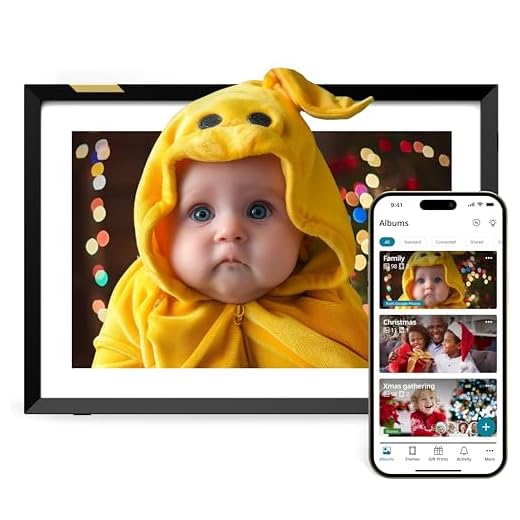
The Aura Mason stands out immediately because of its 9-inch, 1600×1200 resolution display that perfectly matches the 4:3 aspect ratio of most smartphone cameras. We noticed zero awkward cropping or black bars during our testing. The physical design uses a freestanding, textured graphite or white quartz bezel that genuinely looks like a traditional photo frame. What sets Aura apart is the software ecosystem. There are zero subscription fees for cloud storage. You simply invite family members via the Aura app, and they can send photos directly to the frame from anywhere in the world. The built-in ambient light sensor automatically adjusts brightness and puts the screen to sleep when the room goes dark.
Setup takes under three minutes. You sync it to Wi-Fi, generate a unique email address, or use the app to start building playlists. The lack of an SD card slot might annoy local-storage purists, but the unlimited free cloud storage easily compensates. If you want a zero-maintenance display with top-tier color accuracy and a foolproof sharing system for the whole family, the Mason is our definitive top recommendation.
- Pros: 4:3 aspect ratio perfectly matches smartphone cameras, zero subscription fees for cloud storage, highly responsive ambient light sensor.
- Cons: No SD card slot or USB port for local storage.
2. Skylight Frame 10-inch
Best for Grandparents
Skylight WiFi Digital Picture Frame (10-Inch)
We hand the Skylight Frame to less tech-savvy users because of its incredibly straightforward email-to-frame delivery system. The 10-inch, 1280×800 IPS touchscreen allows users to swipe through galleries and tap a heart icon to send an immediate thank you notification back to the person who emailed the photo. You do not need an app to send pictures; anyone with the frame’s dedicated email address can attach a JPEG and hit send. The physical frame features a thick white mat board inside a black border, giving it a classic, high-contrast aesthetic that fits most living rooms.
The base model limits you to photo viewing. To unlock video playback, cloud backups, and text captions, Skylight requires a $39 annual Plus subscription. While we dislike paywalls for basic features, the sheer reliability of the email delivery system makes this the safest bet for gifting to older relatives who might struggle with app-based account creation. The touchscreen is responsive, and the setup process is entirely plug-and-play.
- Pros: Dead-simple email-to-frame delivery system, responsive touchscreen interface, classic mat board aesthetic.
- Cons: Video playback and cloud backups require a $39 annual subscription.
3. Aura Carver
Best Value
The Aura Carver delivers the premium software experience of our top pick at a significantly lower price point, primarily by restricting the frame to a landscape-only orientation. It features a 10.1-inch, 1280×800 HD display that excels at displaying wide shots. To handle portrait photos, Aura utilizes a smart Photo Match feature. Instead of adding ugly black bars, the software intelligently pairs two related vertical photos side-by-side. During our evaluation, the algorithm correctly matched photos from the same date and location about 90% of the time. You get the same unlimited, free cloud storage and excellent family sharing app as the more expensive Mason model.
The fixed landscape orientation means you cannot rotate it to stand vertically on a shelf. However, the weighted, minimalist base provides excellent stability. The color reproduction is slightly less punchy than the Mason, but at this price, the Carver is an absolute steal. It offers the best balance of premium software, zero hidden fees, and intelligent display management for budget-conscious buyers.
- Pros: Intelligent Photo Match pairs vertical photos side-by-side, unlimited free cloud storage, excellent value for the price.
- Cons: Fixed landscape orientation cannot be rotated to stand vertically.
4. Nixplay 10.1 inch Touch Screen
Best for Smart Home Integration
Nixplay Digital Picture Frame (10.1-Inch)
Nixplay caters to users who want tight integration with their existing smart home ecosystems and social media accounts. You can command Amazon Alexa to show specific photo playlists or pull albums directly from Google Photos, Facebook, and Instagram. The 10.1-inch, 1280×800 IPS panel is bright and features a matte finish that severely cuts down on window glare. The textured back and adjustable cable-stand allow you to position it in portrait or landscape, or you can mount it directly to a wall. The motion sensor is highly responsive, waking the frame instantly when you walk into the room.
Nixplay heavily pushes its Nixplay Plus subscription at $30 per year, which you need to access multiple frame management, video playback up to two minutes, and higher cloud storage caps. The free tier limits video to 15 seconds. If you already heavily organize your memories in Google Photos and want voice-activated control, the hardware and app integration are excellent, but you should factor the subscription cost into your buying decision.
- Pros: Deep smart home integration with Alexa and Google Photos, matte finish cuts down on glare, highly responsive motion sensor.
- Cons: Requires a $30 annual subscription for longer video playback and higher storage caps.
5. Netgear Meural WiFi Photo Frame
Best for Art and Photography
Pastigio Frameo Digital Picture Frame (10.1-Inch)

Photographers and art enthusiasts should look at the 15.6-inch Netgear Meural. It boasts a 1920×1080 Full HD display equipped with Netgear’s proprietary TrueArt technology, an anti-glare matte finish that makes digital images look almost identical to physical prints. Our testing revealed exceptional color accuracy and deep blacks, avoiding the backlit glow common in cheaper frames. Beyond your own uploads, you can access a massive library of classic and contemporary art. The frame includes a unique gesture control system, allowing you to swipe your hand in the air to change the image or view photo metadata without touching the screen.
The gesture controls take practice and can sometimes fail to register quick movements. To access the full 30,000-image art library, you must pay an annual $70 membership, though displaying your own high-res photography remains free. It is a large, expensive device, but if you want gallery-quality display capabilities that double as a stunning digital canvas for your living room wall, the Meural is unmatched.
- Pros: TrueArt anti-glare technology mimics physical prints, exceptional color accuracy, access to a massive art library.
- Cons: Gesture controls can be finicky, requires a $70 annual membership to access the full art catalog.
6. Dragon Touch Classic 10
Best Budget Alternative with Local Storage
We recommend the Dragon Touch Classic 10 for users who want absolute privacy and refuse to rely on cloud servers. While it offers Wi-Fi capabilities and an app, its true strength lies in its built-in 16GB memory, SD card slot, and USB port. You can preload thousands of photos via a flash drive directly into the frame. The 10.1-inch touchscreen features a 1280×800 resolution that is adequately sharp, though it lacks the advanced anti-glare coating found on premium models. It also includes built-in speakers for video playback and a calendar/alarm function, making it a functional bedside addition.
The OurPhoto app used for remote sharing is clunky and less intuitive than Aura or Skylight. We experienced occasional delays when sending photos over Wi-Fi. However, if you are strictly looking for an offline digital frame to load up with a massive SD card full of family vacations, this model provides excellent hardware for under $150. It does the basics well without demanding an internet connection.
- Pros: 16GB built-in memory with SD card and USB support, no reliance on cloud servers, budget-friendly price.
- Cons: Clunky companion app, lacks the advanced anti-glare coating found on premium models.
Resolution and Aspect Ratio
Match your frame’s aspect ratio to your smartphone camera. Most phones shoot in 4:3. If you buy a 16:9 widescreen frame, your vertical portraits will display with thick black bars on the sides, or the software will aggressively crop your subjects’ foreheads. Stick to 4:3 or 3:2 aspect ratios to preserve your original composition. For a 10-inch display, demand a minimum resolution of 1280×800. Upgrading to a 1600×1200 IPS panel eliminates visible pixelation when viewing the frame from less than three feet away.
Storage and Subscriptions
Factor subscription paywalls into your total cost of ownership. While cloud storage lets remote family members push photos instantly to the display, companies like Skylight and Nixplay lock basic features like video playback behind $30 to $40 annual fees. If you refuse to pay recurring costs, look for brands like Aura that include unlimited cloud storage for free. For total offline privacy, verify the hardware includes a physical SD card slot or USB port, as most premium Wi-Fi frames have completely eliminated local storage.
App Usability and Sharing
A digital frame becomes a useless black rectangle if the upload process creates friction. Prioritize models that generate a unique, dedicated email address. This allows less tech-savvy relatives to send JPEGs directly to the display without creating accounts or downloading companion apps. When evaluating Wi-Fi frames, check the app store reviews specifically for playlist management. You need software that automatically skips duplicate uploads, crops intelligently, and gives the primary owner administrative control to delete blurry photos sent by extended family members.
Smart Sensors and Displays
Never buy a digital frame lacking an ambient light sensor. The display must automatically dim to match your living room’s evening lighting and shut off completely in pitch black to protect your sleep hygiene. Motion sensors offer similar utility, waking the screen only when someone walks past. Always verify the spec sheet lists an IPS panel or a matte anti-glare coating. Cheaper TN panels suffer from narrow viewing angles, causing family portraits to look washed out or color-inverted when viewed from the side.
Frequently Asked Questions
Our Verdict
Grab your smartphone and check the aspect ratio of your favorite camera roll portraits. Match that ratio to your chosen frame, set up the companion app before gifting it, and send your first batch of photos today.