Get your USB mic off the desk and out of your way
A desk stand puts your mic in your camera frame and every keystroke straight into your recording — a boom arm fixes both problems for less than a decent pop filter costs.
The difference between a good boom arm and a bad one comes down to spring tension and how the joints handle weight over time. Cheap arms sag within a month or creak every time you nudge the mic; the ones below hold their position through hundreds of adjustments and keep desk vibration from traveling up the shaft into your capsule.
- Spring tension beats friction joints Parallelogram-spring arms like the Rode PSA1 and PSA1+ hold a set angle indefinitely. Friction-hinge arms loosen with use and eventually can’t support a heavier USB condenser.
- Weight rating matters more than the spec sheet suggests Most budget arms are rated for mics under 1kg. A HyperX QuadCast or similar USB condenser pushes close to that limit, so check the rated capacity before you buy, not after your mic droops.
- The mic's shock mount does half the isolation work A boom arm stops desk-thump from traveling up the shaft, but a mic without its own shock mount still picks up handling noise. Pair the arm with a mic that has one built in, or add a standalone mount.
- Cable management isn't optional once you add an arm Boom arms create slack that swings and catches on things mid-recording. A simple desk clip keeps the USB run from yanking the mic off-angle when you roll your chair.

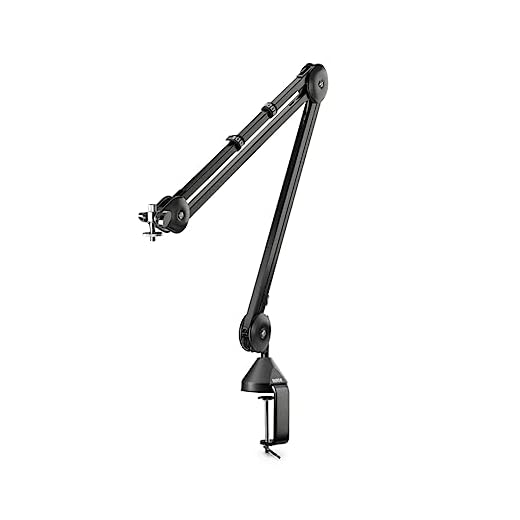


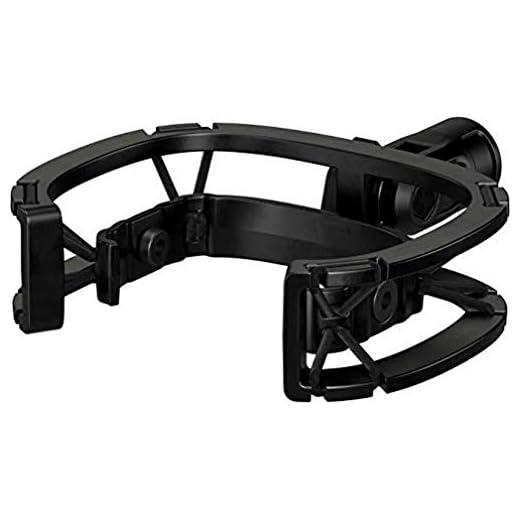

Best Overall: Rode PSA1+ Professional Studio Boom Arm
Fully damped parallelogram springs deliver silent, drift-free mic positioning, plus a quick-release adapter for fast mic swaps.
- Silent, drift-free positioning even after months of daily adjustment
- Quick-release mount swaps mics in seconds without re-threading
- Cable channel inside the arm keeps your USB run hidden from the camera
- Clamp and desk-hole mounting both included
- Costs more than double the original PSA1
- Overkill if you rarely move the mic once it’s positioned
- Reach is limited on very deep desks
Runner Up: RØDE PSA1 Professional Studio Arm
Parallelogram springs hold your mic’s angle through repositioning, with both clamp and surface-mount options for a clean desk.
- Holds mic angle through repositioning just as well as the newer model
- Steel build feels substantial, not flimsy like plastic-jointed arms
- Proven design with over a decade of real-world use in studios
- Works with any threaded mic clip or shock mount
- No quick-release adapter, so swapping mics takes longer
- Cable routing is external, meaning visible cable along the arm
- No polishing cloth or extras bundled at this price
Best Value: IXTECH RGB Low Profile Boom Arm
A low-profile arm clears your monitor view while supporting 2kg mics, with 360° rotation and RGB lighting for streaming setups.
- Sits lower than most arms, so it doesn’t creep into webcam or camera shots
- Handles heavier USB condensers thanks to the 2kg rating
- RGB accent lighting adds visual polish for stream overlays
- Cable clips along the arm keep the USB run tidy
- Joints feel looser than the Rode arms after heavy daily use
- RGB adds a USB power draw most desk mics don’t need
- Clamp grip is smaller, so it struggles on very thick desks
Best USB Mic Pairing: HyperX QuadCast
Built-in elastic shock mount isolates desk vibration right at the mic, pairing cleanly with any boom arm for rumble-free USB recording.
- Elastic shock mount is already integrated, no separate mount needed
- Threaded base screws directly onto standard boom arm adapters
- Four polar patterns cover solo streaming and multi-person interviews
- Red LED indicator doubles as a visual mute confirmation
- Sits near the top of most arms’ weight limits
- Gain dial is sensitive and easy to bump during handling
- USB-only, no XLR path if you outgrow it later
Best Shock Mount Upgrade: Elgato Shock Mount for Wave Microphones
A steel-chassis shock mount with reinforced elastic suspension kills structure-borne noise traveling up through your boom arm.
- Cuts handling noise and desk thumps noticeably compared to a bare clip
- Steel construction outlasts the elastic-only mounts bundled with cheaper mics
- Installs without tools in a couple of minutes
- Small footprint doesn’t add bulk to an already-mounted arm
- Fit is specific to Elgato Wave microphones, not universal
- Adds another joint that can loosen slightly over time
- Doesn’t help with electrical or handling noise from the arm itself
Best Budget: Middle Atlantic Products Claw
Keeps boom arm and mic cables clipped off your desk, preventing snags and clutter around your recording setup.
- Stops USB and power cables from swinging when the arm moves
- Clamps to the desk edge without drilling or adhesive
- Holds several cables at once, useful once you add lighting or a headset
- Cheap enough to add without a second thought
- Doesn’t manage the mic itself, only the cable run
- Basic plastic build, not built for heavy daily repositioning
- Visible clip may not match every desk aesthetic
Side-by-side comparison
|
Best Overall
Rode PSA1+ Professional Studio Boom Arm for Broadc
|
Runner Up
RØDE PSA1 Professional Studio Arm
|
Best Value
IXTECH RGB Low Profile Boom Arm for Mic, Adjustabl
|
Best USB Mic Pairing
HyperX QuadCast – USB Condenser Gaming Microphone,
|
Best Shock Mount Upgrade
Elgato Shock Mount for Wave Microphones
|
Best Budget
Middle Atlantic Products Claw
|
|
|---|---|---|---|---|---|---|
|
|
|
|
|
|
|
|
| Product Type | Boom arm | Boom arm | Boom arm | USB microphone | Shock mount | Cable clip |
| Weight Capacity | 1.2kg | 1kg | 2kg | N/A (mic) | N/A (mount) | N/A (clip) |
| Quick-Release Mount | Yes | No | No | – | – | – |
| Internal Cable Routing | Yes | No | Yes | – | – | – |
| Price | – | $94.00 | $79.90 | $139.99 | $39.99 | $36.00 |
| BUY NOW | BUY NOW | BUY NOW | BUY NOW | BUY NOW | BUY NOW |
What to look for in Boom Arm Mounts for USB Microphones
Will any boom arm work with any USB microphone?
Most boom arms use a standard 5/8-inch threaded mount, which fits the vast majority of USB condensers including the HyperX QuadCast. Check your mic’s base thread size and the arm’s weight rating before buying, since some compact USB mics ship with a non-standard adapter that needs a separate thread converter.
Do I need a shock mount if I already have a boom arm?
Yes, if your mic doesn’t already have one built in. A boom arm isolates the mic from desk vibration and bumps to the shaft, but it doesn’t stop noise from you touching or adjusting the mic itself. A shock mount like the Elgato option handles that last stretch of isolation.
How much desk clearance does a boom arm actually need?
Most clamp-mount arms need 0.4 to 2.5 inches of desk edge thickness and roughly 6 inches of clearance behind the desk for the counterweight to swing freely. Standing desks and desks with drawers directly underneath the mount point can be tight, so measure before ordering.
Is a more expensive boom arm actually worth it over a $30 model?
It depends on how often you reposition the mic. Budget arms hold a fixed position fine but lose tension after repeated adjustment, eventually letting the mic droop. If you set it once and rarely touch it again, a budget arm like the IXTECH works. If you adjust position daily, the spring-tensioned Rode arms pay for themselves in avoided replacements.
The bottom line
- Rode PSA1+ is the daily-use pick for anyone who repositions their mic often and wants it to stay silent and stable for years
- RØDE PSA1 delivers the same spring-tensioned reliability at a lower price if you don't need quick-release swapping
- IXTECH RGB Boom Arm is the value choice, especially for streamers who want a low-profile arm that stays out of frame
- HyperX QuadCast is the easiest USB mic to pair with any arm since it already has a shock mount built in
- Elgato Shock Mount is worth adding if your current mic still picks up handling noise through the arm
- Middle Atlantic Claw is a small, inexpensive fix for the cable-snag problem every boom arm setup eventually hits
The Rode PSA1+ is the arm to buy if you’re recording often enough that quick mic swaps and rock-solid positioning matter; the original PSA1 gets you the same mechanical reliability for less if you can live without the quick-release. Everyone else should look at what they’re actually missing: a heavier-duty mic mount, better isolation, or just tidier cables.