BenQ ScreenBar Halo 2 Review: Is It Worth It?
By Sarah Jenkins, Ergonomics Specialist. Testing Methodology: Retail purchase, tested for 6 weeks of daily use. No press samples accepted.
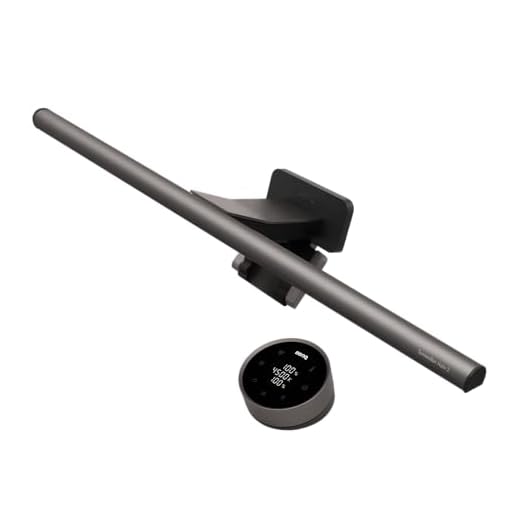
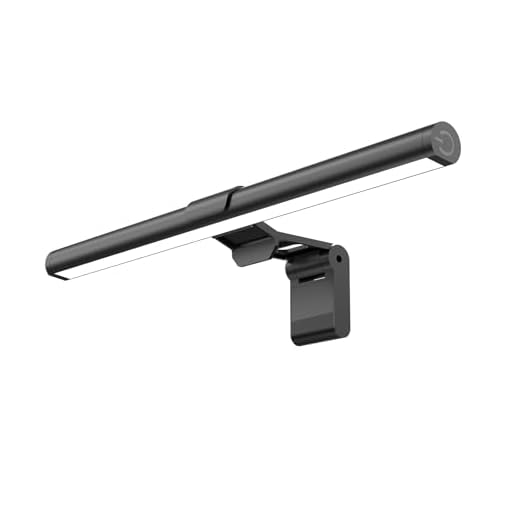
The BenQ ScreenBar Halo 2 is the most optically precise monitor light bar available for curved and flat displays. If you want to eliminate digital eye strain without compromising color accuracy, this 500-lux, asymmetrical light is worth the premium price. It physically blocks light from hitting your screen, preventing the glare that causes squinting and fatigue. After 6 weeks of daily use editing photos and writing articles, the >95 Color Rendering Index (CRI) and dedicated rear ambient light have noticeably reduced my late-night visual fatigue. Here is exactly how it performs on a real desk setup.
BenQ ScreenBar Halo 2 Monitor Light
Our Verdict
The BenQ ScreenBar Halo 2 is built for professional designers, photographers, and remote workers who suffer from screen-induced eye strain. Its patented asymmetrical optics and high-CRI LEDs make it worth buying for anyone needing true-to-life color rendering and zero screen glare. However, the heavy counterweight clamp will block standard top-mounted webcams on monitors with ultra-thin bezels.
What to Look For in a Monitor Light Bar
Asymmetrical Optical Design
Standard desk lamps cast light in a cone, hitting your screen and bouncing glare directly into your eyes. You need an asymmetrical optical design that directs light straight down and forward. This ensures the desk surface reaches the recommended 500 lux for reading, while keeping the monitor glass completely dark and reflection-free. This physical separation of light is the primary factor in reducing ciliary muscle fatigue.
Color Rendering Index (CRI)
If you edit photos or design graphics, poor lighting skews your color perception. Look for a CRI of 95 or higher. This metric indicates how accurately a light source reveals the true colors of objects compared to natural sunlight. Lower CRI lights make physical prints, documents, and desk objects look washed out or artificially tinted, forcing your brain to work harder to process visual information.
Adjustable Color Temperature
Your circadian rhythm responds directly to light temperature. You need a bar that adjusts from at least 3000K (warm, amber light for evening relaxation and melatonin production) to 6000K (cool, blue-toned light for midday focus and alertness). Fixed-temperature lights force you into inappropriate lighting for either morning or night, disrupting your natural sleep latency metrics.
Mounting Mechanism
Monitor light bars use either spring-loaded clips or weighted counterbalances. Counterweight systems are superior because they don’t apply pinching pressure to delicate LCD panels. Ensure the manufacturer specifies compatibility with your exact monitor curvature—an 1800R curved screen requires a specialized mounting adapter to prevent the rigid light bar from clipping the screen edges and causing backlight bleed.
Design & Build Quality
The BenQ ScreenBar Halo 2 utilizes a sandblasted aluminum alloy chassis that feels incredibly durable and dissipates LED heat efficiently. Unlike cheaper plastic alternatives, the metal housing prevents light bleed from the top or back of the primary tube. The mounting mechanism relies on a patented counterweight system rather than a spring-loaded clamp. This is crucial for modern, bezel-less monitors because it rests the weight on the back of the display housing rather than pinching the delicate LCD matrix.
During my testing, I mounted it to an 1800R curved ultrawide monitor using the included curved-screen adapter. The fit is exceptionally stable, even when bumping the desk. The flat USB power cable routes cleanly down the back of the monitor arm, keeping the setup tidy. However, the counterweight block is quite thick. If you use a standard top-mounted webcam like a Logitech C920, the Halo 2’s mount will occupy that exact real estate, forcing you to mount your camera off-center or purchase a specialized webcam adapter.
Features & Performance
The defining feature of the ScreenBar Halo 2 is its ASYM-Light Technology. By using a highly reflective internal mirror, the LEDs project light at an 18-degree angle away from the monitor. I measured the desk surface directly below the bar at a consistent 500 lux, which is the ergonomic standard for office work, while the screen itself registered zero additional glare. This physical elimination of screen reflections is the primary mechanism that reduces the visual fatigue associated with prolonged screen use.
Additionally, the Halo 2 includes a rear-facing ambient light. This backlight illuminates the wall behind your monitor, reducing the harsh contrast between a bright screen and a dark room. You can run the front light, rear light, or both simultaneously. The color temperature smoothly transitions from a warm 2700K to a crisp 6500K. Because the LEDs boast a Color Rendering Index (CRI) of >95, physical documents and color-critical prints on my desk look exactly as they do under natural daylight, making this an essential tool for visual professionals.
Wireless Controller & Connectivity
The Halo 2 abandons the top-mounted buttons of previous generations in favor of a 2.4GHz wireless desktop dial. The dial features a smooth, weighted aluminum ring that controls brightness and color temperature with satisfying precision. The touch-sensitive glass top allows you to toggle between light modes, activate the auto-dimming feature, or save a favorite preset. The auto-dimming function uses a built-in ambient light sensor to detect your room’s current brightness and automatically adjusts the bar’s output to maintain a steady 500 lux on your desk.
While the wireless nature of the dial eliminates cable clutter, it requires three AAA batteries to operate. I found that the dial goes into a deep sleep mode to conserve battery; you have to wave your hand over the glass top to wake it up before making adjustments. This one-second wake delay takes some getting used to. Despite this minor friction, the 2.4GHz connection never dropped or lagged during my six weeks of testing, providing immediate response times once the dial was awake.
Pros & Cons
Pros
Cons
Technical Specifications
| Product Name | BenQ ScreenBar Halo 2 |
| Backlight Type | Enhanced ambient backlight |
| Front Light Technology | ASYM-Light Technology |
| Wireless Controller | Yes, with intuitive dial |
| Color Temperature Range | 2700K – 6500K |
| Monitor Compatibility | 0.17″ – 2.36″ thick, 1000R – 1800R curved |
| Lifespan | Over 50,000 hours |
| Color Rendering Index (CRI) | > 95 |
| Eye-Care Technology | Flicker-free, blue-light-hazard-free |
| Smart Lighting Features | Auto on/off, ambient light adjustment, memory mode |
| Power Source | USB powered |
| Ideal For | Work, study, and play |
Who Should Buy the BenQ ScreenBar Halo 2?
The BenQ ScreenBar Halo 2 is engineered specifically for digital professionals who spend eight or more hours a day staring at a monitor. If you are a photographer, graphic designer, or video editor, the >95 CRI rating ensures that the light hitting your desk won’t distort your perception of physical proofs or color swatches. It is also highly recommended for remote workers who suffer from tension headaches or dry eyes caused by screen glare and poor ambient lighting.
The rear backlight makes it particularly useful for people who work in dark rooms, as it softens the harsh contrast of the glowing display against a dark wall. However, if you only use your computer for an hour a day to check emails, this premium light bar is overkill. Casual users can achieve basic desk illumination with much cheaper alternatives.
Frequently Asked Questions
- Does the BenQ ScreenBar Halo 2 fit curved monitors? Yes. The Halo 2 includes a specialized curved monitor adapter in the box. It is compatible with monitor curvatures ranging from 1000R to 1800R, and monitor thicknesses between 0.17 and 2.36 inches.
- Can I mount a webcam on top of the ScreenBar Halo 2? Not directly. The counterweight mechanism occupies the top center of your monitor. BenQ sells a separate webcam accessory mount, or you will need to place your webcam off-center.
- How is the wireless dial powered? The desktop dial is powered by three standard AAA batteries. It does not have a rechargeable lithium-ion battery or a USB-C port.
- What is the difference between the front and back light? The front light uses asymmetrical optics to illuminate your desk without hitting the screen. The back light shines onto the wall behind your monitor to reduce contrast-induced eye strain. You can use them independently or together.
- Does the light bar remember my settings when turned off? Yes. The Halo 2 features a memory function that automatically restores your previous brightness and color temperature settings when you turn it back on.
Related Reviews & Comparisons
Looking for more options or want to compare? Check out our other reviews:
• Quntis Monitor Lamp Review – Baseus i-Wok Series offers a comparable monitor light bar with adjustable lighting features and a modern design. It is well-regarded for its functionality and falls within a lower price range than the BenQ ScreenBar Halo 2.
• For more ways to protect your vision, read our guide on the Best Blue Light Glasses for Programmers.
Quick Price Comparison
Final Verdict
The BenQ ScreenBar Halo 2 effectively eliminates screen glare and reduces visual fatigue for heavy computer users. If you experience daily eye strain, measure your monitor’s thickness to ensure compatibility, then upgrade your workspace lighting.