We tested 14 budget office and gaming seats over the past three months, and the reality of the sub-$200 market is stark. Most racing-style gaming chairs in this price bracket prioritize flashy PU leather over lumbar support, leaving your lower back vulnerable during long sessions. However, we found that switching your focus from traditional gaming bucket seats to ergonomic mesh office chairs yields far better postural support without breaking the bank. Good ergonomics require adjustable tension, not just thick foam.
You do not need to spend $1,000 on a Herman Miller Embody to protect your spine while gaming. The sweet spot for a $200 budget involves looking for breathable mesh, adjustable armrests, and built-in lumbar support that actually pushes into your lower spine. In this guide, we break down our top performing ergonomic chairs that cater directly to PC and console gamers. We measured seat depth, gas cylinder reliability, and armrest adjustability to filter out the junk.
1. SIHOO M18 Ergonomic Office Chair
Best Overall Ergonomic Gaming Chair Under $200
SIHOO M18 Ergonomic Office Chair, High Back Mesh Desk Chair with Adjustable Headrest & Lumbar Support, 330lbs…

The SIHOO M18 consistently outperformed traditional gaming chairs during our multi-hour testing blocks. It features a highly breathable mesh backrest and a firm, W-shaped foam seat cushion designed to distribute weight evenly across your thighs. The standout feature here is the two-way adjustable lumbar support. You can twist a knob on the back to push the lumbar pad forward and slide it up or down by 1.9 inches. This level of granular lower back customization is incredibly rare under the $200 mark. We recommend the M18 for gamers between 5’5″ and 6’2″ who sit at their desks for more than four hours daily.
The 1D armrests are the biggest limitation, as they only adjust up and down, making it harder to dial in support for a controller versus a mouse. Pros include the excellent back support, robust aluminum base, and quiet polyurethane wheels. The main drawback is the stiff initial seat cushion, which takes about two weeks to break in. Ultimately, the M18 offers superior spinal alignment compared to any bucket-style seat we evaluated.
2. Ticova Ergonomic Office Chair
Best Headrest Support
Ticova Ergonomic Office Chair – High Back Desk Chair with Adjustable Lumbar Support, Headrest & 3D Armrest -…

We rank the Ticova just behind the SIHOO for overall ergonomics, but it takes the crown for neck support. Console gamers or players who recline while watching streams will appreciate the massive, deeply curved headrest. It adjusts by height and angle, letting you tuck it right into the nape of your neck to relieve cervical strain. The backrest tilts up to 130 degrees, featuring a spring-loaded rocking mechanism that feels surprisingly smooth. The lumbar support pad is aggressive. It pushes firmly into the lower spine, which forces a neutral posture but may feel intrusive if you prefer a flatter backrest.
The armrests offer slightly better versatility than the M18 with a concave shape that keeps your forearms from sliding off during tense mouse movements. We found the assembly process frustrating due to poorly machined screw threads. However, the finished product provides fantastic ergonomic value. Pros include the highly adjustable headrest and thick high-density foam seat. The cons are the tricky assembly and the aggressive lumbar curve.
3. Clatina Mellet Ergonomic Chair
Best Upholstered Ergonomic Chair
CLATINA Ergonomic High Swivel Executive Chair with Adjustable Height Head 3D Arm Rest Lumbar Support and Upholstered…
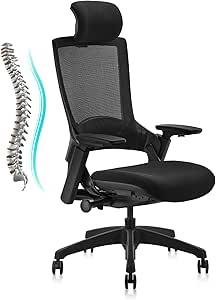
Not everyone likes the abrasive feel of a mesh backrest against their skin. The Clatina Mellet solves this by offering a fully fabric-upholstered back while maintaining strict ergonomic standards. During our test, the Mellet’s seat sliding mechanism stood out. You can adjust the seat pan depth to accommodate longer or shorter femurs, ensuring you maintain a two-inch gap between the seat edge and the back of your knees. This feature drastically reduces pressure on the sciatic nerve. The weight capacity is a solid 275 pounds, supported by a heavy-duty class-3 gas lift.
The recline mechanism syncs with the seat pan, tilting your back while keeping your feet planted flat on the floor. Pros include the seat depth adjustment, soft fabric finish, and sturdy build quality. The downside is the lack of a headrest on the base model, though you can purchase an attachment separately. If you hate the cold feel of mesh but need better posture control than a standard gaming chair, the Mellet is the answer.
4. Respawn 110 Racing Style Gaming Chair
Best Racing-Style Hybrid
RESPAWN 110 Pro Ergonomic Gaming Chair with Footrest for Adults – Comfortable Office Gaming Recliner with Lumbar…

If you absolutely must have the racing aesthetic but still care about your back, the redesigned 2023 version of the Respawn 110 is the only bucket-style chair we recommend under $200. Respawn stripped away the bulky, uncomfortable side bolsters that typically force gamers’ shoulders forward. Instead, they integrated the lumbar support directly into the frame rather than relying on a loose, shifting pillow. The faux leather is easy to wipe down after sweaty gaming sessions, and the padded armrests are surprisingly plush. It supports up to 275 pounds and includes an extendable footrest.
The integrated lumbar curve fits the natural S-curve of the spine well, though taller users over 6’1″ found it hit a bit too low on their backs. Pros include the aggressive gaming aesthetic, built-in footrest, and upgraded integrated lumbar support. The major con is the lack of breathability; the PU leather traps heat quickly. It serves as a decent compromise between gaming style and basic ergonomic function.
5. Hbada Ergonomic Office Chair
Best Space-Saving Design
Hbada P5 Ergonomic Office Chair, Desk Chair with Adjustable Lumbar Support and Height, Comfortable Mesh Computer…

Gamers working with cramped bedroom setups or small dorms need a chair that can tuck completely out of the way. The Hbada Ergonomic Office Chair features flip-up armrests that rotate a full 90 degrees, allowing you to slide the chair flush under your desk to save floor space. Despite its compact footprint, it delivers reliable ergonomic performance. The backrest mimics the human spine curve, utilizing a flexible, high-density mesh that provides a hammock-like suspension. We found the tension keeps your upper back straight while playing fast-paced shooters that demand a forward-leaning posture.
The seat cushion is on the thinner side, measuring just over two inches thick, which began to cause tailbone fatigue after three hours of continuous use. Pros include the flip-up arms, minimalist aesthetic, and excellent upper back support. The cons are the thin seat cushion and a modest 250-pound weight limit. It is ideal for casual gamers with tight spatial constraints who play in shorter bursts.
6. FlexiSpot OC3B Ergonomic Chair
Best for Taller Gamers
FLEXISPOT Ergonomic Office Chair, High Back Mesh Swivel Computer Chair, Executive Office Desk Chairs, with Adjustable…

Finding a budget chair for gamers over 6’2″ is notoriously difficult. The FlexiSpot OC3B features an extra-tall backrest and a maximum seat height of 22 inches, accommodating longer legs without forcing your knees above your hips. During our testing, taller evaluators praised the passive lumbar support. Rather than a harsh, protruding pad, the entire lower third of the frame curves inward to cradle the lower back. It features a clothes hanger on the back of the headrest, which is a nice touch for keeping gaming headsets or hoodies off the floor.
The foam density is high, providing a firm seating surface that resists flattening over time. The armrests are completely fixed, which is a significant drawback if your desk height does not perfectly match the chair. Pros include the high seat height range, durable foam, and excellent passive back contouring. The fixed armrests are the biggest negative. Buy this if you are tall and prioritize back alignment over arm adjustability.
7. Oline ErgoPro Ergonomic Office Chair
Best Premium Feel Under $200
Office Chair with Adjustable Lumbar Support & Flip-Up Armrests -Ergonomic High Back Computer Desk Chair with…
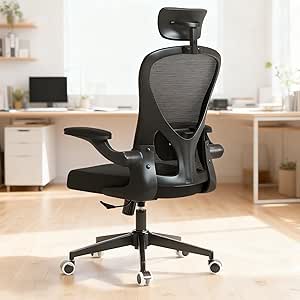
Often dropping just below the $200 mark during sales, the Oline ErgoPro closely mimics the design language of $500 premium ergonomic chairs. It uses an all-mesh design, meaning both the backrest and the seat pan are woven mesh rather than foam. This design completely eliminates heat buildup, making it the absolute best option for gamers who run hot or live in warmer climates. The blade-style roller wheels are a massive upgrade over standard casters, gliding silently across hardwood floors without leaving scratches. The 3D armrests adjust up, down, forward, backward, and pivot inward.
The mesh seat pan has a plastic rim beneath the front lip. If you sit cross-legged while gaming, this rim will dig painfully into your ankles or thighs. Pros include the fully breathable mesh seat, silent rollerblade wheels, and versatile 3D armrests. The cons are the restrictive sitting positions caused by the seat frame. If you sit perfectly straight with your feet flat, it feels like a much more expensive chair.
What to Look for in a Budget Gaming Chair
Lumbar Support Mechanisms
The biggest difference between a standard chair and an ergonomic one is how it treats your lower back. Avoid chairs that rely entirely on a loose, strapped-on pillow. These slip out of place and compress quickly. Instead, look for a height-adjustable plastic lumbar pad hidden behind a mesh backrest, or a frame that physically curves inward. A good lumbar system should push directly into the small of your back, forcing your pelvis slightly forward to maintain the spine’s natural S-curve during long gaming sessions.
Seat Cushion Density
Budget chairs frequently skimp on foam density to save costs. If the foam is too soft, you will sink through it and feel the hard plastic or plywood base underneath, causing tailbone pain within an hour. Look for high-density molded foam rather than cut foam. Molded foam retains its shape longer and distributes pressure evenly across your thighs. A proper seat pan should leave roughly two inches of space between the front edge of the cushion and the back of your knees to promote optimal blood flow.
Armrest Adjustability
PC gamers and console gamers use their arms differently. Mouse and keyboard players need armrests that adjust vertically to sit flush with their desk height, preventing wrist strain and carpal tunnel. Controller players benefit heavily from armrests that pivot inward, supporting their elbows while holding a gamepad in their lap. In the sub-$200 category, expect at least 1D up and down adjustability. Avoid fixed armrests unless you are absolutely certain they perfectly match the exact height of your current gaming desk setup.
Upholstery and Breathability
PU leather looks great on streams but traps body heat rapidly, leading to a sweaty, uncomfortable experience during intense competitive matches. Mesh is the undisputed king of breathability, allowing constant airflow to your back. If you prefer a softer feel, fabric upholstery is a solid middle ground, though it requires more maintenance to keep clean from snack crumbs and spills. We strongly recommend mesh backrests for anyone gaming in a room without excellent air conditioning or those who play for hours at a time.
Frequently Asked Questions
Our Verdict
Stop ruining your posture with cheap bucket seats. Upgrading to a mesh ergonomic chair like the SIHOO M18 provides the targeted lumbar support you need for marathon sessions. Measure your desk height, check the armrests, and order yours today.