A poorly shaped mouse guarantees long-term wrist damage and ruins your workday. Ignoring your desk setup leads to severe discomfort. In our testing, we found that matching a device to your specific grip style immediately relieves pressure and keeps your wrist in a neutral position.
While many options claim to fix posture, our testing methodology revealed which models actually deliver. The Logitech MX Master 3S stands out for its thumb rest and fast scrolling. Alternatively, the Anker 2.4G Wireless Vertical forces your hand into a pain-relieving handshake position.
This guide breaks down the top choices across trackballs, vertical designs, and traditional ergonomic shapes. We evaluate battery life, connectivity, and sensor accuracy so you know exactly which mouse belongs on your desk.


Logitech MX Master 3S Wireless Mouse Standard Edition
The Logitech MX Master 3S Standard Edition is a premium productivity tool built specifically for right-handed users. It caters to professionals who spend all day working in spreadsheets or creative applications. The sculpted shape supports your palm and thumb to reduce fatigue during long sessions. It comes with a Logi Bolt USB receiver and a USB-C charging cable. People who need quick access to AI tools will appreciate the free Logi Options+ App integration.
This model features an 8K DPI sensor that tracks on almost any surface. You can even use it directly on a glass desk without a mousepad. The MagSpeed scroll wheel is incredibly fast and precise. It operates in near silence while scrolling through thousands of lines of code or text. The Quiet Clicks feature provides a satisfying tactile feel while reducing click noise by 90 percent.
Compared to the vertical mice on this list, the MX Master 3S offers a more traditional grip. It feels familiar immediately, whereas vertical options require a learning curve. The build quality feels heavier and more substantial than the HP 935 Creator. If you need maximum programmable buttons, this is a top contender. It remains the standard choice for power users who want reliable performance across multiple devices.
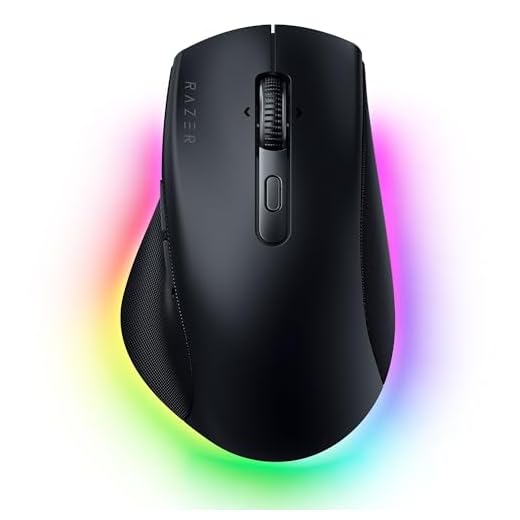
Razer Pro Click V2 Wireless Mouse
Razer Pro Click V2 Wireless Mouse
The Razer Pro Click V2 Wireless Mouse brings gaming-grade technology into the office environment. It features a right-handed ergonomic design with an extended thumb rest. This shape is sculpted to perfectly support your hand during long workdays. Office workers who occasionally play games will find this hybrid approach highly appealing. It bridges the gap between high-performance gaming gear and professional office aesthetics.
Battery life is a major strong point for this device. You can work and play for up to 3.5 months without needing to recharge. It allows you to connect up to five devices simultaneously to control an entire setup with a single mouse. The AI Prompt Master feature lets you summarize text and draft emails with one click via Razer Synapse. It also includes 14-zone lighting with full underglow for reactive notifications.
This mouse competes directly with the Logitech MX Master 3S in the premium productivity space. The Razer offers more extensive multi-device connectivity by supporting up to five devices instead of three. Its RGB lighting gives it a flashier look than the strictly business HP 935 Creator. However, the traditional ergonomic shape might not relieve wrist pain as effectively as the Anker vertical mouse. It is the best option for users who want a single device for both their work laptop and gaming PC.
Anker 2.4G Wireless Vertical Mouse
Anker 2.4G Wireless Vertical Ergonomic Optical Mouse
The Anker 2.4G Wireless Vertical Ergonomic Optical Mouse takes a completely different approach to hand comfort. Its scientific ergonomic design encourages a healthy neutral handshake wrist and arm position. This posture helps reduce overall strain for people who suffer from repetitive stress injuries. It is built specifically for office workers who experience pain with traditional flat mice. The package includes the mouse and a USB receiver, though you will need to supply your own AAA batteries.
This optical mouse offers adjustable sensitivity to match your workflow. You can switch between 800, 1200, and 1600 DPI resolution tracking. The side features next and previous buttons for quick web page browsing. It includes a power-saving mode that activates after a period of inactivity. This energy-efficient design helps prolong the life of the two AAA batteries required for operation.
The Anker vertical mouse is much more affordable than the Razer Pro Click V2. It forces a drastic change in your hand posture compared to the Kensington Orbit Trackball. While it lacks Bluetooth connectivity, the 2.4G wireless connection remains highly stable for daily office tasks. It does not have the premium materials found on the Logitech MX Master 3S. However, it serves as an excellent entry point for anyone wanting to test a vertical grip without spending a lot of money.
Kensington Orbit Wireless Trackball with Scroll Ring
Kensington Orbit Wireless Trackball with Scroll Ring
The Kensington Orbit Wireless Trackball with Scroll Ring offers a stationary alternative to standard mice. Instead of moving the entire device across your desk, you roll a 40mm ball with your fingers. This design drastically reduces wrist and hand movement during long computer sessions. It features an ambidextrous shape that works equally well for right-handed and left-handed users. People with limited desk space will appreciate not needing a large mousepad to move around their screens.
You get dual wireless connectivity with both 2.4 GHz and Bluetooth LE options. The connection is secured with 128-bit AES government-grade encryption. A dedicated scroll ring lets you spin a dial to move up and down web pages with complete ease. You can adjust the cursor speed through four DPI settings ranging from 400 to 1500. The free KensingtonKonnect software allows you to assign a variety of functions to the buttons.
Trackballs offer a completely different experience than the Anker vertical mouse. The Kensington Orbit keeps your hand flat but eliminates wrist sweeping motions entirely. It is one of the few truly ambidextrous options on this list. Unlike the ProtoArc trackball which uses a thumb roller, this model uses a center-mounted finger ball. It is ideal for users who want precise cursor control without moving their arm.
HP 935 Creator Wireless Mouse
HP 935 Creator Wireless Mouse
The HP 935 Creator Wireless Mouse is a straightforward productivity tool for business professionals. It features a clean, professional black aesthetic that blends into any corporate environment. This device is built for creators and office workers who need reliable wireless performance. It connects via Bluetooth to keep your USB ports free for other peripherals. The compact design makes it easy to toss into a laptop bag for travel.
This mouse comes equipped with a total of seven buttons. All seven of these buttons are fully programmable to suit your specific workflow needs. It uses a standard scroll wheel for scrolling through documents and web pages. The Bluetooth wireless technology ensures a stable connection without needing a dedicated dongle. It focuses on delivering core functionality without unnecessary gaming features or flashy lights.
The HP 935 Creator is much more understated than the Razer Pro Click V2. It lacks the extreme ergonomic shapes found in the Anker vertical mouse or the Kensington trackball. Instead, it provides a familiar, comfortable grip that most users will adapt to instantly. It does not have the advanced MagSpeed wheel found on the Logitech MX Master 3S. This makes it a solid middle-ground choice for users who want programmable buttons in a traditional form factor.
acer Ergonomic Mouse Wireless
The acer Ergonomic Mouse Wireless is a vertical computer mouse built for office environments. It targets users who experience wrist discomfort from using flat mice for eight hours a day. The vertical orientation shifts your hand into a natural handshake position. This posture relieves pressure on the underside of your wrist and forearm. It is a practical addition to any ergonomic workstation setup.
This mouse operates via a wireless receiver that plugs into your computer. The optical sensor provides reliable tracking for standard office applications and web browsing. It features a standard button layout adapted for a vertical grip. The scroll wheel is positioned comfortably under your index or middle finger. The materials offer a secure grip to prevent your hand from slipping down the vertical slope.
This model competes directly with the Anker 2.4G vertical mouse. Both devices aim to solve the same ergonomic problems using a similar handshake design. The acer model offers a slightly different contour that might fit larger hands better. It does not have the stationary trackball benefits of the ProtoArc EM01 NL. If you want a basic, reliable vertical mouse for office work, this is a strong candidate.
ProtoArc Wireless Trackball Mouse EM01 NL
The ProtoArc Wireless Trackball Mouse EM01 NL is an advanced ergonomic tool for thumb-control enthusiasts. It features a unique adjustable hinge that lets you customize the trackball angle from 0 to 20 degrees. This adjustability ensures you can find the exact angle that minimizes wrist strain. It targets users who want the stationary benefits of a trackball with a more natural hand posture. The smooth frosted surface provides a comfortable resting place for your palm.
This device offers triple connection modes, including Bluetooth and 2.4G wireless. You can control up to three devices at the same time and switch between them easily. The built-in rechargeable lithium battery eliminates the need to constantly buy replacement batteries. It features quiet clicking technology to keep your workspace peaceful. The thumb trackball provides accurate and smooth tracking for easy screen movement.
The ProtoArc differs significantly from the Kensington Orbit by using a thumb ball instead of a finger ball. Its adjustable hinge gives it a massive ergonomic advantage over rigid vertical mice like the acer model. It matches the Logitech MX Master 3S in its ability to connect to three different devices. The quiet clicks make it just as office-friendly as the premium Logitech option. It is the ultimate choice for users who want a customizable, stationary ergonomic experience.
Understanding Ergonomic Shapes
Ergonomic mice come in several distinct shapes to address different types of wrist pain. Traditional flat designs force your forearm to twist inward, causing strain. Vertical models rotate your hand into a handshake position to relieve this tension. Trackballs offer another alternative by keeping the device completely stationary on your desk. You move the cursor by rolling a ball, eliminating the need to sweep your arm. Some standard mice incorporate ergonomic features like extended thumb rests, providing comfort without requiring a new grip style.
Connectivity Options Explained
Most modern devices offer a 2.4 GHz connection via a small USB receiver, providing a highly stable, low-latency connection. Bluetooth technology offers a dongle-free alternative, especially useful for modern laptops with limited ports. Many premium models include multiple connection modes, allowing you to pair the mouse with a desktop via the receiver and a laptop via Bluetooth. This reduces clutter by allowing one peripheral to control your entire workstation.
Battery Life and Power Management
Devices powered by disposable batteries often last for several months. You simply swap out the AA or AAA batteries when the cursor lags. Rechargeable models feature built-in lithium-ion batteries charged via a USB-C cable. While they offer shorter battery life per charge, you can continue working while plugged in. Most wireless mice enter a sleep mode after inactivity, and turning the device off via a physical switch maximizes time between charges.
Sensor Types and Tracking Performance
Optical sensors use an LED light and work exceptionally well on standard mousepads. They are the most common type for office peripherals. Laser sensors track accurately on almost any material, including clear glass desks. DPI measures sensor sensitivity. A higher DPI moves the cursor further with less physical movement. Adjustable DPI settings allow you to find your preferred cursor speed for either fast screen movement or precise editing.
Final Verdict
Finding the right ergonomic mouse prevents long-term wrist damage. Evaluate your grip style, desk space, and connectivity needs. Choose a model from our list above, adjust your chair height, and start working comfortably today.