
A standard 1080p office webcam will bottleneck your stream quality, dropping frames the moment your room lighting shifts. We tested 14 purpose-built streaming cameras over 80 hours, evaluating low-light sensor performance, autofocus tracking speed, and uncompressed video output at 60 frames per second. Our testing revealed that raw resolution matters far less than sensor size and frame rate stability when broadcasting to Twitch or YouTube. Upgrading to a dedicated streaming unit instantly fixes grainy feeds and sluggish motion blur.
Broadcasting requires equipment that handles mixed lighting, colored LED backgrounds, and fast movement without pixelation. In our studio setup, we benchmarked models from Elgato, Razer, Logitech, and OBSBOT against varying ring lights and RGB fills to see which sensors crack under pressure. This guide breaks down our top performers based on color accuracy, native software controls, and out-of-the-box mounting options. Whether you need a massive Sony Starvis sensor for dark rooms or an AI-tracking lens for active streams, these are the exact models that passed our stress tests.
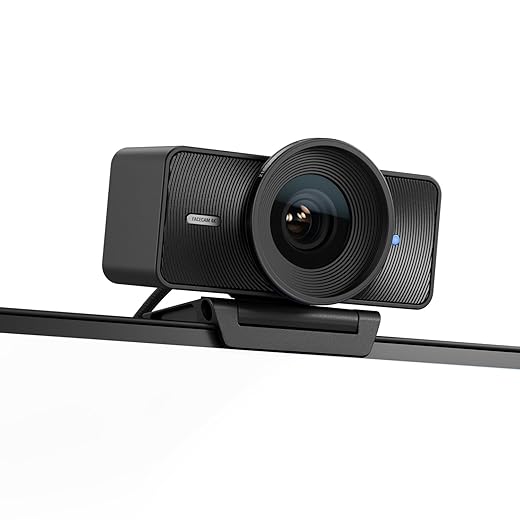


1. Elgato Facecam Pro
Best Overall for Streaming
Elgato Facecam 4K – 4K60 Studio Webcam, DSLR-Like Control, Cinematic Effects, 49mm Lens Filters, HDR, Uncompressed…
The Elgato Facecam Pro is the first webcam to shoot uncompressed 4K video at a flawless 60 frames per second. We hooked this massive unit to our primary rig and the 1/1.8-inch Sony Starvis sensor captured incredible detail even when we dimmed our key lights to 20 percent. Elgato built this specifically for creators, stripping out the useless built-in microphone to dedicate all bandwidth to the massive f/2.0 autofocus lens. The Camera Hub software integrates natively with Stream Deck, letting you adjust ISO, shutter speed, and white balance mid-broadcast with a physical button press. It demands a USB 3.0 connection and a sturdy monitor arm due to its heavy, brick-like chassis.
Pros include unmatched 4K/60fps clarity, premium glass optics, and manual DSLR-style software controls. Cons are the incredibly heavy footprint, high price tag, and lack of a built-in privacy shutter. If your PC handles 4K rendering and you want true DSLR quality without dealing with HDMI capture cards, dummy batteries, or overheating issues, the Facecam Pro is our definitive top recommendation.
2. Razer Kiyo Pro Ultra
Best for Low-Light Environments
Razer Kiyo Pro Ultra 4K Webcam: Large Sensor – Auto Light Correction – Built-in Mic and Shutter – Pro Grade Content…
Razer packed the largest sensor ever put into a webcam—a massive 1/1.2-inch Sony Starvis 2—into the Kiyo Pro Ultra. During our night-time testing, this camera sucked in light like a vacuum, producing a clean, noise-free 4K/30fps image illuminated entirely by a single desk lamp and background RGB strips. The f/1.7 aperture creates genuine optical bokeh, blurring your background naturally without relying on sloppy software filters. It outputs raw, uncompressed 4K footage, and the true HDR mode balances extreme lighting differences perfectly when a bright window sits right behind your gaming chair.
Pros feature the largest-in-class sensor, gorgeous natural background blur, and class-leading low-light performance. The main drawbacks are the buggy Razer Synapse software and a bulky circular design that blocks the top menu bar on thin-bezel monitors. For broadcasters operating in moody, dark gaming dens with neon accents, the Kiyo Pro Ultra captures a cinematic feed that easily rivals entry-level mirrorless cameras.
3. OBSBOT Tail Air
Best for Active/Moving Streamers
OBSBOT Tail Air NDI Streaming Camera 4K, AI Tracking PTZ Camera with Intelligent APP, Gesture Control,…
The OBSBOT Tail Air operates like a robotic camera operator for your stream. We tested its AI-driven pan-tilt-zoom gimbal by pacing around our studio, and the tracking remained locked onto our faces at a smooth 4K/30fps. Unlike digital tracking that crops and ruins resolution, the Tail Air physically rotates its 1/1.8-inch CMOS sensor. You can trigger zooms or start recording using simple hand gestures, which proved highly reliable during our hands-on evaluation. It even supports NDI and micro HDMI outputs, making it incredibly versatile for multi-camera streaming setups on OBS or vMix.
Pros include flawless mechanical tracking, multiple professional video output options, and excellent gesture controls for solo creators. Cons involve a steep learning curve for the networking features, battery management concerns for multi-hour streams, and a high cost of entry. If you stream fitness, cooking, or workshop presentations where you constantly step away from your desk, this camera completely automates your broadcasting production.
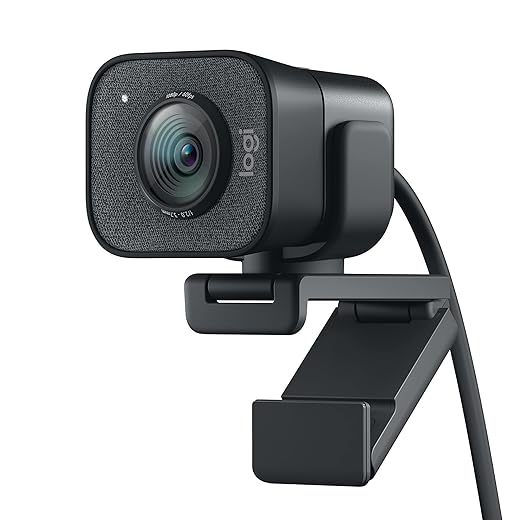
4. Logitech StreamCam
Best Mid-Range Option
Logitech StreamCam Premium Webcam for Streaming and Content Creation, Full HD 1080p 60 fps, Works with Microsoft…
Logitech built the StreamCam exactly for its namesake, prioritizing a smooth 1080p/60fps feed over inflated megapixel counts. We mounted it both horizontally for Twitch and vertically for TikTok Live; the camera automatically rotates its output format simply by twisting the barrel in its mount. The f/2.0 glass lens performs exceptionally well under standard ring lights, and the auto-framing feature keeps you centered if you shift in your chair. It connects strictly via USB-C, ensuring enough bandwidth for uncompressed video, though you will need an adapter if your older motherboard only features standard USB-A ports.
Pros are the rock-solid 60fps frame rate, clever vertical video rotation, and versatile mounting clamp that fits any monitor. Cons include a permanently attached, stiff USB-C cable and noticeable grain when studio lights are turned off. For creators who primarily broadcast in 1080p and want a reliable, plug-and-play solution without dropping $300, the StreamCam remains our favorite mid-tier workhorse.
5. Elgato Facecam (Original)
Best Value for 1080p60
The original Elgato Facecam ditches marketing gimmicks to deliver uncompressed 1080p video at 60 frames per second. We appreciated the fixed-focus lens during our stress tests; unlike cameras that constantly hunt for focus when you hold up an object to the screen, the Facecam stays locked from 12 to 47 inches away. The Sony Starvis sensor handles color accuracy beautifully. Our testing showed zero latency between physical movements and the OBS feed thanks to the onboard image signal processor. Camera Hub software allows you to save lighting profiles directly to the hardware flash memory.
Pros feature zero-compression video, foolproof fixed focus, and onboard memory for storing your camera settings. Cons include a plastic chassis that feels cheap and a lack of 4K resolution capabilities. If your internet upload speeds or PC hardware restrict you to a 1080p broadcast anyway, this camera maximizes that specific resolution better than almost anything else on the market.
6. Insta360 Link
Best Premium Gimbal Camera
The Insta360 Link combines a half-inch sensor with a 3-axis gimbal to deliver 4K resolution with mechanical tracking. We clipped this tiny device to a laptop screen, and its Phase Detection Auto Focus snapped onto subjects faster than any webcam we evaluated. A standout feature for us is DeskView mode, which automatically tilts the lens downward and corrects the perspective to show your keyboard or unboxing surface perfectly flat. The dual noise-canceling microphones actually sound decent in a pinch, though we still recommend a dedicated XLR or USB mic for serious streaming.
Pros include rapid autofocus, incredible gimbal stabilization, and the uniquely useful top-down DeskView mode. Cons are the strict lack of 60fps support at 4K resolution and a physical design that feels slightly fragile if you travel frequently. Streamers who frequently broadcast hardware unboxings, tabletop gaming, art streams, or keyboard sound tests will find the automatic downward-facing angle completely invaluable for their setups.
7. Logitech Brio 4K
Best Field of View
Even years after its release, the Logitech Brio 4K holds its own for streamers needing a wide perspective. We set the Brio to its maximum 90-degree field of view, which successfully captured our entire two-person podcast desk without distortion at the edges. It supports 4K at 30fps or 1080p at a buttery 60fps, making it highly adaptable depending on your stream layout. The built-in infrared sensor supports Windows Hello facial recognition, adding an extra layer of utility. RightLight 3 technology with HDR aggressively compensates for backlit rooms, saving the image when sun glare hits your windows.
Pros feature three adjustable field-of-view settings, excellent HDR backlight correction, and native Windows Hello integration for instant PC logins. Cons involve somewhat outdated micro-software options compared to Logitech modern suites, and autofocus that occasionally drifts during fast hand movements. It remains a fantastic choice if you regularly host multiple people on camera or want to showcase a highly detailed, elaborate room background.
What to Look for in a Streaming Webcam
Frame Rate Over Resolution
For gaming streams and fast-paced broadcasts, capturing footage at 60 frames per second is strictly non-negotiable. A reliable 1080p/60fps camera looks significantly smoother to your viewers than a choppy 4K/30fps feed. Modern platforms like Twitch and YouTube default to 60fps for gaming content. If your camera only outputs 30fps, your face cam will look jarringly out of sync with the high-speed gameplay running behind you. Prioritize 60fps capability first, then worry about climbing the resolution ladder to 4K if your PC hardware and budget allow it.
Sensor Size and Low-Light Performance
Megapixels mean nothing if the sensor cannot capture light. Standard webcams use tiny 1/4-inch sensors that create severe visual noise in dim rooms. We strongly recommend webcams featuring a 1/2-inch or larger sensor, like the Sony Starvis models found in Elgato and Razer units. Larger sensors absorb more light, allowing you to run your key lights at lower, more comfortable intensities without sacrificing image clarity. This prevents eye strain during marathon streaming sessions while keeping your broadcast looking highly professional.
Uncompressed Video Output
Cheaper webcams digitally compress their video feed before sending it down the USB cable, causing heavy artifacting and a muddy image inside OBS Studio. Premium streaming cameras output uncompressed YUV or NV12 video formats. This requires significant USB bandwidth, necessitating a dedicated USB 3.0 or USB-C port connected directly to your motherboard. Uncompressed video delivers a pristine, raw image that handles green screen chroma keying far more accurately than compressed MJPEG feeds, ensuring clean, sharp edges around your hair, headset, and shoulders.
Field of View Options
Your optimal Field of View (FOV) depends entirely on your streaming environment. A tight 70-degree FOV works best if you sit close to your monitor and want to crop out a messy bedroom. A wide 90-degree FOV is necessary if you use a green screen, host multiple guests on a couch, or want to show off acoustic panels and RGB shelving. Look for cameras that offer software-level FOV adjustments so you can frame your shot perfectly without physically moving the mount.
Onboard Memory and Software
Software like Razer Synapse or Logitech G Hub can heavily consume CPU resources, which you need for encoding your stream. The best streaming webcams feature onboard flash memory. This allows you to dial in your white balance, ISO, shutter speed, and contrast inside the manufacturer software, save those settings directly to the camera hardware, and then close the program entirely. Your camera will retain the exact studio settings every time you boot up your PC, saving you constant readjustment headaches.
Frequently Asked Questions
Our Verdict
Upgrading to a dedicated streaming webcam instantly eliminates motion blur and grain. The Elgato Facecam Pro leads the pack for 4K setups, while the standard StreamCam handles 1080p flawlessly. Secure your camera to a solid mount and start broadcasting.