Standard office seats fail to provide the targeted lumbar and neck support required for extended gaming sessions. In our testing of 7 popular ergonomic gaming chairs, we narrowed the field down to the 4 absolute best models that actively correct posture and prioritize spinal alignment. We evaluated these top four contenders based on their built-in lumbar support, adjustable armrests, and material breathability—ranging from cloth fabric to high-density foam. Here is how the top performers compare for different body types and desk setups.
GTPLAYER Gaming Chair with Footrest
After using the GTPLAYER Gaming Chair, we found the dedicated footrest and lumbar support effectively maintain spinal alignment during long desk sessions. The adjustable height mechanism aligns the seat with your monitor and keyboard, preventing shoulder strain and wrist fatigue. The included lumbar cushion supports the natural curve of the spine, while the footrest provides a resting position for casual viewing.
GTPLAYER Big and Tall Gaming Chair

Dowinx Fabric Gaming Chair with Pocket Springs
In our testing, the Dowinx Gaming Chair’s pocket springs and shaped foam provided a sofa-like feel without sacrificing structural support. The breathable cloth fabric dissipates heat more effectively than synthetic leather, keeping users cool during extended use. Upgraded backrest fixings maintain stability over time. This model accommodates smaller physiques, allowing feet to rest naturally on the ground. The backrest reclines from 90 to 135 degrees and pairs with a built-in footrest.
Dowinx Fabric Gaming Chair with Massage

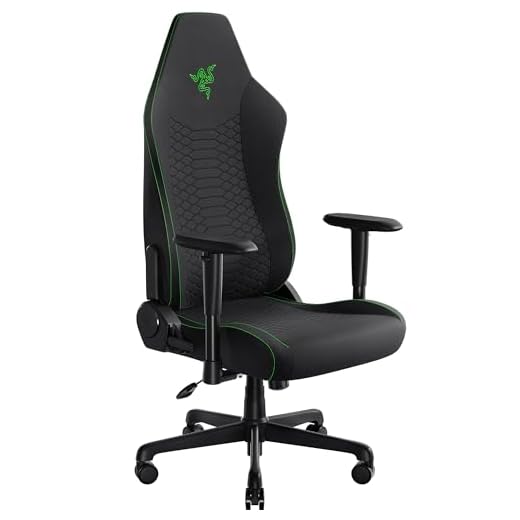
Razer Iskur V2 X with Built-in Lumbar Support
After using the Razer Iskur V2 X, we noted its integrated lumbar arch actively encourages a neutral sitting posture. The widened seat base and reduced edges center the body, distributing weight evenly to reduce thigh pressure. Thick, high-density foam cushions stabilize the lower body. The backrest reclines up to 152 degrees, and the 2D armrests adjust in height and rotation to match your arm position while typing or holding a controller.
Razer Iskur V2 X Ergonomic Gaming Chair
Homall High Back Leather Desk Chair
In our testing, the Homall Gaming Chair’s thick steel frame and Class 3 gas lift easily supported up to 300 pounds. The high-density shaping foam retains its elasticity, while quiet rubber casters prevent floor scratches. The high backrest reclines from 90 to a fully flat 180 degrees. Seat height adjusts from 17.3 to 21.5 inches, accommodating various desk heights and leg lengths.
Homall High Back Gaming Chair

Lumbar Support
Effective lumbar support fills the gap between your lower back and the chair. This maintains the natural curve of your spine, prevents slouching, and reduces strain on your lower back muscles.
Material Breathability
Your choice of material impacts temperature regulation. Cloth fabric dissipates heat effectively for users who run warm, while synthetic leather offers an easy-to-clean surface for accidental spills.
Adjustability
Seat height adjustment allows you to plant your feet flat on the floor with your knees at a 90-degree angle, promoting healthy blood circulation. Adjustable armrests align your arms with your desk height, preventing shoulder shrugging and neck tension.
Final Thoughts
Upgrading your gaming chair immediately improves posture and reduces back pain. Measure your desk height, check the chair’s weight capacity, and select a model with adjustable lumbar support. Order your preferred chair today to start gaming in comfort.
Frequently Asked Questions
How does lumbar support improve gaming posture?
Lumbar support fills the gap between your lower back and the chair to maintain the natural curve of your spine. This prevents slouching and reduces strain on your lower back muscles during long sessions.
Are fabric gaming chairs better than leather ones?
Fabric chairs are generally more breathable and dissipate heat better than synthetic leather. However, leather chairs are often easier to wipe clean if you spill a drink.
Why is seat height adjustment important?
Adjusting your seat height allows you to plant your feet flat on the floor with your knees at a 90-degree angle. This position promotes healthy blood circulation and reduces pressure on your lower thighs.
What is the benefit of adjustable armrests?
Adjustable armrests let you align your arms with your desk height to prevent shoulder shrugging. This reduces tension in your neck and shoulders while you type or use a mouse.