Typing from physical documents often leads to a stiff neck and aching shoulders. You might find yourself constantly twisting your head back and forth between your desk and your monitor. This repetitive motion places immense stress on your cervical spine over a long workday. A simple adjustment to your workstation layout can eliminate this painful twisting. Placing your reference materials directly in your line of sight keeps your posture neutral and comfortable.
Document holders bridge the gap between your keyboard and your screen. They prop up your papers so you can read them without dropping your chin. Some models sit right over your keyboard to create a continuous writing surface. The Good Use MicroDesk offers a clear platform that lets you see your keys while you write. Other options like the 3M Adjustable Document Copy Holder sit just below your monitor to hold thick books and catalogs.
Choosing the right holder depends heavily on your specific desk setup and the type of materials you reference. A heavy textbook requires a much sturdier base than a few loose sheets of paper. You also need to consider how much space you have available between your keyboard and your monitor base. We tested and reviewed several popular options to help you find a suitable match for your workspace. The right choice will help you maintain a healthy posture and reduce daily discomfort.


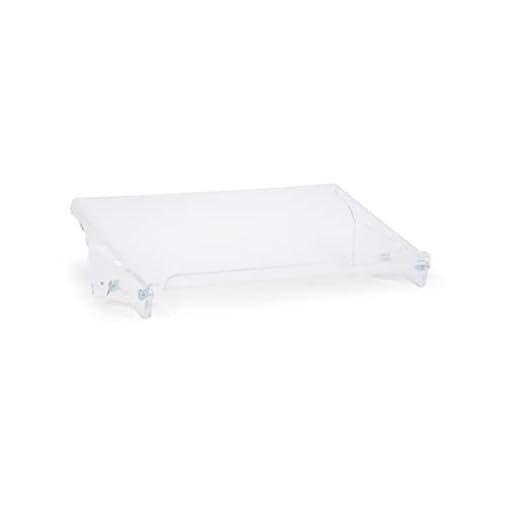

#1 Good Use MicroDesk
Good Use MicroDesk Compact Writing Platform
The Good Use MicroDesk is a clear acrylic platform that sits directly over your keyboard. It serves as an inline writing surface for people who need to take notes while typing. This setup stops the aches and pains caused by twisting your body to write on the side of your desk. The compact 17-inch width fits well in restricted work areas. It is an excellent choice for laptop users who lack the space for a full-sized copy holder. You can keep your posture straight and avoid awkward reaching.
This unit creates a highly stable and adjustable work surface right in front of your monitor. You maintain continuous access to your keyboard as you write on the platform above it. The clear material ensures you can still see your keys and your hands while you work. It actively organizes your workspace by giving your papers a dedicated spot. Users experience increased work comfort and decreased muscle strain throughout the day. The non-slip feet keep the entire assembly firmly planted on your desk.
Compared to traditional upright copy holders, the MicroDesk functions more like a secondary desk tier. It is much better suited for active writing rather than just passive reading. If you only need to prop up a single sheet of paper, the Kensington Insight might be a simpler alternative. The MicroDesk requires a specific keyboard placement to work correctly. It excels in environments where you constantly switch between handwriting and typing. The narrow profile ensures it will not overwhelm a small cubicle desk.
#2 3M Adjustable Document Copy Holder, In-line with Monitor Minimizing
3M DH640 In-Line Document & Book Holder
The 3M Adjustable Document Copy Holder is a heavy-duty stand meant to sit directly between your monitor and keyboard. It keeps your documents in an easy-to-read upright position just below your screen. This specific placement minimizes the head and neck movement required to reference your materials. The large 18-inch wide backplate supports heavy books and thick catalogs. It is a great option for data entry professionals who work from large manuals. The black finish blends in easily with standard office equipment.
This copy holder boasts an impressive capacity that holds up to 300 sheets of paper at once. It features an elastic line guide that marks your place on the page. This guide stretches to accommodate even the thickest books without snapping. The base measures 11 inches deep and 4 inches high to provide a solid foundation. You can adjust the angle to reduce glare from overhead office lighting. The wide ledge prevents large binders from sliding off the front edge.
This model handles heavy books much better than the smaller Kensington Insight. It takes up a significant amount of desk depth compared to the Good Use MicroDesk. You need a fairly deep desk to fit your keyboard in front of this 11-inch base. It works exceptionally well for users who reference thick textbooks or legal binders. The elastic line guide is a unique feature that helps you track small text. It remains one of the most capable heavy-duty holders on the market.
#3 Kensington Insight Adjustable Book Copyholder, 50 Sheet Capacity,
Kensington Insight Adjustable Copyholder
The Kensington Insight Adjustable Book Copyholder is a compact metal stand that props up your daily reference materials. It allows ergonomic copy and book positioning right between your keyboard and monitor. The midnight blue metal frame provides a sturdy but lightweight base for your papers. It helps organize loose papers and active projects for greater daily productivity. This model suits hybrid workers who need a portable solution for their home and office. The simple design keeps your desk looking tidy and professional.
A large and firm copy clip sits at the top of the stand to secure your documents. This grip holds up to 50 multi-size pages at a single time. You can display your sheets in either landscape or portrait orientation depending on your needs. The stand features an angle adjustment mechanism to help you find the most comfortable viewing position. When you finish working, the entire unit collapses flat for easy portability. You can easily slip it into a laptop bag or a desk drawer.
The 50-sheet capacity is much smaller than the 300-sheet limit of the 3M model. It is a better choice for users who only reference a few printed emails or spreadsheets at a time. The collapsible design gives it a distinct advantage over the rigid Bakker and Elkhuizen stand. It takes up very little space on a crowded desk. The metal construction ensures it will survive frequent trips in your backpack. It provides a highly practical solution for basic document viewing.
#4 Bakker & Elkhuizen BNEQDOC515 Document Holder Q-doc 515 7 Stages
Bakker & Elkhuizen Q-doc 515 Document Holder
The Bakker and Elkhuizen Q-doc 515 is a transparent acrylic document holder manufactured in the Netherlands. It functions as an inline copy stand that sits directly in front of your monitor. The clear material prevents the stand from visually cluttering your workspace. It provides a wide surface area to rest your papers and small binders. This model appeals to users who want a minimalist aesthetic on their desk. The simple construction relies on high-quality materials rather than complex moving parts.
This document holder features seven different stages of angle adjustment. You can easily change the slope to match your specific height and monitor setup. The package dimensions measure 540 millimeters long by 320 millimeters wide. This generous width accommodates two standard sheets of paper side by side. The 140-millimeter height clearance allows you to slide your keyboard underneath when not in use. The transparent design ensures you can still see any notes or sticky pads placed under the stand.
The Q-doc 515 offers more angle adjustments than the Good Use MicroDesk. It lacks the heavy-duty book support found on the 3M Adjustable Document Copy Holder. The ability to store your keyboard underneath makes it highly useful for small desks. It works best for users who read flat documents rather than thick bound manuals. The European manufacturing quality is evident in the thick acrylic construction. It provides a very clean and professional look for corporate environments.
#5 Desktop Document Holder Stand with 7 Adjustable Positions, Black
Adjustable Metal Document Holder Stand
This Desktop Document Holder Stand is a black metal file organizer that keeps your reading materials upright. It functions as a straightforward easel for your papers and thin folders. The metal mesh construction provides a rigid backing that prevents your papers from flopping over. It is a highly practical choice for home offices and student desks. The black finish matches most standard computer peripherals and desk accessories. You can place it right next to your monitor to keep your reference materials visible.
The stand features seven adjustable positions to help you find the correct viewing angle. You can tilt the backrest forward or backward to eliminate glare from your desk lamp. A small lip at the bottom prevents your documents from sliding down onto your desk. The metal frame is lightweight enough to move around your workspace easily. It holds standard letter-sized paper and small notebooks without tipping over. The open mesh design prevents dust from collecting on the backplate.
This metal stand is much more basic than the transparent Bakker and Elkhuizen model. It sits off to the side rather than inline between your keyboard and monitor. If you need an inline solution, the 3M copy holder is a much better alternative. This stand works well for users who just need a simple way to prop up a single notebook. It takes up very little desk space and stores easily when not in use. The simple metal construction provides reliable daily performance.
Buying Guide
Understanding Inline vs. Side Placement
The placement of your reference materials drastically affects your neck comfort. Inline placement means the document sits directly between your keyboard and your monitor. This setup allows you to look up and down in a straight line. You avoid the repetitive side-to-side head turning that causes muscle fatigue. Many ergonomics experts recommend this straight-ahead alignment for heavy computer users.
Side placement involves putting the stand to the left or right of your monitor. This style works well if you only glance at your papers occasionally. It is less ideal for continuous data entry because it forces your neck into a rotated position. If you must use a side stand, try to place it as close to the monitor screen as possible. You should also angle it inward so it faces you directly.
Your desk depth will often dictate which placement style you can use. Inline stands require a significant amount of space between the keyboard and the screen base. If you have a very shallow desk, a side stand might be your only option. You can sometimes mount a monitor on an arm to free up the necessary space for an inline setup. Evaluating your available desk real estate is a crucial first step.
Weight Capacity and Material Types
Document stands come in various materials that determine their overall weight capacity. Plastic and thin acrylic models work well for single sheets of paper and light folders. They are lightweight and easy to move around your desk as needed. However, they will often bend or tip over if you try to load them with a heavy textbook. You must match the material to the type of documents you handle daily.
Metal stands offer a much higher weight capacity for demanding office environments. They feature rigid backplates that will not flex under the weight of a large catalog. Many metal models also include a weighted base to prevent the entire unit from sliding backward. This stability is essential when you need to turn pages in a thick manual. The trade-off is that metal stands are heavier and harder to store away.
Thick, heavy-duty acrylic provides a middle ground between cheap plastic and heavy metal. It offers a clean, transparent look while still supporting moderate weight. You can often place small binders on a thick acrylic stand without any issues. The clear material also prevents the stand from blocking your view of the desk surface. This visual lightness helps keep small cubicles from feeling cluttered.
Adjustability and Viewing Angles
A fixed-angle stand rarely provides the optimal viewing position for every user. People have different torso lengths and monitor heights that require specific adjustments. A stand with multiple angle settings allows you to customize the slope to your exact needs. You can tilt the documents back to read the bottom of the page more easily. This flexibility is vital for maintaining a neutral neck posture throughout the day.
Adjustability also helps you combat glare from overhead lighting or windows. A slight change in the angle can completely remove a blinding reflection from glossy paper. Some stands offer a continuous friction hinge, while others use a slotted back leg with specific stages. Slotted stages are generally more stable and will not slowly collapse under a heavy book. Friction hinges offer more precise control but can loosen over time.
You should also consider the height adjustability of the document ledge. Some advanced models allow you to raise or lower the entire platform. This feature helps you align the top of your documents with the bottom bezel of your monitor. Proper alignment creates a smooth visual transition between your paper and your screen. It reduces the amount of refocusing your eyes have to do.
Page Retention and Line Guides
Keeping your pages open and flat is a common challenge when typing from a book. A good stand will include some form of page retention mechanism. This might be a set of spring-loaded clips at the bottom or a heavy elastic band across the middle. These tools hold the book open so you do not have to use your hands. You can keep both hands on the keyboard and maintain your typing speed.
Line guides are another helpful feature for data entry tasks. A line guide is a straight edge that highlights the specific row of text you are reading. It prevents you from losing your place when you look up at the monitor. Some guides slide up and down on a track, while others are simple elastic strings. They are especially useful when reading dense spreadsheets or small numerical data.
If you primarily work with loose sheets of paper, a top clip is highly beneficial. A strong clip acts like a clipboard to keep your pages organized and prevent them from curling. It also stops a draft from an air vent from blowing your papers off the desk. You should check the sheet capacity of the clip before making a purchase. A firm grip ensures your documents stay exactly where you put them.
Final Verdict
Upgrading your workstation with a dedicated copy stand is a simple way to improve your daily comfort. The Good Use MicroDesk provides an excellent inline writing surface for people who take constant notes. If you need to support massive textbooks, the 3M Adjustable Document Copy Holder offers the necessary strength and capacity. Both options keep your reference materials directly in your line of sight. You can finally stop twisting your neck and focus on your work.
For users with limited space, the Kensington Insight delivers a highly portable and collapsible solution. The Bakker and Elkhuizen Q-doc 515 provides a sleek, transparent aesthetic with multiple angle adjustments. Choosing the right model depends entirely on your desk size and your daily reading materials. Implementing any of these tools will help you maintain a neutral spine. Your neck and shoulders will feel significantly better at the end of the week.