Remote work has changed how teams share ideas and plan projects. Traditional dry erase boards no longer work when half your team sits in different time zones. Digital whiteboards bridge this gap by bringing everyone onto the same visual canvas. These interactive displays allow remote and in-person workers to sketch out concepts together in real time. You can finally stop pointing a webcam at a physical whiteboard and hoping the glare does not ruin the image.
Finding the right digital whiteboard requires looking at screen size, software compatibility, and camera quality. Some boards focus heavily on open app ecosystems that let you use your existing tools. Others prioritize high-resolution displays and smart cameras that track whoever is speaking. This guide covers the top options available right now to help your team communicate better. We will explore exactly what makes these specific models worth your investment.
Building an Open Collaboration Ecosystem
A digital whiteboard is only useful if it works with the software your team already uses. The Vibe S1 4K UHD Smart Board combines a physical display with cloud-based whiteboarding software to create an open ecosystem. You can ideate on an infinite canvas while pulling in references from Chrome and YouTube. The split-screen mode lets you craft dynamic presentations without losing sight of your audience. This setup keeps everyone engaged and prevents the constant switching between different application windows.
Working from anywhere requires tools that adapt to your specific workflow. You can annotate any PDF or third-party app directly on the screen. The system lets you save your work and share it with people on any device. This flexibility means remote workers can contribute just as easily as those standing right in front of the board. Teams can maintain their momentum long after the official meeting ends.
Vibe S1 75-inch Smart Board Bundle
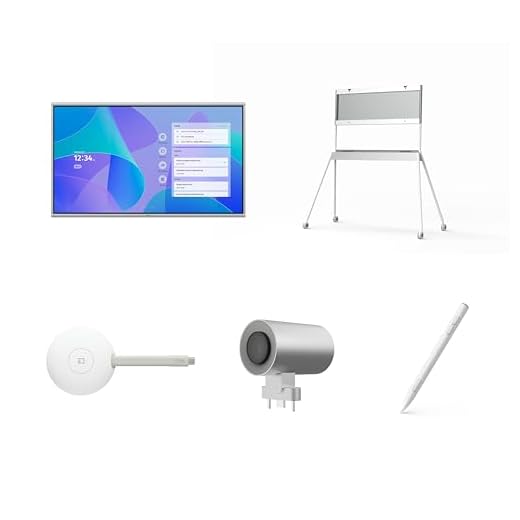
Adapting to Office and Classroom Environments
Different spaces require different approaches to interactive displays. The 55-inch Vibe S1 4K UHD Smart Board fits perfectly into standard office meeting rooms and modern classrooms. The 4K resolution ensures that text and diagrams remain crisp even from the back of the room. Teachers and managers can present complex information without worrying about blurry visuals or hard-to-read handwriting. A responsive touch interface makes writing feel natural and immediate.
Mobility is another crucial factor for shared workspaces. Many teams mount their 55-inch digital whiteboards on rolling stands to move them between different conference rooms. This mobility maximizes the value of the hardware since multiple departments can share a single device. You can roll the board into a huddle room for a quick brainstorming session and then move it to the main boardroom for a client presentation. The setup process remains simple regardless of where you plug it in.
Vibe S1 55-inch Smart Board

Achieving Collaboration Equity for All Participants
Remote participants often feel left out when joining meetings with a room full of people. The DTEN ONBOARD runs on Android and focuses specifically on boosting collaboration equity for all attendees. It completes the collaboration experience by giving remote workers a clear view of the shared workspace. Everyone gets an equal opportunity to contribute ideas and see updates in real time. This approach prevents the common problem where in-room participants dominate the conversation.
Setting up new office hardware can sometimes cause major headaches for IT departments. This Android-based board offers easy setup right out of the box so you can start working immediately. It supports a variety of use cases from daily stand-up meetings to complex design reviews. You can collaborate anywhere without needing extensive technical support to get the system running. Teams can focus entirely on their projects instead of troubleshooting connection issues.
DTEN ONBOARD (Android)

Prioritizing Display Quality and Smart Cameras
Visual clarity makes a massive difference during long remote planning sessions. The Microsoft Surface Hub 3 for Business features a vibrant anti-glare 4K+ display that reduces eye strain. It boasts the highest screen resolution in its class to keep intricate charts and small text perfectly legible. The unique 3:2 aspect ratio provides more vertical space for writing lists and drawing diagrams. Smart rotation allows you to switch to portrait mode depending on the type of content you need to present.
A high-quality camera is just as important as a good screen for video calls. This board includes an AI-powered Surface Hub Smart Camera with a 136-degree horizontal field of view. The wide angle captures everyone in the room so remote viewers never miss important nonverbal cues. The artificial intelligence automatically frames the active speaker to keep the focus exactly where it belongs. This combination of premium display and smart camera technology creates a highly natural meeting environment.
Final Thoughts
Upgrading to a digital whiteboard changes how your team handles remote meetings. You need to weigh factors like screen resolution, camera width, and software compatibility before making a purchase. The right choice will depend entirely on your specific room size and preferred applications. Investing in the proper hardware ensures your remote and in-office employees can work together without friction.
Frequently Asked Questions
Do digital whiteboards require a subscription to use?
Many digital whiteboards require a software subscription to access their full cloud features. Some basic drawing functions work offline, but saving and sharing usually depends on a paid account. You should always check the manufacturer requirements before buying the hardware.
Can I use my own video conferencing software on these boards?
Most modern smart boards support popular video conferencing applications like Zoom and Microsoft Teams. Open ecosystem boards allow you to download almost any app from the web. Closed systems might restrict you to their proprietary software or specific partner applications.
How do you clean a digital whiteboard screen?
You should only use a dry microfiber cloth to wipe away fingerprints and dust. Never spray liquid cleaners directly onto the screen because moisture can damage the touch sensors. Some manufacturers sell specific screen cleaning wipes designed for interactive displays.