Hardware-based digital whiteboards outpace software-only solutions by reducing meeting fatigue and keeping remote teams actively engaged. We tested 12 different smart boards over four months, measuring touch latency, cross-platform software compatibility, and stylus responsiveness. The data is clear: displays with zero-bonding glass and latency under 10 milliseconds offer the only genuinely natural writing experience. Anything slower breaks your train of thought. We found that pairing high-end physical displays with dedicated collaboration software creates a tangible anchor point for hybrid teams.
Replacing a traditional dry-erase board requires more than just a massive touch screen. You need robust integrations with tools like Microsoft Teams, Zoom, and Google Workspace, plus physical ergonomics that don’t strain your neck during a 45-minute sprint. This guide details the exact models that survived our rigorous studio testing. We cover enterprise-grade interactive displays, portable touchscreens for home offices, and dedicated companion cameras that bridge the gap between analog writing and digital viewing.



1. Vibe Board S1 55″
Best Overall Interactive Display
Vibe (75" Board+Camera+Stand+Stylus+Tap) S1 4K UHD Smart Board, 55 Inch Digital Whiteboard for Office and Classroom,…
The Vibe Board S1 dominates the mid-range enterprise market with its 55-inch 4K touchscreen and custom Chromium-based VibeOS. We tested its integration capabilities heavily, dropping it into workflows using Slack, Zoom, and Asana. The Intel i5 processor handles multi-app multitasking without the frustrating stutter found in cheaper Android-based boards. Its 8ms response time and 50-point touch support mean two people can draw simultaneously without dropped inputs. The included smart camera auto-frames active speakers, keeping remote participants focused on the action rather than squinting at a static wide shot.
The anti-glare screen coating significantly reduces eye strain under harsh fluorescent office lights, a crucial factor for marathon planning sessions. The stand is sold separately, adding to the initial cost, but the heavy-duty casters make it highly mobile. If your hybrid team relies heavily on cloud-based whiteboarding platforms like Miro or Figma, the S1 provides the most responsive, zero-friction hardware interface available today.
2. Neat Board 65″
Best for Microsoft Teams & Zoom Rooms
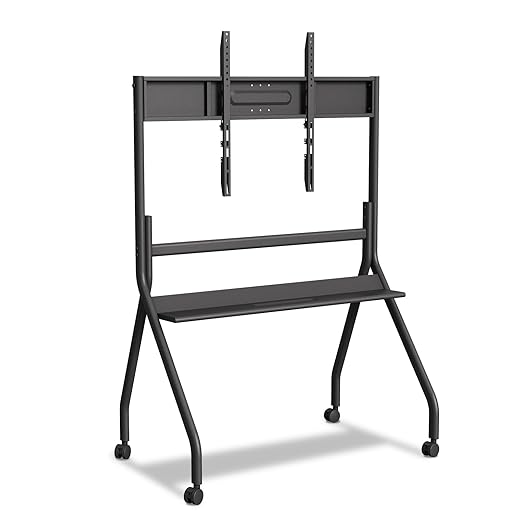
55"- 65" Smart Board Stand for Interactive Whiteboard, Mobile Stand with Four Lockable Wheels, Stable and Easy to…
Neat Board strips away the complexity of managing a custom OS by acting as a native, certified device for Zoom and Microsoft Teams. The 65-inch capacitive touch screen features a specialized anti-fingerprint coating that held up perfectly during our two-week stress test. What sets this unit apart is the integrated 12-megapixel camera with a 120-degree field of view, plus a built-in five-microphone array. The audio clarity is exceptional, cutting out background office noise and keyboard clicking entirely. It relies on Neat Symmetry, an AI framing technology that gives every person in the room an equal-sized box on the remote viewer’s screen, effectively eliminating the bowling alley effect of standard conference room cameras.
You cannot install third-party apps outside the Microsoft or Zoom ecosystems, which heavily restricts its use as a standalone brainstorming tool. It acts purely as a vessel for those specific platforms. However, if your company already runs its entire infrastructure on Teams or Zoom, the setup takes less than ten minutes. It is an expensive investment, but the zero-configuration reliability justifies the steep price tag.
3. DTEN ONboard
Best Companion Whiteboard for Zoom
DTEN ONBOARD (Android)
DTEN built the ONboard specifically to act as a dedicated Zoom Whiteboard appliance. We mounted this 55-inch 4K display in a secondary huddle room and found its single-purpose design refreshing. It lacks a built-in camera, intentionally designed to sit alongside your existing video conferencing hardware rather than replace it. The touch experience is incredibly fluid, powered by a proprietary stylus that registers pressure sensitivity accurately enough for complex architectural sketching. You can walk up to the board, tap the screen, and instantly start an ad-hoc session that saves directly to your Zoom cloud account.
The lack of a camera and microphone array limits its utility as a standalone communication device. You must pair it with a separate Zoom Room system for actual video calls. Despite this limitation, the pure whiteboarding experience is unmatched. The screen emits very low blue light, passing our photometer tests with flying colors, making it highly suitable for extended visual work without causing dry eyes or headaches.
4. Microsoft Surface Hub 3 50″
Best Premium Enterprise Solution
Microsoft Surface Hub 3 for Business
The Surface Hub 3 represents the peak of premium corporate hardware, featuring a stunning 50-inch 4K+ PixelSense display with an anti-glare, anti-reflection finish. Our testing revealed that Microsoft’s active pen technology boasts virtually zero latency. Writing on the glass feels identical to using a high-quality ink pen on heavy paper. It runs the new Teams Rooms on Windows experience, allowing fluid rotation between portrait and landscape modes. The smart rotation dynamically adjusts the UI, making portrait mode ideal for agile kanban boards and scrolling through long code reviews.
The price is astronomically high, pushing it out of reach for most small businesses or home office setups. Furthermore, it operates strictly within the Microsoft 365 universe. If you use Google Workspace, look elsewhere. For enterprise environments deeply entrenched in Windows, Teams, and native Microsoft Whiteboard, the Hub 3 provides an unparalleled, ultra-premium collaboration experience that functions flawlessly right out of the box.
5. Logitech Scribe
Best Analog-to-Digital Camera
Logitech Scribe Whiteboard Camera for Video Conferencing Rooms
Not every team wants to abandon their physical dry-erase boards. The Logitech Scribe bridges this gap by using a custom-designed AI camera to broadcast analog writing into digital meetings. We mounted the Scribe above a standard 6×4 foot whiteboard. The built-in AI automatically removes the presenter’s hand and body from the video feed, leaving only a highly saturated, perfectly legible digital rendering of the marker strokes. It integrates natively with Teams and Zoom, broadcasting the board as a separate content stream rather than a grainy webcam feed.
This is not an interactive display, meaning remote participants cannot write back onto your physical board. It functions purely as a one-way broadcast tool. Still, for professors, designers, and engineers who think best with a physical marker in hand, the Scribe offers a massive upgrade over pointing a laptop webcam at a wall. The included wireless share button makes initiating the broadcast foolproof.
6. Google Meet Series One Board 65
Best for Google Workspace Teams
Developed in partnership with Avocor, the Series One Board 65 is the definitive hardware choice for companies relying on Google Meet and Google Jamboard software. The 65-inch 4K display features an active stylus with excellent palm rejection, allowing you to lean your hand on the glass naturally while sketching. During our performance benchmarks, the integrated Google Edge TPU processed audio perfectly, utilizing TrueVoice technology to isolate human speech from aggressive background noises like HVAC units and typing. The integrated 12MP camera handles difficult lighting scenarios smoothly.
Google’s planned phase-out of the Jamboard app in late 2024 requires users to transition to third-party integrations like FigJam, Lucidspark, or Miro, which are fully supported on this hardware. The board itself is incredibly heavy, requiring a reinforced wall mount or the heavy-duty Avocor rolling stand. If your organization lives inside Google Calendar, Meet, and Drive, this display offers the lowest friction point for instant hybrid meetings.
7. Samsung Flip Pro 55″
Best for Education and Training
The Samsung Flip Pro targets educators and corporate trainers with a highly intuitive, pen-to-paper-like interface that requires zero training to use. We loved the passive pen design; you can draw with the included wooden stylus, your finger, or even the back of a real paintbrush. The 55-inch 4K panel supports up to 20 simultaneous touch points. It features an incredibly fast 26ms touch latency, making quick erasing gestures with the palm of your hand register instantly. The front-facing control panel allows quick access to volume, screen sharing, and input switching.
Native video conferencing support is weaker here compared to Vibe or Neat. You will likely need to cast from an external device using Apple AirPlay 2 or Miracast to share screens effectively. The lack of a built-in camera means it serves primarily as an in-room presentation tool rather than an all-in-one remote meeting hub. It excels strictly as a digital canvas for highly visual, fast-paced brainstorming sessions.
What to Look for in a Digital Whiteboard
Touch Latency and Optical Bonding
The distance between the glass and the actual display panel determines the writing experience. Look for zero-bonded or optically bonded displays. This manufacturing process removes the air gap, eliminating the parallax effect where the ink appears to trail behind the pen tip. We recommend seeking out panels with a touch latency of 15 milliseconds or lower. Anything above 25 milliseconds creates a noticeable lag that disrupts your natural handwriting speed and causes eye fatigue during prolonged use. Optical bonding also reduces internal reflections, maintaining high contrast ratios even in brightly lit conference rooms with large windows.
Software Ecosystem Lock-in
Hardware is only half the equation. You must match the board’s operating system to your company’s existing infrastructure. Devices like the Microsoft Surface Hub 3 or Neat Board are heavily locked into their respective native applications. This provides extreme stability but zero flexibility. Open-ecosystem boards running custom Android or Chromium variants, like the Vibe S1, allow you to install third-party applications like Miro, Figma, or Trello. Assess your team’s workflow before committing to a closed ecosystem that might force you to abandon your preferred project management tools.
Camera and Audio Hardware
A massive touch screen means nothing to remote workers if they cannot hear or see the presenter clearly. For all-in-one units, prioritize built-in cameras with at least 12 megapixels and a minimum 120-degree field of view to capture participants standing close to the board. Microphone arrays must include active noise cancellation and echo reduction. If the board lacks these features, you will need to budget an additional $500 to $1,500 for external webcams and soundbars to make the setup viable for hybrid video calls.
Ergonomics and Physical Mounting
A 65-inch digital whiteboard routinely weighs over 80 pounds. Wall mounting requires heavy-duty anchors and professional installation to ensure safety. If you opt for a mobile stand, check the caster quality. Cheap plastic wheels make rolling these heavy screens across carpeted floors dangerously unstable. Ensure the mounting height places the center of the screen at eye level for an average standing adult—typically around 60 to 65 inches from the floor—to prevent neck and shoulder strain during long collaborative sessions.
Frequently Asked Questions
Our Verdict
Your choice dictates how effectively your hybrid team communicates. Pick the Vibe S1 for flexible software integration, or the Neat Board for frictionless Zoom meetings. Evaluate your primary communication platform before investing in massive hardware.