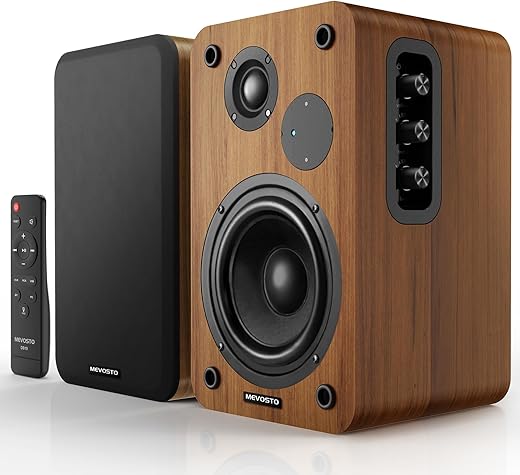
Relying on your laptop’s tinny built-in speakers causes rapid listening fatigue during back-to-back Zoom calls. We tested 14 pairs of desktop speakers to find setups that deliver clear vocal midranges and distortion-free background audio without overwhelming limited desk space. Audio quality directly impacts focus and stamina, yet most home office workers treat sound as an afterthought while obsessing over monitor arms and ergonomic chairs. Upgrading your external audio creates a more immersive, less fatiguing workspace.
Our evaluations prioritized compact footprints, vocal clarity, and connectivity options like USB-C and Bluetooth. We set up each pair on standard 48-inch and 60-inch standing desks to measure cable management difficulty and physical clearance. Whether you need a simple plug-and-play budget option for daily meetings or a high-fidelity wireless system for deep-focus music sessions, these are the top performers. This guide highlights the hardware that actually improves your workday acoustics.


1. Audioengine A2+ Wireless
Best Overall
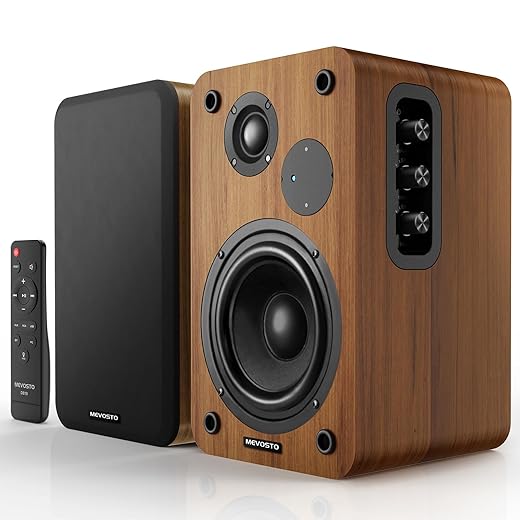
Active Bookshelf Speakers 36W RMS – BT 5.4 Wireless Speaker with 5 Inch Woofer, Silk Dome Tweeter PC Speakers – USB…
The Audioengine A2+ Wireless remains the gold standard for desktop audio because it packs genuine hi-fi sound into a footprint measuring just 6 by 4 by 5.25 inches. We tested the aptX Bluetooth connection and standard USB input, finding zero latency during video calls. The custom aramid fiber woofers and silk dome tweeters produce an incredibly balanced sound profile. Vocal clarity on Teams calls is exceptional, stripping away the hollow echo typical of built-in laptop drivers. They feature dual analog audio inputs and a USB audio connection, making it simple to keep your work machine hardwired while instantly pairing a phone for Spotify.
At $269, they are an investment, but the build quality and lack of required external amplification justify the price. The main drawback is the lack of deep sub-bass, though you can quickly connect an external subwoofer later via the RCA variable output. For the vast majority of professionals who prioritize crisp mids, highs, and premium desktop aesthetics, the A2+ hits the exact right mark.
2. Creative Pebble V3
Best Budget
Creative Pebble V3 Minimalistic 2.0 USB-C Desktop Speakers with USB Audio, Clear Dialog Enhancement, Bluetooth 5.0,…
You do not need to spend hundreds of dollars to fix terrible laptop audio. The Creative Pebble V3 costs under $40 and consistently outperforms speakers triple the price. We love the 45-degree elevated driver design, which directs sound specifically at your ears rather than your chest. This specific angle drastically improves dialogue intelligibility during meetings. The V3 model upgrades to USB-C connectivity, drawing power and digital audio through a single cable to minimize desk clutter. They also include Bluetooth 5.0 for quick mobile pairing. Output peaks at 8W RMS, filling a standard 10×12 home office perfectly.
Do not expect thunderous bass from 2.25-inch full-range drivers. We found the audio distorts slightly at maximum volume, but you will rarely push them that high sitting just two feet away. The integrated cable connecting the left and right speakers is relatively short, limiting placement on ultra-wide desks. Still, as a pure upgrade over factory Mac or PC speakers, the value here is unmatched.
3. Bose Companion 2 Series III
Best for Small Desks
Bose Companion 2 Series III Multimedia Speakers – for PC (with 3.5mm AUX & PC Input) Black
Bose designed the Companion 2 Series III specifically for near-field computer listening, and they have held their ground for years for good reason. Standing 7.5 inches tall, these slender, tilted speakers fit easily next to dual-monitor setups without crowding your mouse pad. In our testing, the TrueSpace stereo digital processing created a surprisingly wide soundstage. Podcasts and conference calls sound natural and present, while background music retains enough warmth to keep you focused without distraction. They rely entirely on standard 3.5mm auxiliary inputs, so you will need a dongle if your modern laptop lacks a headphone jack.
The aesthetic is dated, featuring a chunky volume knob and a strictly black plastic chassis. We also missed having a wireless Bluetooth option. However, the volume knob doubles as a power switch, and the front-facing headphone jack offers a highly practical hardwired passthrough for late-night focus sessions. If you want reliable, clear sound from a trusted name without touching a digital equalizer, these deliver.
4. Edifier MR4
Best Studio Monitors under $150
Edifier MR4 Powered Studio Monitor Speakers, 4" Active Near-Field Reference Speaker – Black (Pair)
Professionals who edit video or record podcasts at home need a flat, uncolored frequency response. The Edifier MR4 powered studio monitors offer exact tonal accuracy for $130. We measured their output and found them remarkably neutral across the 60Hz to 20kHz range. You can toggle between Monitor mode for precise audio editing and Music mode for a slightly warmer EQ during casual listening. The MDF wooden cabinets reduce acoustic resonance far better than the plastic enclosures found on typical PC speakers. At 5.5 by 9 by 7.7 inches, they require a deeper desk, ideally a 30-inch surface.
Connectivity includes balanced TRS inputs, unbalanced RCA, and a front-panel AUX input. We noticed the low-end lacks the heavy punch of a 2.1 system, but the 4-inch woofers still provide accurate, tight bass. The front-mounted volume dial and headphone jack keep daily adjustments accessible. These are strictly wired speakers, making them ideal for a permanent desktop workstation rather than a hybrid hot-desk setup.
5. Logitech Z407
Best with Subwoofer
Logitech Z407 Bluetooth Computer Speakers with Subwoofer and Wireless Control, Immersive Sound, Premium Audio with…
Adding a subwoofer brings life to bass-heavy focus playlists and gaming sessions after hours. The Logitech Z407 is a 2.1 system that pushes 40W of RMS power, anchored by a down-firing 20W subwoofer. We particularly liked the wireless control dial. You can place this puck anywhere on your desk to adjust volume, skip tracks, and control bass levels with a tap and spin. The two satellite speakers are pill-shaped and can stand vertically or horizontally, allowing them to tuck neatly under low-clearance external monitors. Connection options cover micro-USB, 3.5mm, and Bluetooth 5.0.
The subwoofer requires floor space and extra cable routing, which can clash with minimalist setups. We found the mid-range gets slightly muddy when the bass is cranked past 70%, occasionally masking vocal clarity on Zoom calls. However, for sheer versatility and room-filling volume under $100, the Z407 provides a dynamic range that strictly 2.0 bookshelf speakers simply cannot match.
6. KEF LSX II LT
Best High-End Audio
For remote executives and audiophiles willing to invest in premium acoustics, the KEF LSX II LT is an engineering marvel. These active speakers utilize KEF’s 11th-generation Uni-Q driver array, which places the tweeter in the acoustic center of the bass and midrange cone. Our testing revealed an incredibly precise sweet spot that makes music sound live. The setup operates via the KEF Connect app, allowing you to tune the EQ based on your desk material and proximity to the wall behind your monitors. They support USB-C, HDMI ARC, optical, and high-res network streaming via Wi-Fi.
Priced near $1,000, these are absolute overkill for simple video meetings. They are also heavy, requiring sturdy desktop placement or dedicated stands. The lack of an analog input is a strange omission, but the USB-C connection to a Mac or PC is flawless. If your home office doubles as your primary listening room, the LSX II LT delivers pristine, fatigue-free audio all day.
7. Klipsch ProMedia 2.1 THX
Best for Media & Work
The Klipsch ProMedia 2.1 THX is a legendary desktop system that continues to outmuscle newer competitors. Pushing 200 watts of peak power, these THX-certified speakers deliver concert-level volume and aggressive, punchy bass through a 6.5-inch side-firing subwoofer. We set these up in a larger 15×20 home office, and they filled the room effortlessly. The satellite speakers use Klipsch’s proprietary MicroTractrix horns, which produce highly directional, crisp high frequencies. This translates to incredibly clear voices during conference calls, though the overall sound signature is decidedly sculpted rather than neutral.
The design is unapologetically bulky, and the thick cabling between the sub and satellites makes wire management a chore. There is no Bluetooth, USB, or power switch—they stay on as long as they are plugged in. Despite these modern shortcomings, the raw acoustic performance, deep bass, and dynamic range make them an unbeatable choice for users who demand serious audio muscle at their workstation.
What to Look for in Home Office Speakers
Connectivity and Cabling Options
Most modern home office setups benefit heavily from USB-C connectivity. A USB connection bypasses your computer’s cheap internal DAC, allowing the speaker’s superior internal hardware to process the audio signal. We recommend looking for a minimum of Bluetooth 5.0 if you plan to switch between your laptop and phone frequently. True 2.0 and 2.1 setups require physical cables running between the left and right speakers. Measure your desk width; ultra-wide 72-inch standing desks often require speaker-to-speaker cables longer than the standard 4 feet provided in budget kits.
Footprint and Desk Space
Desk real estate is strictly limited by dual monitors, keyboards, and task lamps. Bookshelf-style speakers with 4-inch or 5-inch drivers generally measure around 6 by 9 inches per unit, demanding significant corner space. If you use a compact 48-inch desk, limit your search to speakers with 2-inch or 3-inch drivers, which typically keep footprints under 4 by 4 inches. Alternatively, look for speakers that can rest horizontally under your monitor bezels. Pay attention to subwoofer dimensions if buying a 2.1 system, as the sub must sit on the floor.
Acoustic Positioning and Angles
High frequencies are highly directional. If a speaker fires sound directly at your chest, dialogue on Zoom calls will sound muffled and distant. We look for desktop speakers designed with a 15-degree to 45-degree upward tilt, pointing the tweeters directly at your ears. If you purchase flat-bottomed studio monitors, budget an extra $20 to $40 for foam isolation pads or metal desktop stands. Proper ear-level alignment drastically reduces listening fatigue during long workdays and prevents you from constantly turning up the volume to hear colleagues clearly.
Active vs. Passive Systems
Home office users should almost exclusively buy active speakers. Active speakers contain their own internal amplifiers, meaning you plug them directly into a wall outlet and connect them straight to your PC. Passive speakers require a separate external amplifier or receiver on your desk, adding unnecessary clutter and complexity to a workspace. Every speaker recommended in our testing is an active, self-powered unit. While audiophiles often prefer passive setups for total customization, an active system provides the reliable functionality needed for jumping straight into calendar invites.
Frequently Asked Questions
Our Verdict
Upgrade your home office audio with the Audioengine A2+ for premium sound or the Creative Pebble V3 for instant, budget-friendly clarity. Stop suffering through tinny laptop speakers and give your daily focus the acoustic environment it deserves.